Windows Hello
- Inherits: Non-exportable, hardware-protected asymmetric keys. A private key the TPM generates, holds, and signs with but never releases in plaintext (Chapter 2, The TPM); and the reusable-secret lesson from NTLM: a password-equivalent hash authenticates as the user without the password, so every shared-secret scheme leaves a replayable value behind (Chapter 16, The Death of NTLM).
- Promise: In the key-backed Hello model (Windows Hello for Business, Microsoft-account/Entra-backed Hello, and WebAuthn/FIDO2 platform-authenticator flows) a remote verifier authenticates the user while storing no password, no password-equivalent hash, and no reusable secret. It stores a public key or certificate path, and each sign-in is a fresh signature over the verifier's challenge, produced by a device-bound, preferably TPM-protected private key that a local user gesture (PIN, face, or fingerprint) authorizes but never transmits. Local-account Hello is a convenience sign-in and does not carry the full asymmetric-key claim.
- TCB: The TPM (or platform key-protection module) holding the private key; the local user-verification path (biometric capture, matching, liveness, or PIN entry) and, on Enhanced Sign-in Security hardware, the VBS-isolated biometric components (which protect the face matcher and its templates, and validate a certified match-on-sensor fingerprint device over a secure channel); the OS code that authorizes the signing operation after a successful gesture.
- Adversary → Break: The attacker abandons the non-exportable key and attacks the gesture→key authorization path instead: a spoofed or emulated infrared camera (CVE-2021-34466), a manufactured near-infrared presentation artifact, or template injection on a non-ESS system (Faceplant). The Promise covers the remote exchange; it ends at the local sensor boundary and at everything that happens after a legitimate unlock.
- Residual: Post-authentication session and token abuse after a real unlock → owned by Zero Trust (Chapter 26) and Continuous Access Evaluation (Chapter 27); recovery-path downgrade, synced-passkey portability, and the generalized public-key ceremony → owned by WebAuthn and Passkeys (Chapter 21); theft of the cloud bearer credential the signed-in device then mints → Pass-the-Hash to Pass-the-PRT (Chapter 19).
- Bequeaths: A phishing-resistant, no-shared-secret sign-in credential (a TPM-bound asymmetric key unlocked by a local gesture) handed to WebAuthn and Passkeys (Chapter 21), which generalizes the same public-key pattern to every website. Does NOT provide: endpoint integrity after the unlock, an un-spoofable sensor on non-ESS hardware, or a phishing-resistant recovery path.
- Proof: 🔵 documented.
certutil -tpminfo,dsregcmd /status(NgcSet), and theWin32_DeviceGuardVBS surface are reader-reproducible verification points; no 🟢 capture exists for this chapter, because the lab VM's emulated sensor and virtual TPM cannot stand in for the physical biometric hardware these claims are about.
The Reasoner's question. How does Windows establish user trust when the server knows no password, no hash, and no reusable secret, and where does that design still break?
Foundations. What you need before this chapter.
- Shared secret. A value that both claimant and verifier can use to prove the claimant's identity: a password, password-equivalent hash, NTLM response basis, Kerberos long-term key, recovery code, or any other reusable value. Shared secrets fail structurally because the user can type them into the wrong place, malware can intercept them, servers can store password-equivalent data, and thieves can replay or crack the stolen material.
- Asymmetric credential. A public/private key pair. The private key stays with the authenticator. The relying party stores the public key. Authentication is a fresh signature over a challenge, not disclosure of a memorized value. Stealing the public key does not let an attacker sign the next challenge.
- TPM-bound key. The TPM chapter (Chapter 2) established the primitive: a private key the hardware generates, holds, and signs with but never releases in plaintext. Windows Hello consumes exactly that property. In the high-assurance model the operating system asks the TPM to perform a private-key operation after the gesture; it never reads the private key as a normal file or memory blob.
- NGC container. Windows' "Next Generation Credentials" container is the local
Windows Hello credential state for a user and device. Operationally, surfaces
such as
dsregcmd /statusexpose this asNgcSet: YES. Architecturally, it is the sign that the user has a Hello credential container, not merely a convenient biometric unlock setting. - Gesture. The local user-verification act (PIN, face, or fingerprint) that authorizes use of the private key. The gesture is not the network credential. A Hello PIN is device-bound; a stolen PIN without the device is not equivalent to a stolen password.
- Biometric template and fuzzy extraction. Biometric samples are noisy. A face camera never captures exactly the same face twice; a fingerprint sensor never captures identical ridges twice. A biometric system therefore stores a local template or helper representation that lets a noisy sample produce a stable match decision while tolerating ordinary variation. That local artifact is security-sensitive, but it is not sent to Microsoft Entra ID, Active Directory, or a WebAuthn relying party.
- Windows Biometric Framework (WBF). The Windows API, service, and driver model that standardized biometric capture and matching beginning with Windows 7. WBF gave Windows a common biometric plumbing layer, but the original security boundary was still largely the ordinary operating system.
- Enhanced Sign-in Security (ESS). The newer Windows Hello hardening model in which compatible biometric paths are protected with virtualization-based security and secure sensor requirements. ESS is the difference between "the OS has biometric software" and "the biometric comparison path is isolated from a compromised normal-world kernel as far as the platform can make it."
- False Acceptance Rate (FAR). The probability that a biometric system accepts an impostor as the enrolled user. FAR is not zero, cannot be zero in any practical biometric system, and must be interpreted together with lockout, liveness detection, sensor quality, enrollment quality, and attack class.
- Attestation. The Attestation chapter (Chapter 5) covers how a key proves its own provenance; here it answers a narrower question: whether a Hello key is TPM-backed or an authenticator belongs to a certified class. Attestation is useful provenance evidence. It is not proof that a human will never be coerced, a sensor will never be spoofed, or recovery will be equally phishing-resistant.
The link's responsibility
Windows Hello's responsibility in the trust chain is narrower than the phrase "biometric sign-in" suggests and more radical than most marketing implies. In its key-backed remote-authentication forms, it is not primarily a face-recognition feature. It is a credential architecture that removes the reusable shared secret from the remote authentication exchange.
The old password model fails because the verifier and the user share knowledge. A
real sign-in page asks for the password, so a fake sign-in page can ask for the
same password. A real server must store something it can check, so a breached
server can leak a password verifier or password-equivalent material. A real
endpoint must transform the user's password into protocol material, so malware on
that endpoint can intercept, replay, or steal the result. Every generation of
mitigation made some part of that process less terrible: plaintext passwords gave
way to hashes; hashes gained salts; network protocols moved from sending the
password to challenge-response; Kerberos added tickets and mutual authentication;
Credential Guard moved long-lived secrets out of lsass.exe. But the shape of the
problem remained: some reusable value, derived from or equivalent to user knowledge,
was still worth stealing.
Windows Hello for Business changes that shape. During provisioning, Windows creates a credential for a specific user on a specific device. In key-trust and cloud-trust models, that credential is a key pair. The private key remains device-local, preferably generated and protected by TPM 2.0. The public key is registered with Microsoft Entra ID, Active Directory, or another relying party. In certificate trust, an enterprise wraps the public key in the certificate infrastructure it already operates. In FIDO2/WebAuthn, the browser and authenticator expose the same public-key pattern to websites. The verifier does not learn a password. It learns a public key, and later asks the device to prove possession of the corresponding private key [253], [250], [849].
That proof is challenge-response. The service sends freshness: a nonce or protocol challenge. The Windows Hello authenticator signs that challenge after the user performs a local verification gesture. The server verifies the signature using the public key it stored at enrollment. A network observer cannot replay the signature against the next challenge. A phisher cannot convert a typed password into a remote login because no remote password is typed. A database thief who steals the public key has stolen a value designed to be public.
This is why the chapter's title says the face is not the password. The user's face or fingerprint does not replace the password as a new shared secret. The user's face or fingerprint unlocks local authorization to use a device-bound private key. The server does not receive the face. Microsoft does not need to store the face in Entra ID. A website using WebAuthn does not receive a biometric template. The network credential is the signature; the durable credential is the private key; the human gesture is the local gate that says the key may be used now.
A Reasoner should also keep the scope narrow. Windows Hello does not make a device immune to malware after the user signs in. It does not guarantee that every camera or fingerprint reader is trustworthy. It does not make recovery phishing-proof by itself. It does not eliminate all bearer tokens issued after authentication. It solves the reusable-secret problem at the sign-in boundary. The rest of this chapter is about how that solution is built, why it was necessary, and which gaps remain.
The password's long failure
The password's story begins as an expedient engineering answer, not as a grand security design. In 1961, Fernando Corbato's Compatible Time-Sharing System at MIT needed a way to give multiple users separate file spaces on a shared mainframe. A secret string was simple: the user typed it, the system compared it to a stored copy, and the user received access if the strings matched [850], [851]. That design assumed that the password file, the terminal, the operator, and the user all behaved. It was a useful assumption for a research time-sharing system. It was not a durable basis for global authentication.
By the mid-1960s, the first famous failure had already arrived. A CTSS software mistake caused the master password file to print as the message of the day on users' terminals. It was not an elegant attack. It was not cryptanalysis. It was a system accident that exposed the central weakness: if the system stores the secret in a recoverable form, the system can leak the secret [852]. The password had barely been invented before the password breach had been invented with it.
The obvious repair was to stop storing passwords in plaintext. Unix's crypt()
function, described by Robert Morris and Ken Thompson and widely associated with
the late-1970s Unix password model, used a one-way function based on modified DES
with a salt [853]. If an attacker stole the password file, the attacker did not see
the passwords directly. They had to guess candidate passwords, hash them, and
compare results. This was a real improvement, and it remains the conceptual basis
of password hashing today.
It did not end the problem. Hashing turns password theft into an offline guessing problem, and users consistently choose guessable passwords. Hardware improved. Wordlists improved. Attackers built tables and cracking rigs. The EFF and distributed.net demonstration that a DES challenge could be broken in roughly a day made the point vivid: cryptographic cost assumptions age [854]. A password hash is not a password, but it can become one when the password is weak and the attacker's compute is strong.
Windows inherited and amplified some of these mistakes. LAN Manager hashing uppercased passwords, limited useful length, and split a fourteen-character password into two seven-character halves before hashing them separately. That design collapsed the search space. Instead of cracking one long secret, an attacker cracked two short ones. Microsoft eventually moved away from LM hashes, but the enterprise memory of password-equivalent material persisted for a reason: a hash can be as useful as a password when the protocol accepts proof derived from that hash [855].
The next generation tried to stop sending the password over the network. NTLM used challenge-response: the server sent a challenge; the client computed a response using password-derived material; the server verified the answer. Kerberos improved the enterprise story with a Key Distribution Center, tickets, mutual authentication, and single sign-on [739]. These protocols were not naive. They were major advances over simply transmitting a password.
But they did not remove the password-equivalent secret from the system. NTLM is the
canonical example, dissected in The Death of NTLM chapter (Chapter 16): if an
attacker obtains the NTLM hash, the attacker often need not know the original
password; possession of the hash can be enough for pass-the-hash style
authentication [856]: the technique the Pass-the-Hash to Pass-the-PRT chapter
(Chapter 19) follows all the way into the cloud. Kerberos (Chapter 17) improves the
model, but tickets and keys remain valuable. A stolen ticket can authorize access
until it expires. A stolen long-term key or krbtgt secret can be catastrophic
(Chapter 18, KRBTGT). Credential Guard, as the Credential Guard chapter (Chapter 15)
explained, moves certain long-lived secrets into an isolated trustlet, but it does
not abolish the usefulness of every derived credential.
Biometrics appeared to offer a way out. A face cannot be forgotten. A fingerprint cannot be phished in the same way a password can. Early laptop fingerprint readers therefore looked like the natural successor to passwords. But first-generation PC biometrics mostly changed the user experience, not the trust model. The sensor captured a sample, software compared it with a template, and the result unlocked some local action. If the template was stored in ordinary OS-accessible state, or if matching ran in ordinary user-mode or kernel-adjacent software, an attacker with sufficient local privilege could attack the template or the decision pipeline.
The famous "gummy finger" attacks from the early 2000s made the lesson memorable: without liveness detection and a protected matching path, commodity biometric readers could be fooled by physical presentations made from inexpensive materials [857]. Microsoft introduced the Windows Biometric Framework in Windows 7 to standardize biometric APIs, storage adapters, sensor adapters, and service behavior [858]. WBF reduced chaos. Before WBF, sensor vendors shipped their own middleware and hooked into logon in inconsistent ways. Standard plumbing mattered. But standard plumbing was not the same as a hardware-rooted credential architecture.
The pattern across six decades is clear. Each generation protected a different layer while leaving a deeper layer exposed:
| Generation | Improvement | Residual failure |
|---|---|---|
| Plaintext passwords | Simple per-user access | Stored secrets leak directly |
| Hashed passwords | Server need not store plaintext | Offline cracking and weak passwords |
| NTLM challenge-response | Password not sent over network | Hash becomes password-equivalent |
| Kerberos | Tickets, mutual auth, SSO | Tickets and long-term keys remain theft targets |
| First PC biometrics | Better local UX | Templates and matching path remain OS attack surface |
| Windows Hello | Device-bound asymmetric key | Sensor, template, recovery, and post-auth gaps remain |
Windows Hello's breakthrough was not "better face recognition." It was the decision to combine local user verification with hardware-backed asymmetric authentication. That combination attacks the old problem at the root: if the verifier stores only a public key, there is no password database to steal; if authentication is a fresh signature, there is no reusable network secret to replay; if the private key is TPM-bound, dumping a file from disk is not enough.
The touch ID catalyst and the FIDO convergence
By 2013, the consumer market had already seen fingerprint sensors, including the Motorola ATRIX 4G in 2011 [859]. Those earlier sensors did not reshape mass authentication. Apple's Touch ID did. When Apple introduced the iPhone 5s in September 2013, the important fact was not merely that the phone had a fingerprint reader [860]. It was that Apple paired the sensor with a vertically integrated trust boundary: the Secure Enclave.
Apple controlled the sensor integration, the system-on-chip, the secure subsystem, and the operating system. The Secure Enclave was not a general-purpose app process holding a convenient fingerprint image. It was a separate security component with its own execution environment and protected memory, designed to keep sensitive biometric and key operations away from ordinary application code [152]. That vertical integration changed what consumers expected. Biometric sign-in could be fast, reliable, and safer than a typed passcode for many everyday scenarios.
Windows could not simply copy that design. The PC ecosystem is deliberately fragmented. A Windows laptop may combine a CPU from one vendor, a TPM or firmware TPM from another, an infrared camera from a third, a fingerprint reader from a fourth, firmware from an OEM, drivers from multiple suppliers, and an operating system from Microsoft. The benefit of the PC model is hardware diversity. The cost is that a biometric trust chain cannot assume one company controls every component.
The Trusted Platform Module, the subject of the TPM chapter (Chapter 2), was Windows' natural hardware anchor. A TPM is narrower than Apple's Secure Enclave: not a rich biometric coprocessor, just the purpose-built key-protection module that chapter described. But that narrowness is exactly what Windows needed for the credential. If the biometric gesture can authorize a private-key operation, and that private key is protected by a TPM, then the network credential can be strong even if the biometric pipeline requires separate hardening.
The standards world was converging on the same idea. The FIDO Alliance, launched in 2013, set out to reduce reliance on passwords through open authentication standards [861]; FIDO2 paired W3C WebAuthn with the CTAP2 authenticator protocol, carrying the older U2F protocol forward as CTAP1 for compatibility, while the earlier UAF branch was eclipsed by WebAuthn's browser-centered public-key model. The resulting FIDO2 / WebAuthn / CTAP passkey architecture is the WebAuthn and Passkeys chapter's subject (Chapter 21) [849], [862], [863], [864]. The shared shape is the one that matters here: a local authenticator, possibly unlocked by a biometric, signs a service's challenge with a key the service never holds.
This convergence matters because Windows Hello is both a Windows sign-in mechanism and a platform authenticator. In enterprise Windows Hello for Business, the asymmetric key integrates with Entra ID, Active Directory, and hybrid deployment models [253]. In WebAuthn/FIDO2, Windows Hello can act as the authenticator a browser uses when a website requests a public-key credential [250], [865]. The same local model repeats: the relying party stores a public key; the private key remains with the user's authenticator; the user verifies locally with biometric or PIN.
Two pressures therefore met in 2015. Enterprises were drowning in password attacks. Consumers had learned that biometric unlock could be delightful. Standards bodies were defining public-key authentication flows that did not require servers to store shared secrets. Windows Hello sits at the intersection of those pressures.
The Windows Hello architecture
Windows Hello's architecture has three separations that a Reasoner must keep separate: biometric matching versus key use, local gesture versus remote credential, and attestation versus authentication.
During enrollment, the user first proves enough identity to bootstrap trust. In a consumer flow, that may be a Microsoft account sign-in and device setup. In an enterprise flow, it may involve Entra ID, multifactor authentication, device registration, mobile device management policy, or domain/hybrid join. That bootstrap is not the steady-state credential; it is the ceremony that authorizes creating the new credential.
Windows then asks the user to configure a gesture. The gesture may be a PIN, a face recognized through compatible camera hardware, or a fingerprint recognized through a compatible sensor. The PIN paradox is essential. A Windows Hello PIN can be shorter than a traditional password and still be safer in the architecture because it is device-bound. A stolen password can be used from any machine on earth if the service accepts it. A stolen Hello PIN, by itself, cannot sign anything; the attacker also needs the device and the local anti-hammering policy must permit attempts. The PIN unlocks use of a key on that device. It is not a roaming shared secret [253].
Next, Windows creates or provisions the credential. In the preferred case, the TPM
generates or protects an asymmetric private key. The public key is registered with
the relying infrastructure. The local Windows Hello state is associated with the
user's NGC container. NgcSet: YES in dsregcmd /status is one of the operational
signals that the user has that Next Generation Credential state configured. The
container is not merely a folder of convenience settings. It represents the local
credential state that ties user, device, gesture, and key together.
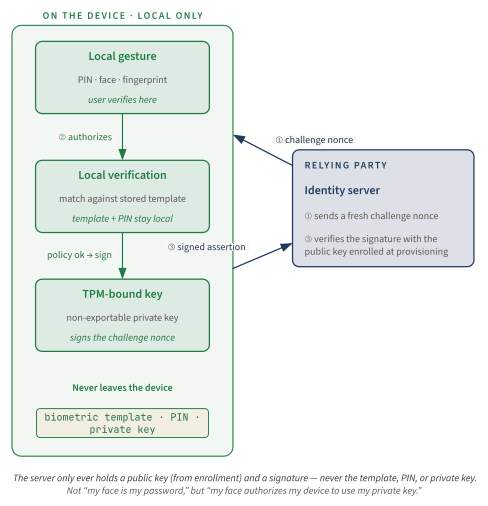
No step requires the server to receive the user's biometric template. No step requires the server to receive the user's PIN. No step requires a password hash to be transmitted. The server can verify possession of the private key, but it cannot use the public key to impersonate the user.
This is also why the common phrase "the TPM releases the key" can mislead. In a well-designed TPM-backed flow, the useful property is not that Windows gets a copy of the private key after a face match. The useful property is that the key remains non-exportable and the TPM performs the private-key operation under policy. The operating system receives a signature, not a reusable private-key blob. Software layers still matter (malware can abuse an unlocked session, trick a user, or interfere with prompts) but the private key is not supposed to become ordinary process memory.
The biometric side is local user verification. Windows captures a sample and compares it to an enrolled representation. For face recognition, Windows Hello uses near-infrared imaging because it works in varied lighting and resists many simple photo attacks better than visible-light webcam images. For fingerprint, Windows relies on sensor hardware and matching pipelines. Microsoft's biometric requirements define performance expectations, including false-accept thresholds; Windows Hello face authentication is documented around a FAR below 0.001 percent, or one in 100,000, for the relevant certification bar [866]. Apple documents Face ID at a different threshold (less than one in 1,000,000 for a single enrolled face) which is useful for comparison but not a reason to collapse the architectures [867].
FAR is a probability, not a shield. If the per-comparison false-accept probability
is p, the chance of at least one false accept across n independent comparisons
is:
P(false accept at least once) = 1 - (1 - p)^n
At p = 10^-5, one attempt is a 0.001 percent event. Many attempts change the
risk. That is why lockout, anti-hammering, liveness detection, sensor quality, and
policy matter. A FAR number is a lab and certification metric. A real attack is a
system problem.
The biometric template is not a password. It cannot be compared byte-for-byte against a fresh capture because the fresh capture is noisy. The mathematical family of ideas often described as fuzzy extraction is useful vocabulary for noisy measurements, stable decisions, and helper data; this chapter is not claiming that Windows Hello specifically implements a textbook fuzzy extractor. In production biometric systems, the exact algorithms and formats are vendor-specific and security-sensitive, but the concept is straightforward: tolerate natural variation from the genuine user while rejecting impostors. That helper representation or template must remain local and protected. If it roams to the verifier, the system has recreated the central password problem with a harder-to-rotate secret.
Microsoft documents the key privacy point plainly: Windows Hello biometric data is stored on the local device and is not sent to external devices or servers as part of normal authentication [253]. The relying party receives public keys and signatures, not face images. This is the difference between "my face is my password" and the actual model: "my face authorizes my device to use my private key."
Attestation is the third separation, and the Attestation chapter (Chapter 5) is its full treatment. During provisioning, a relying party may want evidence that a key was created or protected by appropriate hardware rather than by arbitrary software. TPM attestation can help make that distinction. FIDO/WebAuthn attestation can identify authenticator properties, subject to privacy choices and relying-party policy [250], [849]. Enterprise Windows Hello for Business uses device registration and trust models to decide whether a credential is acceptable [253].
But attestation is bounded evidence. It can support statements such as "this key is TPM-backed" or "this authenticator belongs to a certified class." It does not prove that the person enrolling was not socially engineered. It does not prove the camera path will never be spoofed. It does not prove the account recovery path is strong. It does not prove that malware will not act after a legitimate unlock. Treating attestation as a permanent moral certificate is a category error. It is provenance evidence for a key and platform, not eternal proof of human intent.
The architecture can be summarized as a table:
| Layer | Local artifact | Remote artifact | What theft buys |
|---|---|---|---|
| Password | Memorized secret | Password verifier or hash | Reusable login material or offline cracking target |
| NTLM/Kerberos | Password-derived key, ticket, or session state | Challenge response or ticket | Replay, relay, or cracking path depending on protocol |
| Windows Hello | TPM-bound private key plus local gesture and NGC state | Public key plus fresh signature | Public key only, or one non-replayable assertion |
| Synced passkey | Private key protected and synchronized by credential manager | Public key plus fresh signature | Depends on manager and recovery strength; still no server-side shared secret |
The table shows both the win and the residual. Hello removes the server-side shared secret. It does not remove the need to protect the local device, the biometric pipeline, the user, and recovery.
Windows Hello for Business and the NGC container
Consumer Windows Hello and Windows Hello for Business share the same core idea, but enterprise deployment adds identity governance, device registration, policy, and trust model choices. An enterprise does not merely ask, "can this laptop unlock with a face?" It asks: which identity provider trusts the key, how is the device registered, what happens for on-premises resources, how is recovery handled, and what evidence proves the key is hardware-backed?
Windows Hello for Business originally exposed two major enterprise trust models: certificate trust and key trust [253]. Certificate trust fit organizations that already operated a full Public Key Infrastructure. The Hello public key could be wrapped in certificate machinery, with certificate templates, certificate authorities, revocation infrastructure, and often federation components. For a large enterprise with mature PKI, this was familiar. For a cloud-first organization that wanted to escape PKI complexity, it was a deployment tax.
Key trust reduced some PKI dependency by registering the user's public key directly in Active Directory and relying on Windows Server 2016-or-newer domain controllers and schema support. That was simpler than certificate trust for many organizations, but it still assumed on-premises Active Directory infrastructure.
Cloud trust, generally available in 2022, changed the migration calculus for hybrid organizations [868]. Instead of requiring a full on-premises PKI or ADFS path, cloud trust uses Entra ID and Microsoft Entra Kerberos integration to support on-premises authentication scenarios with less infrastructure. Microsoft now recommends cloud trust for many deployments unless certificate-based requirements force a different choice [869].
A decision tree in prose looks like this:
- If the organization is cloud-native or primarily Entra ID based, start with cloud trust.
- If on-premises Active Directory access is still required and the organization has no strong PKI requirement, evaluate cloud trust first, then key trust where cloud trust is not suitable.
- If the organization already has mature PKI and certificate-based authentication is a compliance or architecture requirement, certificate trust may still be the right fit.
- If administrators cannot explain which trust model they are deploying, pause the rollout. Confusion here becomes recovery pain later.
The provisioning and sign-in path is easier to reason about as a flow than as a slogan:
| Phase | What is established | Verifier-side check |
|---|---|---|
| Device registration | The device is joined or registered in the chosen identity model, and device state becomes visible to Entra ID, Active Directory, or both. | Is this device known, compliant enough for policy, and in the expected join state? |
| User bootstrap | The user completes the organization's required first sign-in and MFA or equivalent proofing step. | Is this the right user, and is the bootstrap strong enough to authorize a new credential? |
| Key or certificate creation | Windows provisions the Hello credential in the user's NGC container; key-trust and cloud-trust flows use a device-bound key, while certificate trust issues an authentication certificate bound to that key. | Does policy accept this trust model, and is the key or certificate registered for the right user and device? |
| Cloud Kerberos preparation | In hybrid cloud Kerberos trust, Microsoft Entra Kerberos is deployed for the domain, and Microsoft documents read-write domain-controller capacity as a prerequisite for user authentication sites. | Can Entra ID issue the Kerberos material needed for on-premises access, and can on-premises DCs finish service-ticket issuance and authorization? |
| Steady-state sign-in | The user performs a local gesture; Windows authorizes use of the private key; the verifier receives a fresh proof rather than a password. | Does the signature or certificate authentication validate, does the challenge match, and do Conditional Access, device, and resource policies permit the session? |
| Revocation and recovery | Administrators disable the account, revoke certificates where used, reset or reprovision the device credential, or require a new bootstrap. | Has the stale credential path actually stopped working, including on-premises access and recovery fallback? |
Cloud trust, key trust, and certificate trust therefore differ less in the local gesture than in what the verifier checks after the public key exists: direct key registration, certificate issuance and revocation, or Entra Kerberos integration for hybrid on-premises access [869], [815].
The NGC container is the local operational anchor for this enterprise state. A
Windows Hello for Business enrollment creates device-bound credential state for the
user. dsregcmd /status surfaces NgcSet as a yes/no indicator. A Reasoner should
read NgcSet: YES as "this user has a Windows Hello key container configured on
this device," not as "biometrics are secure," "ESS is active," or "the deployment
model is healthy." It is a necessary clue, not the whole answer.
The distinction matters in audits. A machine can have a TPM and no Hello credential for a user. A user can have a Hello PIN and no ESS-capable biometric path. A machine can be Entra joined but not properly provisioned for on-premises cloud trust. A browser can use Windows Hello as a platform authenticator for a website while the enterprise's WHfB deployment is separately misconfigured. The words are similar; the states are different.
In February 2019, Android received FIDO2 certification [870]. In March, WebAuthn became a W3C Recommendation [250]. In May, Windows Hello received FIDO2 certification [871]. That sequence matters because it moved Windows Hello from "Windows sign-in convenience" into the broader passkey ecosystem the WebAuthn and Passkeys chapter (Chapter 21) covers in full. The same Windows platform gesture could now satisfy WebAuthn requests from relying parties that never knew or cared about Active Directory.
For a website, the ceremony is the same public-key pattern with Windows Hello cast as the platform authenticator: the site asks the browser to create a credential, the browser asks Hello to perform user verification, the authenticator mints a key pair (with the algorithm negotiated by authenticator and relying-party policy; many current deployments use ECDSA P-256, but that is not a universal law), and the site stores the returned public key. Authentication then repeats challenge-sign-verify. The site never receives the PIN or the face: only a signature and the associated WebAuthn data binding it to this relying party and challenge [250], [865], which is the phishing-resistant part: a signature created for one origin cannot be replayed to another. The WebAuthn and Passkeys chapter (Chapter 21) owns that ceremony and its data formats end to end; here the point is only that the Windows gesture slots into it unchanged.
Verify it yourself (documented)
There is no hash-stamped lab capture for this chapter. The evidence below is therefore deliberately 🔵 DOCUMENTED: supported Windows surfaces a reader can run and expected indicators derived from Microsoft documentation, not quoted output from this book's lab VM. The point is to show what to verify without pretending a capture exists.
🔵 DOCUMENTED: Microsoft Learn, Windows Hello for Business and TPM-backed key
model
reproduce: certutil -tpminfo
Expected indicators on a Hello-for-Business-capable device:
TPM is present and ready for use
TPM version is 2.0
Manufacturer and manufacturer version are populated
Endorsement-key or attestation information is available to Windows
Read this narrowly. TPM presence does not prove Windows Hello for Business is provisioned for the user. It proves the hardware root that gives Hello its important property: a private key can be protected by a device security module rather than stored as an ordinary exportable software secret.
🔵 DOCUMENTED: Microsoft Learn, Windows device registration and Windows Hello
for Business status surfaces
reproduce: dsregcmd /status
Expected indicators after successful organizational provisioning:
AzureAdJoined : YES        # or domain/hybrid state appropriate to the deployment
NgcSet        : YES        # Windows Hello NGC container is configured for the user
WamDefaultSet : YES        # token broker state present for many cloud sign-in flows
NgcSet is the operational tell for this chapter. A device can have a camera and a
TPM without a user NGC container. A Hello deployment with no NGC container is not
the link described here. The join fields vary by deployment (Entra joined, hybrid
joined, or domain joined) so do not cargo-cult the exact surrounding lines.
🔵 DOCUMENTED: Microsoft Learn, Windows Biometric Framework API and Enhanced
Sign-in Security for Windows Hello
reproduce: Get-Service WbioSrvc | Select-Object Name,Status,StartType
Expected service surface when Windows biometric components are available:
Name      Status   StartType
WbioSrvc  Running  Manual
The biometric service being present or running is not the same as ESS. It only shows that the Windows biometric stack exists. For ESS, Microsoft documents a hardware-dependent path involving Windows 11, VBS, TPM 2.0, compatible secure sensors, and secure communication into protected components [339]. That hardware boundary is what separates modern Hello from the old "software biometric" model.
🔵 DOCUMENTED: Windows Device Guard / VBS status surface used for ESS prerequisites reproduce:
Get-CimInstance -Namespace root/Microsoft/Windows/DeviceGuard `
  -ClassName Win32_DeviceGuard |
  Select-Object VirtualizationBasedSecurityStatus,SecurityServicesRunning
Expected prerequisite signal for VBS-backed features:
VirtualizationBasedSecurityStatus : 2
SecurityServicesRunning           : includes configured VBS services where present
VBS running does not by itself prove a given biometric operation is ESS-protected. It proves one prerequisite. A Reasoner needs the full chain: supported Windows version, VBS, TPM, compatible secure sensor, correct biometric enrollment, and policy allowing ESS use. If one link is absent, the system may still offer a pleasant Hello UX while falling back to a weaker biometric threat model.
A practical verification sequence is therefore:
- Verify TPM 2.0 is present and ready.
- Verify the device is joined or registered in the expected identity model.
- Verify
NgcSet: YESfor the user. - Verify WBF components exist if biometric sign-in is in scope.
- Verify VBS and ESS prerequisites for the specific hardware model: OEM support
statement, firmware and driver level, Device Manager secure-device indicators
for face hardware, fingerprint
SecureFingerprintconfiguration where applicable, and the Windows or MDM policy state that allows ESS use [339]. - Test sign-in and recovery flows before removing password prompts from critical workflows.
Windows biometric framework, ESS, and the sensor boundary
The hardest part of Windows Hello is not the public-key cryptography. It is the boundary between the messy physical world and the clean cryptographic world. A TPM can protect a private key perfectly and still be misused if the operating system accepts a forged biometric decision. That is the lesson of the Windows Hello attack history.
WBF solved an ecosystem problem first. Before WBF, biometric vendors shipped their own drivers, services, storage formats, and logon integration. That produced fragile security and fragile operations. WBF provided a consistent architecture: sensor adapters, engine adapters, storage adapters, a biometric service, and APIs that applications and Windows components could use [858]. Standardization made management possible.
But WBF's original abstraction did not magically create a secure sensor boundary. If the sensor can be impersonated, if the template can be edited by an administrator, or if the match decision can be tampered with in ordinary OS space, the TPM will faithfully sign after receiving what looks like a successful local verification. The cryptography is doing its job; the wrong input reached it.
Enhanced Sign-in Security is Microsoft's answer to that boundary problem. ESS raises the bar by using virtualization-based security and secure biometric hardware requirements. For face authentication, Microsoft documents a model in which facial recognition is isolated, templates are generated in a protected environment, and stored templates are encrypted with keys available only to VBS-protected components [339]. For fingerprint, ESS relies on match-on-sensor designs and secure sessions with certified sensor hardware. In plain English: do not let an arbitrary USB device hand the OS pixels and call that identity.
The PC ecosystem makes this difficult. A TPM alone is not ESS. A VBS-capable CPU alone is not ESS. A fingerprint reader alone is not ESS. An infrared camera alone is not ESS. The high-assurance claim requires the combination. Many enterprise fleets contain older systems, systems without built-in ESS-certified sensors, AMD-based and Intel-based generations with different support histories, firmware variations, and external peripherals. Those machines may still support Windows Hello, but they do not all support the same threat model.
That distinction should drive an assurance ladder rather than a binary label:
| Deployment posture | Strong claim | Boundary to document |
|---|---|---|
| Local-account Hello | Convenient local sign-in | Not the full asymmetric remote-authentication model [253] |
| TPM-backed Hello PIN / WHfB | Device-bound key unlocked by a local activation secret | Device possession, anti-hammering, recovery, and provisioning policy |
| Non-ESS biometric Hello | Biometric convenience for local user verification | Sensor, template, and match decision may remain ordinary OS attack surface |
| ESS biometric Hello | VBS-protected face path or match-on-sensor fingerprint path where supported | Specific sensor, driver, firmware, and policy evidence [339] |
| WHfB cloud/key/certificate trust | Managed enterprise key or certificate accepted by Entra ID, AD, or both | Trust-model prerequisites, verifier checks, revocation, and on-premises access |
| Synced passkey | No server-side shared secret with cross-device usability | Credential manager, sync, bootstrap, and account recovery |
| Hardware FIDO2 key | Dedicated authenticator with visible, portable hardware boundary | Backup, lifecycle, PIN/biometric activation, and verifier policy |
NIST's terminology helps keep the ladder honest: a local PIN is an activation secret when it unlocks an authenticator rather than a centrally verified password; a biometric comparison is not, by itself, an authenticator; and AAL3-oriented deployments need phishing resistance plus stronger hardware and verifier requirements than a mere successful face sign-in demonstrates [872], [873]. It is reasonable to allow Hello PIN on a TPM-backed device even where no biometric sensor exists. It may be unreasonable to treat non-ESS biometric sign-in as high assurance for administrators or high-risk users. Pair Hello with FIDO2 hardware keys for break-glass and privileged roles where hardware heterogeneity makes ESS coverage uncertain [862], [872].
The sensor boundary is also where FAR meets presentation attack resistance. FAR measures ordinary impostor acceptance under a defined test regime. Presentation attacks are adversarial attempts to feed the system an artifact (a photo, mask, replay, synthesized near-infrared video, injected template, or malicious sensor stream) that causes acceptance. A low FAR does not automatically defeat presentations outside the test distribution. Anti-spoofing and liveness detection are their own disciplines.
Where this link breaks
This is the section a Reasoner came for. Windows Hello closes the server-side shared-secret surface. It does not close every way to misuse authentication, spoof a local gesture, weaken recovery, or act after sign-in. The residuals fall into classes.
1. The USB camera trust gap. In 2021, Omer Tsarfati at CyberArk asked what would happen if a USB device claimed to be an infrared camera. The answer became CVE-2021-34466 [874]. The attack did not need to steal the TPM private key. It attacked the sensor boundary. By presenting crafted infrared face data through a USB device that Windows treated as a camera, the attacker could cause Windows Hello face authentication to accept the target under affected conditions. The lesson is architectural: protecting the key is not enough if the input path deciding whether to use the key is not authenticated.
2. Near-infrared presentation attacks. Windows Hello face authentication relies on near-infrared imaging partly because ordinary printed photographs and standard screens do not reproduce the same infrared signal as a live face. Research challenged that assumption by describing a class of presentation attacks that used specially constructed display hardware and learned RGB-to-infrared facial representations to present convincing near-infrared face data [875], [876]. The important claim for this chapter is the attack class, not a brittle title or venue assertion: if an attacker can manufacture the sensor's expected physical signal well enough, liveness and anti-spoofing become a moving target. Microsoft's response strengthened liveness detection and anti-spoofing, but the class remains conceptually open because sensors and generators co-evolve.
3. Template injection on non-ESS systems. ERNW researchers described a Windows Hello for Business template-injection attack they called Faceplant [877], with conference discussion also available from Black Hat materials [878]. The practical shape was straightforward: if biometric templates are protected mainly by ordinary software controls, an attacker with local administrator-level capability may be able to extract, transplant, or replace template material so that the attacker's biometric is accepted for the victim account. ESS changes the boundary by keeping templates and matching in VBS-protected paths where available. Non-ESS systems remain the important gap.
4. Malware after legitimate unlock. Windows Hello authenticates the user and unlocks local key use. It does not mean every process after sign-in is trustworthy. If malware runs in the user's session after a legitimate Hello unlock, it may steal browser tokens, abuse already-issued access tokens, perform actions through the user's session, or wait for the next prompt. This is the same distinction the credential chain has made repeatedly: authentication is not authorization hygiene, endpoint integrity, or session containment. The residual it leaves (stolen browser and access tokens used after a valid sign-in) is routed forward to the Zero Trust chapter (Chapter 26) and the Continuous Access Evaluation chapter (Chapter 27), which re-evaluate a token's validity after issuance rather than trusting the sign-in forever.
5. Recovery downgrade. Passwordless systems often become password systems again when recovery starts. If losing a device sends the user to email, SMS, help-desk social engineering, or a weak password reset flow, then the system's effective security is bounded by recovery [879]. Recovery codes are passwords with better printing. SMS is not phishing-resistant. Help desks are humans under time pressure. A Windows Hello rollout that leaves password reset as the dominant recovery path has not eliminated shared secrets; it has moved them to the back door.
6. Synced passkey portability and manager risk. Traditional Windows Hello for Business credentials are device-bound. Synced passkeys improve usability by making credentials available across devices through platform credential managers, but they change the threat model. Apple, Google, and Microsoft committed to broader passkey support in 2022 [880]. Google documents passkey sync through Google Password Manager [881]; Apple documents passkeys through iCloud Keychain [882]. This is a usability win and a server-side-secret win, but the credential manager, account recovery, and cross-device bootstrap become part of the trust chain: the residual the WebAuthn and Passkeys chapter (Chapter 21) owns, where synced passkeys are the central design rather than a footnote.
7. Cross-vendor portability. Vendor ecosystems still matter. Moving credentials between managers without recreating phishing-prone export paths is hard. The FIDO Alliance's credential exchange work aims to support safer transfer and user choice, but broad operational interoperability remains a migration problem [883]. Until that matures, users can be locked into platform recovery and sync models.
8. Quantum migration. Current mainstream FIDO2/WebAuthn credentials rely on classical public-key signatures such as ECDSA P-256. A cryptographically relevant quantum computer running Shor's algorithm would break ECDSA and RSA. NIST has standardized post-quantum algorithms, but Windows Hello and FIDO2 ecosystems have not completed a broad post-quantum migration [111]. This is not an emergency for ordinary sign-ins today. It is a roadmap problem for long-lived authentication infrastructure.
9. Accessibility and inclusion. Biometric authentication can exclude people with facial differences, missing fingers, injuries, aging-related changes, sensor failures, or contexts where biometric presentation is impractical. A passwordless future must keep PINs, hardware security keys, recovery credentials, delegated administration, and accessibility-aware flows as first-class citizens. Otherwise, security becomes a gate some users cannot open.
The Reasoner's one-line model is:
Windows Hello removes the remote shared secret; it does not remove the need to trust the local sensor path, protect local templates, harden recovery, and contain the session after authentication.
Presentation-attack gap analysis
Presentation attacks deserve their own analysis because they are often confused with FAR. FAR asks: how often does the matcher accidentally accept an impostor under the test's comparison model? A presentation attack asks: can an adversary present an artifact or signal that drives the capture and liveness pipeline into accepting? Those are related but not identical questions.
A printed photograph attack targets two-dimensional visible-light assumptions. An ordinary webcam face unlock that lacks depth, infrared, or liveness checks may be fooled by a high-quality image. Windows Hello's use of near-infrared imaging was partly designed to raise this bar. A normal display emits visible light; a normal printed photo reflects visible light. Neither automatically recreates the near-infrared structure expected by the system.
A replay or emulated-camera attack targets the digital input path. If the operating system accepts frames from a device merely because it enumerates as a camera, then the attacker can try to feed the matcher a chosen stream. The 2021 USB camera bypass showed why device identity and secure sensor channels matter [874]. ESS responds to this class by requiring more than a generic peripheral path for high-assurance biometrics [339].
A near-infrared presentation attack targets the physical assumption. Instead of asking the OS to accept a fake camera, it asks whether an artifact can emit or present a signal in the band the camera trusts. Near-infrared presentation-attack research showed that this class is not science fiction: adversaries can build presentation hardware and use machine-learning translation from ordinary RGB face material to near-infrared-like representations [875], [876]. For this book's purposes, the important point is not an exact paper title. The important point is that "ordinary screens cannot emit the signal" is an assumption, and assumptions can age.
A template attack targets stored biometric state. If the attacker can alter the stored template so their own face or fingerprint becomes the enrolled representation, then the sensor and liveness pipeline may behave correctly while authenticating the wrong person. That is the Faceplant class on non-ESS systems [877]. It is not a spoofed face; it is a changed reference.
A model attack targets the classifier. Modern biometric systems use increasingly sophisticated detection and anti-spoofing models. Generative systems improve presentations; discriminative systems improve detection; attackers adapt. This is an adversarial machine-learning arms race. There may be strong mitigations for specific sensors and artifacts, but there is no final theorem saying physical biometric presentation attacks are solved.
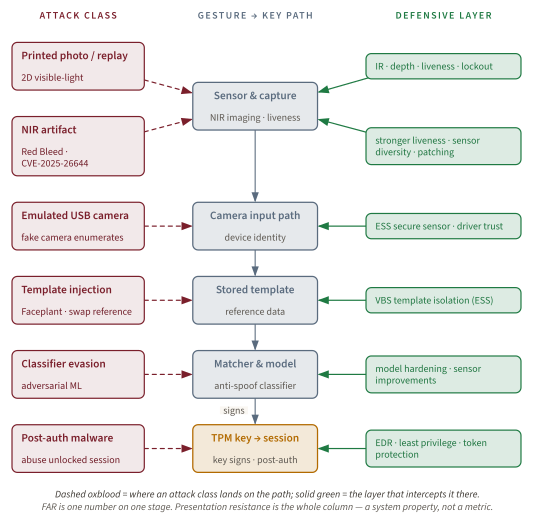
This is why "Windows Hello has a FAR below X" is not enough for a high-risk deployment. FAR is one metric. Presentation resistance is a system property.
Passkeys and the passwordless future
In May 2022, Apple, Google, and Microsoft jointly committed to expanded support for FIDO sign-in standards [880]. The industry name that won was "passkey." A passkey is a FIDO2/WebAuthn public-key credential. It may be device-bound, like a traditional Windows Hello for Business key, or synchronized through a credential manager, like many consumer passkeys today [849], [882]. The local user gesture remains local. The relying party still stores public keys and verifies signatures.
Passkeys solve one of early FIDO's major usability problems. Device-bound credentials are secure but brittle. Lose the laptop, lose the credential. Replace the phone, re-enroll everywhere. Consumers will not tolerate an authentication system that makes device loss catastrophic. Synced passkeys let users recover credentials through platform ecosystems while preserving the no-shared-secret property at the relying party.
The trade is subtle. With device-bound credentials, the private key's boundary is the device. With synced passkeys, the effective boundary includes the credential manager, account recovery, device-to-device bootstrap, and cloud synchronization protection. That can still be much better than passwords. It is not identical to a TPM-bound enterprise Hello key.
Microsoft's 2025 passkey update framed the scale of the shift: Microsoft reported thousands of password attacks per second, nearly a million passkey registrations per day, faster sign-ins, and much higher passkey success rates than passwords [884]. Those numbers explain the industry's urgency. Passwords are not merely weak; they are operationally expensive. Users forget them. Help desks reset them. Attackers phish them. Services rate-limit around them. Passkeys promise both security and usability.
A platform comparison makes the design choices visible:
| Dimension | Windows Hello / WHfB | Apple Face ID / passkeys | Google passkeys | FIDO2 hardware keys |
|---|---|---|---|---|
| Hardware root | TPM 2.0 where available | Secure Enclave | TEE / Titan-class hardware depending on device | On-key secure element |
| Credential locality | WHfB traditionally device-bound | Synced through iCloud Keychain for passkeys | Synced through Google Password Manager | Device-bound to key |
| Local gesture | PIN, face, fingerprint | Passcode, Face ID, Touch ID | Screen lock, biometric, PIN | Touch / PIN / biometric depending on key |
| Enterprise management | Intune, Group Policy, Conditional Access | MDM with platform constraints | Android Enterprise / Google admin tooling | Manual or managed provisioning |
| Recovery | Re-enroll or admin recovery for WHfB; passkey manager for synced passkeys | Apple account and device ecosystem | Google account and manager recovery | Backup keys and account recovery |
| Assurance ceiling | Strong for managed TPM-backed devices; hardware-dependent ESS | Strong consumer ecosystem; enterprise varies | Strong cross-platform usability; OEM variation | Often best for high-assurance and AAL3-oriented deployments |
FIDO2 hardware security keys (covered in detail in the WebAuthn and Passkeys chapter, Chapter 21) remain important because they make the boundary visible and portable without cloud sync. A YubiKey or Titan-style authenticator can hold credentials in a dedicated secure element and work across platforms through USB, NFC, or Bluetooth. That is less convenient than a synced passkey but attractive for administrators, regulated environments, and users whose recovery path must be explicitly controlled. NIST's AAL3 requirements point toward hardware-backed, phishing-resistant authenticators for the highest assurance cases [872].
Windows Hello therefore does not disappear in the passkey future. It becomes one of the platform authenticators through which passkeys are created and used. On a Windows machine, the user experience may still be "look at the camera" or "touch the fingerprint reader." Underneath, the protocol is public-key authentication. The relying party still sees signatures, not faces.
Deploying Windows Hello today
For an individual Windows user, the deployment path is simple. Open Settings, Accounts, Sign-in options. Create a Windows Hello PIN. Enroll face or fingerprint if the machine has compatible hardware. If Windows offers only PIN, the device likely lacks a compatible biometric sensor or driver. Once configured, the PIN is bound to that device; it is not a reusable cloud password [253].
For an enterprise, the path is policy and inventory before enthusiasm. The first question is not "do users like face unlock?" The first question is "which identity model are we deploying?" Entra joined, hybrid joined, and domain joined devices produce different operational checks. Cloud trust, key trust, and certificate trust carry different infrastructure requirements. A migration plan should name the trust model explicitly.
A practical enterprise rollout looks like this:
- Inventory TPM 2.0 readiness, Windows version, VBS capability, and biometric hardware by model.
- Choose the WHfB trust model, with cloud trust as the default starting point for many hybrid organizations unless PKI requirements dictate otherwise [869].
- Ensure Entra ID, Microsoft Entra Kerberos, domain controller versions, and device join state match the chosen model.
- Pilot with a small user group and include help-desk staff in the pilot so recovery pain appears early.
- Require Hello PIN enrollment for every participating user; treat biometrics as a convenience and assurance layer only where hardware supports the desired threat model.
- Issue backup FIDO2 hardware keys to administrators and high-risk users.
- Verify
NgcSet, TPM readiness, sign-in success, on-premises resource access, VPN behavior, and recovery before broad deployment. - Tighten Conditional Access gradually so phishing-resistant credentials satisfy MFA and passwords become fallback rather than the daily path [879].
ESS requires a separate hardware check. Many organizations make the mistake of asking, "does this laptop support Windows Hello?" when the right question is, "does this laptop support the ESS-protected biometric path we are relying on?" A machine can support Hello face sign-in without giving the organization the modern VBS-isolated biometric threat model. If administrators are making risk decisions for privileged accounts, that distinction matters.
For sensitive accounts, prefer layered enrollment: Hello PIN on managed devices, ESS-capable biometric where available, and at least one hardware FIDO2 key stored and tested as backup. Do not remove password recovery until passwordless recovery has been tested under real help-desk conditions. Passwordless rollouts fail when recovery is designed last.
For developers and service owners, WebAuthn support is the application-side move. Do not build a custom biometric login. Ask the browser for a public-key credential. Let platform authenticators such as Windows Hello, Apple passkeys, Google passkeys, and hardware keys perform local user verification. Store public keys, enforce origin/relying-party binding, verify challenges, and design account recovery with the same seriousness as sign-in.
The Limits
Biometrics fail in a way passwords do not: they are hard to rotate. You can change a password after a breach. You can revoke a security key and issue another. You have one face, ten fingers, two irises, and a body that changes over time. If a raw biometric representation is compromised, there is no simple reset button.
Cancelable biometrics try to solve this by transforming biometric features through non-invertible functions so a compromised template can be revoked and reissued with a different transform. In theory, this is exactly what biometric systems need: a revocable representation of an irrevocable trait. In practice, the trade-off between non-invertibility, unlinkability, resistance to reconstruction, and matching accuracy remains difficult. The more aggressively a system hides the biometric, the harder matching can become. The more matching-friendly the representation, the more carefully it must be protected.
The theoretical limit underneath all biometric recognition is overlap. Genuine-user samples vary. Impostor samples sometimes resemble the enrolled user. Sensor noise, lighting, aging, injury, presentation angle, skin condition, and environment all change the score distributions. Jain, Ross, and Prabhakar's biometric survey remains useful because it frames biometric recognition as a statistical decision problem with false accepts, false rejects, and performance trade-offs [885]. There is no magic classifier that makes noisy physical identity perfectly separable.
The open problems are therefore not footnotes. They are the roadmap:
1. Cross-platform credential portability. Users need to move between ecosystems without falling back to passwords or unsafe export files. FIDO credential exchange work is promising, but real-world interoperability, user consent, manager security, and enterprise policy are hard [883].
2. Adversarial biometric generation. Generative models can synthesize faces, voices, and sensor-specific representations. Presentation attacks improve as models, displays, printers, masks, and sensor knowledge improve. Defenders improve liveness and classifiers. There is no final round.
3. Recovery without passwords. Recovery is the graveyard of elegant authentication systems. If the fallback is email password reset or SMS, attackers will attack that. A serious passwordless deployment needs phishing-resistant backup credentials, admin recovery workflows, fraud controls, and tested user education [879].
4. Post-quantum signatures. ECDSA P-256 is strong against classical attackers, but not against a future cryptographically relevant quantum computer. NIST has standardized post-quantum signature algorithms (ML-DSA and SLH-DSA; ML-KEM is a key-encapsulation mechanism, not a signature), but the FIDO/WebAuthn hardware and browser ecosystem still needs migration paths [111]. Hybrid signatures are plausible; deployment at ecosystem scale is the challenge.
5. ESS coverage. The high-assurance biometric story depends on compatible hardware. Many enterprise devices lack ESS-capable built-in sensors. Hardware refresh cycles are slow. Policy has to distinguish "Hello works" from "Hello works with the protected biometric pipeline we require" [339].
6. Accessibility and inclusion. Not every user can or should use face or fingerprint authentication. Injuries, disabilities, religious or cultural contexts, privacy needs, lighting conditions, masks, gloves, and sensor failures all matter. PINs and hardware keys must remain first-class alternatives, not grudging fallback.
7. Privacy and unlinkability. Attestation can identify authenticator models; credential managers can sync across ecosystems; enterprises can observe sign-in patterns. The passwordless future must avoid turning stronger authentication into stronger tracking.
The theoretically ideal system would combine local zero-knowledge biometric verification, revocable biometric templates, hardware-attested non-exportable keys, post-quantum signatures, secure cross-vendor credential portability, and phishing-resistant recovery. That system does not fully exist. Windows Hello is a large step away from shared secrets, not the final form of authentication.
What it means for you
If you are reasoning about Windows Hello, do not ask whether it is "secure" in the abstract. Ask which link you are evaluating.
For the remote verifier in a key-backed Hello, WHfB, or WebAuthn flow, Windows Hello is a major improvement. The server stores a public key or validates a certificate path. A phishing site cannot ask the user to type the private key. A breached relying-party database does not reveal a reusable password. A captured signature is bound to a challenge and relying party. This is the cleanest part of the design.
For the local device, the answer depends on hardware and policy. TPM 2.0 matters. VBS matters. ESS-capable sensors matter. NGC state matters. A PIN-only Hello deployment on managed TPM-backed devices may be stronger than a password-heavy deployment even without biometrics. A non-ESS biometric deployment on unmanaged or heterogeneous hardware should not be treated as the same assurance level as an ESS-protected one.
For enterprise rollout, prefer cloud trust unless your environment has a specific reason not to. Inventory hardware before promising biometric assurance. Treat privileged users separately. Issue backup hardware keys. Test recovery. Remove password prompts last, not first.
For application developers, do not invent a biometric protocol. Use WebAuthn. Let platform authenticators handle local verification. Store public keys and verify signatures correctly. Make recovery as phishing-resistant as sign-in.
For users, the practical advice is simple:
# Check device registration and NGC state
dsregcmd /status

# Check TPM readiness
certutil -tpminfo

# Check whether VBS is running, a prerequisite for several modern isolation claims
Get-CimInstance -Namespace root/Microsoft/Windows/DeviceGuard `
  -ClassName Win32_DeviceGuard |
  Select-Object VirtualizationBasedSecurityStatus,SecurityServicesRunning
Look for NgcSet: YES, TPM 2.0 readiness, and VBS status appropriate to the
claims your organization is making. If the claim is ESS-protected biometrics, ask
for hardware-model evidence, not just a screenshot of a successful face sign-in.
The Reasoner payoff is this: in the scoped, key-backed model, Windows Hello is not "a face password." It is a public-key credential unlocked by local user verification. That distinction explains both its strength and its failures. The server-side shared secret is gone; the local trust chain remains.
Common Misreadings
Several Windows Hello misunderstandings recur often enough that they are worth settling explicitly.
Does Microsoft store my face in the cloud? No. In the Windows Hello model, the biometric material used for matching stays on the local device. The relying party receives a public key during registration and signatures during authentication. In an enterprise deployment, Entra ID or Active Directory trusts the public key or certificate path; it does not need the user's face template to verify a sign-in [253]. This is not just a privacy promise. It is structurally necessary to the design. If the biometric template were uploaded as the verifier's secret, Windows Hello would have recreated the server-side password database with a biometric value that is harder to rotate.
Can a photograph fool Windows Hello? A simple visible-light photograph is exactly the kind of attack Windows Hello face recognition was designed to resist. The system uses near-infrared imaging and anti-spoofing requirements for compatible face hardware [866]. But the honest answer is not "photos never matter." The honest answer is that presentation resistance is an arms race. A commodity photo, an emulated infrared camera stream, a purpose-built near-infrared presentation device, and a changed template are different attack classes. Some have been demonstrated against specific Windows Hello configurations and patched or mitigated; others are blocked by ESS-capable hardware; all require threat-model-specific reasoning [874], [339], [886].
Is a PIN less secure than a password? In the Hello architecture, no. A password is a roaming shared secret: if an attacker learns it, they can try it from another device. A Hello PIN is a local unlock factor for a key on one device. The attacker needs the device, the PIN, and a way past local anti-hammering controls. That does not mean every four-digit PIN is wise for every user. It means the comparison is not length-versus-length; it is roaming secret versus device-bound key unlock [253].
What is the difference between Windows Hello and Windows Hello for Business? Consumer Windows Hello can mean two different things. With a Microsoft account or FIDO/WebAuthn relying party, it can use the same key-based pattern this chapter has been describing. With a purely local Windows account, Microsoft documents it as convenient sign-in rather than the same asymmetric public/private-key credential. Windows Hello for Business is the managed enterprise architecture: policy, device registration, trust models, Conditional Access, Intune or Group Policy deployment, and on-premises/hybrid integration [253], [869].
Do passkeys replace Windows Hello? No. On Windows, Hello is one of the ways a user verifies locally to create or use a passkey. Passkeys generalize the public-key model across websites and platforms through WebAuthn and FIDO2. Windows Hello is a platform authenticator in that ecosystem; it does not become obsolete merely because the relying party calls the credential a passkey [849], [865].
What happens if I lose the device? For a traditional device-bound Windows Hello for Business credential, the user re-enrolls on a new device through the organization's bootstrap and recovery process. For synced consumer passkeys, credential restoration depends on the platform credential manager, such as iCloud Keychain or Google Password Manager [881], [882]. For high-assurance users, the right answer is planned redundancy: at least one backup hardware security key, tested recovery, and administrative processes that do not silently fall back to weak password reset.
Is Windows Hello safe from quantum computers? Not indefinitely. Current FIDO2 and WebAuthn deployments commonly use ECDSA P-256, which is strong against classical attackers but not against a future cryptographically relevant quantum computer running Shor's algorithm. That future machine does not exist for practical credential forgery today, but infrastructure takes years to migrate. Post-quantum signature planning belongs on the roadmap now, not after the first emergency [111].
Should administrators use face unlock? Sometimes, but not as a slogan. For privileged roles, the safer baseline is a managed, TPM-backed Hello credential plus hardware FIDO2 keys and strict Conditional Access. ESS-capable biometrics can be reasonable where the hardware chain is verified. Non-ESS biometrics on older or external-sensor systems should not be treated as equivalent to a hardware security key for Tier-0 administration.
Bequeaths. Windows Hello hands the next link a narrow guarantee: in the key-backed model, the sign-in credential has no server-side shared secret. A device-bound, preferably TPM-protected private key (Chapter 2, The TPM) signs a fresh challenge after a local gesture, so the WebAuthn and Passkeys chapter (Chapter 21) can generalize the same pattern to every origin on the web. The bequest stops at the sign-in boundary. Hello does not provide endpoint integrity after unlock, an un-spoofable non-ESS sensor, or a phishing-resistant recovery path. Those residuals continue into Pass-the-Hash to Pass-the-PRT (Chapter 19), Zero Trust (Chapter 26), and Continuous Access Evaluation (Chapter 27).