AppLocker vs App Control for Business
- Inherits: the publisher-identity binding. Windows can cryptographically answer who signed these bytes?, and its proven limit, a signature is provenance, not behavior (Chapter 12, Authenticode and Catalog Files); and the kernel code-integrity evaluator
ci.dllplus its HVCI/VTL1 protection (Chapter 8, Code Integrity), the exact load-time path App Control for Business plugs a policy into. - Promise: With a signed App Control policy and HVCI on, an attacker who already holds SYSTEM or administrator cannot make Windows run code the policy does not allow. Serviced boundary: the MSRC security-servicing line. This is the only application-control configuration MSRC treats as a security feature.
- TCB:
ci.dllin the kernel (in VTL1 under HVCI) · the signed.cippolicy and the organization's policy-signing key · the Recommended Block Rules and Vulnerable Driver Blocklist merged into it. AppLocker's TCB additionally includes the user-modeAppIDSvc. Which is exactly why AppLocker is not inside this boundary. - Adversary → Break: Against AppLocker, an admin stops
AppIDSvcand enforcement ends; against a signed App Control policy the admin instead reaches for a signed binary the policy already allows (msbuild.exe,mshta.exe,cdb.exe) and runs attacker-controlled content through it. The Promise gates which binary loads, never what an allowed binary then does. - Residual: what allowed, admin-privileged code does once it runs. Including reading the in-memory credential store → Mimikatz and the Credential-Theft Decade (Chapter 14) and Credential Guard (Chapter 15); signed-but-vulnerable drivers (BYOVD) → Code Integrity (Chapter 8); the VTL0→VTL1 isolation the HVCI claim rests on → The Secure Kernel (Chapter 6).
- Bequeaths: to the credential tier, the guarantee that only vetted code runs. Execution is gated by policy, not merely by signature, and not even SYSTEM can rewrite that rule without the signing key. Does NOT provide: any constraint on what that vetted, admin-privileged code then does, any evaluation of runtime behavior or side effects, or per-user policy inside the kernel boundary (AppLocker still owns that).
- Proof: 🔵 documented. Microsoft Learn for both architectures and the servicing criteria [537] [562] [301]; the named public bypass corpora [563] [564] [565]; the probes in Proof on a Live Machine are reproducibility walkthroughs, not a fresh lab capture.
Evidence labels. 🔵 means documented/reproducible from public sources or local commands; 🟡 means emulated; 🟢 means captured from this book's lab with hash-stamped artifacts.
The Reasoner's question. Which signed, hashed, packaged, scripted, or installed code is allowed to run at all?
Foundations: vocabulary this chapter assumes.
- Authenticode (owned by Chapter 12). Windows' code-signing format binds an X.509 publisher identity and signature to a PE file. AppLocker and App Control both consume that signer identity, but neither can infer a binary's future behavior from a valid signature. The Authenticode chapter (Chapter 12) owns the envelope; here it is only an input.
- Code Integrity /
ci.dll(owned by Chapter 8). The kernel component that evaluates image loads against signing and policy rules: the same one that enforces driver signing. App Control for Business is implemented as a policy in that Code Integrity path; the Code Integrity chapter (Chapter 8) owns the evaluator. - HVCI / VBS (HVCI owned by Chapter 8; the VTL model by Chapter 6). Hypervisor-protected Code Integrity runs the CI decision in a VBS enclave at VTL1, so a VTL0 kernel attacker cannot directly tamper with the evaluator. The Secure Kernel chapter (Chapter 6) owns the VTL0/VTL1 boundary.
- AppIDSvc. The Application Identity service is the user-mode evaluator AppLocker depends on. Its user-mode placement is the reason AppLocker is operational hygiene rather than an admin-resistant security boundary, and it is the one load-bearing primitive in this chapter that no other chapter owns.
- Allowlist vs blocklist. An allowlist says what may run; the Microsoft Recommended Block Rules say which otherwise-trusted Microsoft-signed binaries must still be denied because they can run attacker-controlled content.
Chapter thesis. Windows ships two application-control systems in parallel in 2026: AppLocker, a per-user policy evaluator that lives in the user-mode Application Identity service, and App Control for Business (still widely called WDAC), a kernel policy evaluator built into ci.dll. AppLocker's structural limit is that an administrator can stop its evaluator; App Control is the later kernel-bound design meant to close that limit. Microsoft itself states that AppLocker "doesn't meet the servicing criteria for being a security feature" while App Control was designed as one under the MSRC servicing criteria. That single sentence explains why both still ship. AppLocker handles per-user policy on devices that have no code-signing PKI. App Control, with a signed policy and HVCI on, is the only configuration whose policy integrity holds against an admin-equivalent attacker: the configuration Microsoft treats as a security feature. This chapter walks the architecture of each, the structural ceilings of both, the role of ISG and the Recommended Block Rules, and the five-question decision tree for picking between them in 2026.
Two locks on the same door
Sit down on a Windows 11 24H2 device in 2026. Open gpedit.msc. Navigate to Computer Configuration → Windows Settings → Security Settings, and you will find a node called AppLocker, with five rule collections waiting to be populated. Now walk one branch over to Computer Configuration → Administrative Templates → System → Device Guard. That node, despite the obsolete name in the GPO tree, is where you author policy for what Microsoft now calls App Control for Business [537]: the same kernel-enforced application-control engine that has been renamed twice since launch (Configurable Code Integrity in 2015, Windows Defender Application Control in 2017, App Control for Business in 2024) [566] but never replaced.
Two completely separate policy nodes. Two completely separate deployment surfaces. Two completely separate enforcement architectures. Both shipping in the same SKU on the same device in 2026. Both documented as currently supported on Microsoft Learn [537]. Which one is "the right one"? The honest answer turns out to be neither, and both, and the reason is a single sentence on a single Microsoft Learn page that draws a line between security feature and operational hygiene control sharper than most practitioners realise.
Definition: Application control. A policy mechanism that decides, at process-launch or image-load time, whether a given binary, script, or installer is allowed to execute on a Windows device. An application-control policy is an enumerated set of allow rules (an allowlist), deny rules (a blocklist), or both. The decision is made by an OS-resident evaluator before the binary's main entry point runs.
Microsoft's own App Control and AppLocker Overview page makes the line explicit. AppLocker [537], in Microsoft's own words, "helps to prevent end-users from running unapproved software on their computers but doesn't meet the servicing criteria for being a security feature." App Control for Business, in contrast, was "designed as a security feature under the servicing criteria, defined by the Microsoft Security Response Center" [537]. The MSRC servicing criteria are not marketing copy. They are the rule that decides whether a defect in a Windows feature gets a CVE [301]. AppLocker bypasses do not get CVEs. App Control bypasses, with the right configuration, do.
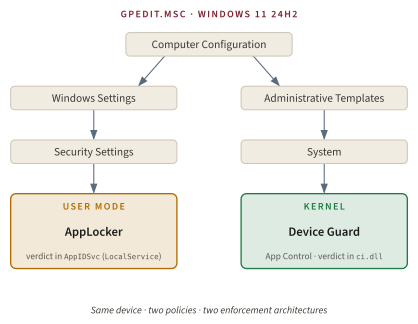
The rest of this chapter pays off that one sentence. The first half walks the architecture of each system at the level of who evaluates what, where in the operating system, and against which attacker. The second half makes the practitioner decision tractable: which one to deploy in 2026, what to pair it with, and what no allowlist of any generation can do.
Key idea. AppLocker and App Control for Business are not two generations of the same product. They are two different products solving two different problems. AppLocker is an operational hygiene control whose enforcement Microsoft itself disclaims as a security boundary. App Control for Business, when its policy is signed by the deploying organization and HVCI is on, is the security boundary. Both still ship because neither is a strict superset of the other.
If both are shipping and both are recommended in different Microsoft Learn pages, what exactly does each one do? And why is the line between them drawn in Microsoft's servicing criteria rather than in its feature inventory? To answer that, we have to start before either product existed.
Pre-history: Why an OS needs Application Control at all
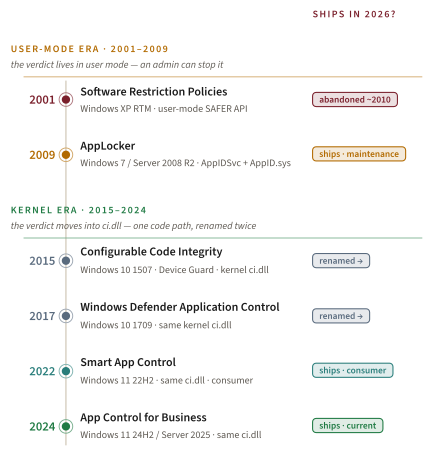
The 1999-2001 macro-virus and worm era (ILOVEYOU [567], Code Red [568], Nimda [569]) made it unsurvivable for Windows to trust any binary the user had Execute permission on. The default behavior of a Windows desktop in that era was: if the bits are on disk and the user can read them, they run. There was no per-binary policy gate. The OS-level answer Microsoft shipped in October 2001 was Software Restriction Policies, an XP RTM feature documented at length the following year by John Lambert at Virus Bulletin 2002 [570].
Definition: SAFER API. The user-mode Windows API (WinSafer*) that SRP used to evaluate a candidate executable against the configured rule set. The SAFER evaluator returned one of three security levels (Disallowed, Basic User, or Unrestricted) on each CreateProcess. The decision lived entirely in user mode, in the same address space as the loader, which is the architectural defect AppLocker partially inherited and App Control later corrected.
SRP supported five rule conditions [571]: hash, certificate, path, Internet zone, and registry path. Each condition tested a candidate file against an administrator-authored allow or deny rule, returning a SAFER security level that the user-mode evaluator honored at CreateProcess. The model was right: a per-machine GPO-administered policy evaluated against a defined file taxonomy.
Definition: Authenticode (recap). The Microsoft code-signing format that binds a publisher identity (an X.509 certificate chain) to a PE binary via a cryptographic signature embedded in the binary's optional header. Authenticode is the plumbing every Windows application-control system uses to answer the question "who published this binary?", but it cannot answer "what will this binary do once it runs?". The Authenticode chapter (Chapter 12) owns the mechanism in full; this chapter consumes only its signer-identity output.
But SRP's management surface was a series of footguns. There were no per-user rules. There was no audit-only mode. You authored a rule and immediately enforced it. There was no PowerShell module; configuration was an MMC snap-in click path. And the Internet-Zone rule was structurally narrow: it applied only to Windows Installer (.msi) packages and keyed off the source zone Windows Installer computed at install time, so it never covered the .exe and script payloads that mattered most.
Side note. Because the zone rule was scoped to Windows Installer packages and the install-time source zone, it never addressed the download-and-run .exe and script paths that dominated real-world abuse. The structural reason AppLocker dropped Internet Zone as a rule condition in 2009 starts here.
SRP is genealogy, not subject matter, for the rest of this chapter. Microsoft never formally deprecated it, but practitioners abandoned it within a year of AppLocker's 2009 release, and Microsoft Learn now points anyone arriving at the SRP page toward AppLocker or App Control. The three operational defects (no per-user, no audit, no PowerShell) sketch the brief that the AppLocker team would inherit. What did Microsoft actually ship in 2009, and where did its designers draw the line between manageability and security?
AppLocker Architecture
October 22, 2009. AppLocker ships in Windows 7 Enterprise / Ultimate and in Windows Server 2008 R2 [572] [573]. What did Microsoft actually build, exactly as Microsoft Learn documents it?
Five rule collections [574]:
- Executable:
.exe,.com - DLL:
.dll,.ocx(off by default; opt-in for performance reasons) - Script:
.ps1,.vbs,.js,.bat,.cmd - Windows Installer:
.msi,.msp,.mst - Packaged App:
.appx,.msix
The script collection's inclusion of .bat and .cmd is a coverage detail that survives into 2026 as one of the few capabilities AppLocker has and App Control does not [575]. Hold that thought; it returns in the side-by-side comparison.
Three rule conditions:
- Publisher: the Authenticode subject name, product name, file name, and minimum file version. The load-bearing usability win over SRP: a single Publisher rule for "binaries signed by Microsoft Corporation with product
Office, version 16.0 or higher" survives every patch the vendor ships. - Path: with environment-variable and wildcard support (
%ProgramFiles%\Contoso\*.exe). - File Hash: the SHA-256 of the binary. Stable but brittle; one update breaks the rule.
Definition: Publisher rule. An AppLocker (or App Control) rule that allows or denies execution based on the Authenticode signer subject, the file's signed metadata (Original Filename, Product Name), and an optional minimum version. The publisher gate trusts the certificate authority's binding of signer name to private key; it does not evaluate what the signed code will do at runtime. The structural limit of any publisher-gate allowlist is that signed code can be made to load and execute attacker-controlled data. This is what the Microsoft Recommended Block Rules in the Where This Link Breaks section enumerate.
AppLocker also added the three management capabilities SRP lacked: per-user / per-group rule assignment via the AppLocker PowerShell module (Get-AppLockerPolicy, Set-AppLockerPolicy, Test-AppLockerPolicy, New-AppLockerPolicy), audit-only mode that logs would-be denials without enforcing them, and a real GPO editor experience under Security Settings. The per-user capability is still, in 2026, the operational reason AppLocker has not gone away [575]; we will return to that in the why-both-still-ship section.
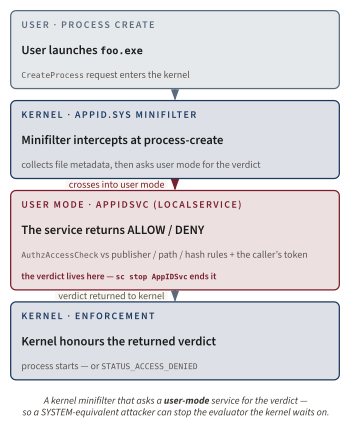
The architecture is the part most readers underestimate. AppLocker is a kernel-mode minifilter that asks a user-mode service for the verdict. Microsoft's AppLocker Architecture and Components page documents the user-mode side at the service-and-callback level [562]: the policy decision is deferred to the user-mode Application Identity service (AppIDSvc) running as LocalService, which evaluates policy via SeAccessCheckWithSecurityAttributes or AuthzAccessCheck against the calling user's group memberships, with interception points at process create, DLL load, and script run. The kernel-side component is the AppId.sys minifilter shipped in %SystemRoot%\System32\drivers\; it issues the callbacks at process creation, optional DLL load, script-host invocation, MSI execution, and packaged-app activation, and the kernel honors the verdict the service returns.
Definition: Application Identity service (AppIDSvc). The Windows service that evaluates AppLocker rules. Runs as LocalService under a service host process. The kernel minifilter AppID.sys collects the candidate file's metadata at the relevant lifecycle hook (process create, image load, script host start) and waits for AppIDSvc to return an access decision derived from the active AppLocker policy and the calling user's token. Stopping AppIDSvc stops AppLocker enforcement. This is the architectural fact the next section turns on.
The five-by-three matrix below is the policy surface a practitioner authors against:
| Collection / Condition | Publisher | Path | File Hash |
|---|---|---|---|
Executable (.exe, .com) | yes | yes | yes |
DLL (.dll, .ocx) | yes | yes | yes |
Script (.ps1, .vbs, .js, .bat, .cmd) | yes | yes | yes |
Windows Installer (.msi, .msp, .mst) | yes | yes | yes |
Packaged App (.appx, .msix) | yes (publisher only) | no | no |
Side note. The DLL collection is off by default for a reason Microsoft Learn warns about plainly [574]: "When DLL rules are used, AppLocker must check each DLL that an application loads. Therefore, users may experience a reduction in performance if DLL rules are used." That cost is paid for every load of every DLL by every running process; on a workstation that loads thousands of DLLs at boot it is observable in startup time. The Packaged App collection is publisher-only because the Universal Windows Platform packaging format always carries an Authenticode signature.
AaronLocker is a deployment tool, not a bypass catalog. The most common misattribution in the AppLocker literature is the conflation of AaronLocker with the AppLocker bypass corpus. AaronLocker [576] is Aaron Margosis's deployment tool: a PowerShell-based generator that authors thorough audit and enforce policies. The canonical AppLocker bypass catalog is Oddvar Moe's UltimateAppLockerByPassList [564]. The canonical App Control bypass catalog is Jimmy Bayne's UltimateWDACBypassList [565]. Three different artifacts, three different authors, three different purposes.
AppLocker's design is admirable. It fixed every operational defect of SRP, it shipped per-user rules a decade before App Control's kernel evaluator caught up, and its PowerShell module is still the most ergonomic Windows application-control authoring surface in 2026. But notice one thing about that sequence diagram: the policy decision lives in a user-mode service. What happens to enforcement if the attacker is running as SYSTEM?
AppLocker's structural limit
A single PowerShell line. sc.exe stop AppIDSvc from a LocalSystem context: the canonical first-step bypass cataloged in UltimateAppLockerByPassList [564] and reproduced in Oddvar Moe's December 2017 case study [577] [578]. Enforcement degrades until the next reboot. Is that a bug?
It is not. It is the design. And three converging pieces of evidence (Microsoft's own words, the documented architecture, and the public bypass record) agree on the scope.
1. Microsoft's own servicing-criteria language. The App Control and AppLocker Overview page says, verbatim [537]: "AppLocker helps to prevent end-users from running unapproved software on their computers, but it doesn't meet the servicing criteria for being a security feature." The MSRC Windows Security Servicing Criteria document [301] is the rule the MSRC uses to decide whether a defect in a Windows feature qualifies for a CVE. Defects in a security boundary receive CVEs and a coordinated patch. Defects in a defense-in-depth feature may not. They are documented and, when convenient, fixed, but Microsoft does not promise that every bypass will be treated as a vulnerability. AppLocker is the second category. App Control, when configured to qualify, is the first.
2. The user-mode AppIDSvc architecture is the proximate reason. Restate the previous diagram: the kernel minifilter AppID.sys collects the file metadata, but the verdict is returned by AppIDSvc running in user mode as LocalService. Any process running as LocalSystem or with administrator privilege can stop AppIDSvc. Stopping the service does not just bypass a rule; it removes the evaluator that the kernel was waiting for. The Microsoft Learn architecture page describes the evaluation surface explicitly [562]: "AppLocker policies are conditional access control entries (ACEs), and policies are evaluated by using the attribute-based access control SeAccessCheckWithSecurityAttributes or AuthzAccessCheck functions." AuthzAccessCheck is a user-mode Authz API; the evaluation chain ends in a process that an admin can stop.
Aside: What the MSRC servicing criteria actually say. The MSRC servicing criteria classify Windows features into security boundaries (a violation produces a CVE, fixes are released on Patch Tuesday or out-of-band), security features designed against a defined threat model (violations may or may not get CVEs depending on the threat model), and defense-in-depth measures (no servicing commitment beyond best effort). AppLocker is explicitly placed in the third class on the App Control and AppLocker Overview page [537]. App Control with a signed policy and HVCI on is treated as a security feature whose threat model includes an admin-equivalent attacker, and that is the precise condition under which an App Control bypass is treated as a CVE-class defect.
3. The published bypass corpora. Oddvar Moe's UltimateAppLockerByPassList [564] catalogs rundll32.exe, regsvr32.exe, mshta.exe, installutil.exe, msbuild.exe, and a long list of others, each documented to bypass the default AppLocker rule set without administrator privileges. Moe's December 2017 case study [577] paired a defined test environment (Windows 10 1703 Enterprise with the default AppLocker rules applied and no third-party software) against a defined adversary capability (an unprivileged interactive user) and demonstrated fourteen distinct bypass techniques. That made "AppLocker is bypassable in practice without admin" an empirical claim, not a theoretical one.
And (this is the part that closes the argument), the Microsoft-org-hosted AaronLocker README [576] states the same scope plainly: "AaronLocker does not try to stop administrative users from running anything they want, and application control solutions cannot meaningfully restrict administrative actions anyway. A determined user with administrative rights can bypass any application control solution." The bypass community and the Microsoft-employee-maintained deployment baseline agree.
This is the chapter's first reorientation. The convergence of the Microsoft servicing-criteria language, the kernel-defers-to-user-mode architecture, and the published bypass record is not three independent observations; it is one observation viewed from three angles. AppLocker is a hygiene control. The bypassability against an admin-equivalent attacker is a scope statement, not a defect. The misconception that AppLocker was ever supposed to defend against an attacker with SYSTEM lives in the reader, not in the product.
The three pieces of evidence, tabulated:
| Evidence | Source | What it establishes |
|---|---|---|
| MSRC servicing-criteria language | Microsoft Learn App Control and AppLocker Overview [537] | AppLocker is not a security feature under MSRC criteria |
User-mode AppIDSvc architecture | Microsoft Learn AppLocker Architecture and Components [562] | A LocalSystem or admin attacker can stop the evaluator |
| Public bypass corpora | Oddvar Moe UltimateAppLockerByPassList [564]; Moe 2017 case study [577] | Demonstrated bypasses without admin against default rules |
| Microsoft-org-hosted deployment baseline | AaronLocker README, Aaron Margosis [576] | Microsoft-employee-maintained tool states the scope identically |
AppLocker's scope is by design. AppLocker prevents non-admin end users from running unapproved software. That is the entire mission statement, and Microsoft says it directly. It is not a weakness of AppLocker that an attacker with administrative rights can bypass it; that is outside the threat model the product was designed against. The right question to ask of AppLocker is not "is it secure?" but "is the threat model it addresses the threat model I need to address?"
If AppLocker cannot defend against an admin-equivalent attacker by design, and that became obvious inside Microsoft by the early 2010s, the question is no longer "why is AppLocker not enough?" It is: what would a Windows application-control system designed against an admin-equivalent attacker actually look like? Microsoft answered that question with Windows 10.
The generational pivot
With Windows 10, Microsoft introduces Device Guard. The framing in the official October 2017 retrospective is unusually candid for a Microsoft product communication: "With Windows 10 we introduced Windows Defender Device Guard", and the new mechanism's value proposition, the retrospective explains, is that its enforcement does not depend on a user-mode service an administrator can turn off [566]. Where AppLocker's AppIDSvc evaluator can be stopped from a LocalSystem shell, the new mechanism's evaluator lives in the kernel and validates its policy file cryptographically. Microsoft was not hiding what changed. Microsoft was announcing what changed.
The 2014-2015 threat-model shift inside Microsoft is well documented in retrospect [566]. Post-Pass-the-Hash, post-APT, the working assumption was that the adversary reaches administrator quickly, and that any control whose enforcement could be turned off by an administrator was therefore not, in itself, a defense against the modern adversary. AppLocker could not be retrofitted to defend against that model because its evaluator lives in user mode by design. The fix was structural: build a peer mechanism in the kernel Code Integrity component.
Definition: Code Integrity (ci.dll) (recap). The Windows kernel component that enforces signature and policy checks on every image loaded into memory: the same ci.dll that enforces driver signing (KMCS) and Driver Signature Enforcement (DSE), which the Code Integrity chapter (Chapter 8) owns in full. The load-bearing fact for this chapter: the App Control for Business policy is a peer of the driver-signing policy, evaluated by the same kernel code at the same hook points. There is no service to stop because there is no service. The evaluator runs in the kernel itself.
Definition: Device Guard. The umbrella brand Microsoft used in 2015-2017 for a bundle of hardware-rooted security features that included HVCI and Configurable Code Integrity. The brand was retired because customers consistently believed the bundle required hardware that, in fact, only HVCI required. The configurable CI policy that was the application-control half of Device Guard is what Microsoft now calls App Control for Business [566].
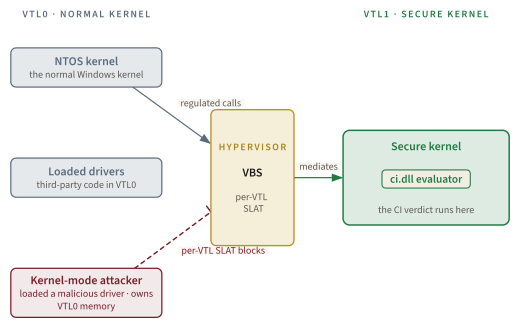
Definition: HVCI (Hypervisor-protected Code Integrity) (recap). The configuration in which the kernel CI evaluator runs inside a Virtualization-Based Security (VBS) enclave at Virtual Trust Level 1 (VTL1), separated from the normal kernel at VTL0 by the Windows hypervisor. The marketing name in Windows 11 Settings is memory integrity [279] [579]. The Code Integrity chapter (Chapter 8) covers HVCI in depth; for this chapter the relevant fact is that with HVCI on, even a kernel-mode attacker in VTL0 cannot tamper with the code-integrity decision.
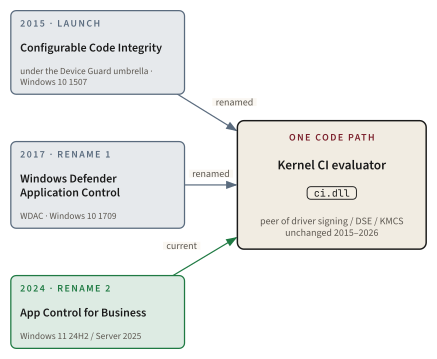
The connecting insight that made the architecture work: do not fix AppLocker. Build a peer mechanism in ci.dll, the same component that already enforces driver signing, and make the new application-control policy a peer of the driver-signing policy. The decision lives in the kernel. The policy file lives on disk under %SystemRoot%\System32\CodeIntegrity\CiPolicies\Active\. There is no user-mode service to stop.
The three-era naming timeline is the question every practitioner asks first about this product, so it is worth laying out cleanly:
| Era | Name | Released | Source |
|---|---|---|---|
| Launch | Configurable Code Integrity, under the Device Guard umbrella | Windows 10 1507, July 29 2015 | [566] |
| Rename 1 | Windows Defender Application Control (WDAC) | Windows 10 1709 (Fall Creators Update GA October 17, 2017; WDAC rename announced October 23, 2017) | [566] |
| Rename 2 | App Control for Business | Windows 11 24H2 / Server 2025, autumn 2024 [580] [581] | [537] [582] |
Aside: A note on the three product names. Microsoft's October 2017 retrospective is the cleanest explanation of the first rename [566]: the Device Guard umbrella "unintentionally left an impression for many customers that the two features were inexorably linked and could not be deployed separately". Which Configurable CI and HVCI never were. The rename to WDAC was brand management, not a technology change. The 2024 rename to App Control for Business [537] is similarly a rebrand; Microsoft Learn states "App Control for Business was originally released as part of Device Guard and called configurable code integrity. The terms 'Device Guard' and 'configurable code integrity' are no longer used with App Control except when deploying policies through Group Policy." The same kernel code path has worn three names in nine years.
The naming convention this chapter uses: lead with "App Control for Business (still widely called WDAC)" on first mention, then use App Control except when quoting third-party sources or search terms. The community search term "WDAC" stays in the title and tags because much practitioner content still uses it.
Search hygiene. In 2026, "WDAC" remains the more discoverable community-search term for the kernel CI policy mechanism. Microsoft Learn redirects from the old windows-defender-application-control/ URL path to the new app-control-for-business/ path, but third-party blogs, conference talks, and the bypass corpora often still use "WDAC". If you are searching, use both terms.
A peer mechanism in the kernel CI component is a deliberate, specific architectural choice. What does App Control for Business actually check at policy-evaluation time, and what makes its policy itself tamper-resistant against a SYSTEM-equivalent attacker?
The mechanism in detail
A LoadImage callback enters the kernel. Where does the policy decision happen, who reads the policy file, and what stops the attacker from just deleting or replacing the policy file?
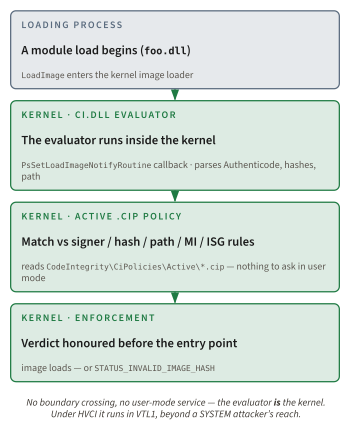
Where it runs. Inside ci.dll, loaded by the Windows kernel. The same component that enforces driver signing / DSE / KMCS [279]. The integration builds on documented kernel API surfaces: PsSetLoadImageNotifyRoutine [583] registers an image-load callback, and PsLookupProcessByProcessId [584] resolves the loading PID to an EPROCESS so the load can be attributed to the right process; the full internal enforcement path inside ci.dll is not public, and the documented load-image notification callbacks are a related surface rather than the blocking enforcement path itself. A user-mode sc.exe stop has no effect because there is no service to stop. The evaluator is the kernel.
What it evaluates. For each candidate image, ci.dll checks:
- The file's Authenticode signature: signer subject, EKU (Extended Key Usage), leaf certificate attributes.
- The file's signed metadata: Original Filename, version, product name (analogous to AppLocker's Publisher rule).
- SHA-1, SHA-256, and page hashes of the file content.
- The file's path, introduced in Windows 10 1903, with a mandatory runtime user-writeability check that distinguishes App Control path rules from AppLocker's [585]. An App Control path rule that resolves to a directory writable by a non-administrator is rejected at evaluation time.
- The file's Managed Installer lineage: whether the file was written by a process tagged as a managed installer [586].
- The file's ISG reputation: covered in the ISG section [587].
Definition: Code Integrity policy. The XML / binary .cip policy file that ci.dll consults at every image-load callback. Authored in XML via the New-CIPolicy and Merge-CIPolicy cmdlets (the ConfigCI PowerShell module) and compiled to a binary .cip via ConvertFrom-CIPolicy. The kernel reads the active policies from %SystemRoot%\System32\CodeIntegrity\CiPolicies\Active\*.cip at boot and on policy refresh. Format lineage: the original single-policy model deployed one binary SiPolicy.p7b directly under %SystemRoot%\System32\CodeIntegrity\; the multiple-policy format introduced in Windows 10 version 1903 replaced it with per-policy {PolicyGUID}.cip files under CiPolicies\Active\, which is the form modern MDM/Intune and script deployments use. Legacy GPO single-policy estates may still carry the older SiPolicy.p7b form.
Definition: Managed Installer. A trust-propagation feature in App Control. An administrator designates a process (typically a configuration-management agent such as Configuration Manager, Intune, or a third-party tool such as Patch My PC) as a managed installer. Any file written by that process is automatically tagged with an Extended Attribute marking it as installed by trusted infrastructure. App Control policy can then allow files bearing the tag. The Managed Installer rule collection is implemented as an AppLocker rule set [586], which is the most-cited example of AppLocker enforcement plumbing being reused by App Control rather than replaced.
Policy file format. XML in, binary in the kernel. The cmdlet sequence:
New-CIPolicy → Merge-CIPolicy → ConvertFrom-CIPolicy → .cip file → drop into Active/ → reboot or refresh
Side note. The PowerShell module that exposes these cmdlets is still partly named after the WDAC era. ConvertFrom-CIPolicy, Set-CIPolicySetting, Set-CIPolicyVersion, Add-SignerRule, and the rest all retain the CIPolicy / ConfigCI naming through the 2024 rebrand. Microsoft has not renamed the cmdlets to App Control for Business. The App Control Wizard [588] is an open-source MSIX-packaged C# tool that uses these same cmdlets under the hood.
Signed vs unsigned policies: the load-bearing distinction. This is the single most common practitioner confusion in App Control deployments, and it is worth several paragraphs of care.
An unsigned App Control policy is fully supported and widely deployed. The policy XML is authored, compiled, and dropped into the active-policies directory. The kernel reads it and enforces it. But the policy file itself has no cryptographic binding to the device. Any process with write access to %SystemRoot%\System32\CodeIntegrity\CiPolicies\Active\ (which includes anything running as SYSTEM or administrator) can simply del the .cip file and reboot. Enforcement vanishes. The defect is not in ci.dll; it is in the policy not being signed.
A signed App Control policy is signed by the deploying organization's code-signing certificate: not by the application publisher's certificate, which is the misconception most often imported from the AppLocker mental model. The deploying organization typically uses an internal PKI leaf, the signing private key kept on a hardware token or in a sealed key vault. When the policy is signed, the kernel CI evaluator validates the signature against the trusted signer set baked into the policy at first application; a subsequent attempt to remove or replace the .cip file is rejected at boot because the unsigned (or alternately-signed) replacement does not match. Even SYSTEM cannot replace the policy without the corresponding private key. This is the only configuration whose policy integrity survives an admin-equivalent attacker: which, as later sections show, is not the same as containing everything such an attacker can do.
App Control policies are signed by the deploying organization's code-signing certificate, not by the application publisher's. The signed policy is bound to the device such that even
SYSTEMcannot remove or replace it without the organization's signing key.
| Dimension | Unsigned policy | Signed policy |
|---|---|---|
Tamper-resistance against SYSTEM / admin | None; the .cip file can be deleted | Strong with Secure Boot enabled; removal requires a properly signed replacement policy |
| Deployment complexity | Low; copy file and reboot | High; requires PKI, signing infra, key custody |
| Signing PKI requirement | None | Internal code-signing CA leaf required |
| Removal mechanism | del *.cip + reboot | Sign and deploy a replace policy with the same key |
| Suitable as MSRC security boundary | No | Yes (with HVCI on) |
HVCI integration. When Virtualization-Based Security is on, the kernel CI evaluator itself runs in VTL1 inside HVCI (memory integrity, in Windows 11 Settings) [279] [579]. A kernel-mode attacker in VTL0 (even one who has loaded an arbitrary kernel driver and corrupted kernel memory at will) cannot tamper with the code-integrity evaluation path. The decision lives behind the hypervisor boundary.
Definition: VTL0 / VTL1 (recap). Virtual Trust Levels exposed by the Windows hypervisor. VTL0 is the normal Windows kernel and user mode. VTL1 is the secure kernel, an isolated execution environment with restricted memory access and a tighter trust model. With HVCI enabled, the code-integrity evaluator runs in VTL1; a kernel-mode attacker confined to VTL0 cannot read or write VTL1 memory directly. The Secure Kernel chapter (Chapter 6) owns the VTL model in depth.
Multi-policy support. From Windows 10 1903 (May 2019) the kernel supported up to 32 active App Control policies whose interactions follow two distinct rules: multiple base policies intersect (an app must be allowed by every base policy that applies), while a base policy and its supplemental policies union (an app is allowed if any of them allow it), and deny rules always win in either combination. The cap was lifted by the April 9, 2024 cumulative security updates: KB5036893 for Windows 11 22H2 and 23H2 (OS Builds 22621.3447 and 22631.3447) [589], and KB5036892 for Windows 10 21H2 and 22H2 (OS Builds 19044.4291 and 19045.4291) [590]. Microsoft's Deploy multiple App Control for Business policies page is explicit on the version scope [591]: "The policy limit was not removed on Windows 11 21H2 and will remain limited to 32 policies." No published Microsoft documentation gives the new ceiling on the platforms where the cap was lifted; the practical limit is policy parsing time at boot.
Unsigned policy = no boundary against admin. This is the single most common practitioner misreading in App Control deployments. An unsigned App Control policy enforces against userland and against unprivileged users perfectly well, but it does not qualify as a security boundary under the MSRC servicing criteria, because an admin or SYSTEM attacker can delete the policy file. The phrase "deploy WDAC" alone is ambiguous; the meaningful phrase is "deploy a signed App Control policy with HVCI on and the Recommended Block Rules merged in".
Kernel evaluator, signed policy, HVCI-isolated evaluator, multi-policy merge. That is the security boundary Microsoft sells. But none of those facts tells you what signals the policy can act on, and one of those signals (ISG) is the single most misunderstood piece of the App Control vocabulary.
ISG, the reputation signal everyone calls a list
Open any practitioner thread about App Control in 2024-2026 and you will see the phrase "the ISG list of trusted apps." There is no such list. Microsoft has said so for years. The misconception is institutional.
The verbatim Microsoft Learn quote, from the Use App Control with the Intelligent Security Graph page [587]:
The ISG isn't a "list" of apps. Rather, it uses the same vast security intelligence and machine learning analytics that power Microsoft Defender SmartScreen and Microsoft Defender Antivirus to help classify applications as having "known good," "known bad," or "unknown" reputation. This cloud-based AI is based on trillions of signals collected from Windows endpoints and other data sources, and processed every 24 hours.
The ISG isn't a 'list' of apps.. Microsoft Learn, Use App Control with the Intelligent Security Graph [587]
ISG is a reputation classifier. An App Control policy can be configured to treat ISG's "known good" verdict as an additive allow signal. ISG never blocks on App Control's behalf. The Microsoft Learn page is precise: "the ISG option only allows binaries that are known good. If a binary is unknown or known bad, it won't be allowed by the ISG" [587]. The classifier sits underneath the policy's explicit rules; it does not override them.
Definition: Intelligent Security Graph (ISG). A Microsoft cloud service that ingests telemetry from Defender SmartScreen, Defender Antivirus, and partner products and produces a reputation classification for individual binaries. The classifier returns one of known good, known bad, or unknown. App Control can be configured to treat known good as an additional allow path, in addition to the explicit signer / hash / path / Managed Installer rules in the policy. ISG never blocks on its own; unknown and known bad simply mean ISG does not vote allow [587].
The mechanism. When ISG is enabled and a binary is classified known good, Windows tags the file with an Extended Attribute named $KERNEL.SMARTLOCKER.ORIGINCLAIM, so the CI evaluator can honor the verdict at subsequent image loads without a fresh cloud call. The cloud reputation model itself is processed every 24 hours [587]; App Control's client-side requeries are documented only as periodic, without a fixed interval. The policy option Enabled:Invalidate EAs on Reboot discards the tags across reboot, forcing a re-evaluation.
Side note. The extended attribute $KERNEL.SMARTLOCKER.ORIGINCLAIM is the same EA-tag mechanism the Managed Installer feature uses to propagate the "installed by trusted infrastructure" signal [586]. Two adjacent App Control features therefore share the same persistence layer: one populated by a local trusted-process designation, the other populated by a cloud reputation classifier. The kernel evaluator does not care which source wrote the tag.
The misconception this section closes is that ISG is a list of curated allowed apps: a corporate-managed allowlist administered by Microsoft. It is not. Calling ISG "cloud-reputation-driven allow-listing" is half-true in spirit and wrong in mechanism. ISG is reputation. The allowlist is what the App Control policy still has to author explicitly.
There is no Intelligent Trusted List or 'ITL'. The phrase Intelligent Trusted List and the acronym ITL surface periodically in AI summaries and in third-party blog posts that describe App Control features. No such Microsoft feature exists. A search of Microsoft Learn produces zero results; the URLs cited by AI summaries return 404; and the definitions offered by AI summaries contradict each other. The closest real Microsoft features are ISG (this section), the Microsoft Recommended Block Rules (the Where This Link Breaks section), and Smart App Control (the Smart App Control section). If you see ITL in a security blog, treat it as a fabrication and ignore it.
ISG turns an App Control policy into a hybrid: explicit rules plus a reputation tap. But it is still an allowlist, and an allowlist has a structural ceiling. Microsoft itself published the consequence as a block list. Why?
Where this link breaks
Microsoft's own Microsoft Learn page lists approximately forty Microsoft-signed binaries that can bypass an App Control allow rule on themselves. The page is called Applications that can bypass App Control and how to block them [563]. Why does Microsoft publish a list of its own bypassable signed binaries?
Because if your App Control policy says "allow Microsoft-signed code", then it admits each of those forty binaries, and each one is a way to run attacker-supplied code while complying with the policy. The publisher gate cannot evaluate side effects.
Definition: LOLBin (Living Off The Land Binary). A binary already present on the operating system, typically signed by the OS vendor, that an attacker can repurpose to perform actions a security control would otherwise block. The canonical Windows LOLBin classes are script interpreters bundled with the OS or runtime (mshta.exe, wscript.exe), build tools that compile and execute attacker-supplied source (msbuild.exe, csi.exe, dotnet.exe), debuggers that script their own target (cdb.exe, windbg.exe), and registration utilities that load arbitrary DLLs into a signed host (regsvr32.exe, rundll32.exe). The community-curated LOLBAS Project [592] catalogs hundreds.
The named-researcher chain that drove the Recommended Block Rules is a who-is-who of mid-2010s Windows offensive research:
cdb.exe: Matt Graeber, August 2016, preserved in the Wayback Machine [593]. The Windows debugger ships signed by Microsoft and includes a scripting facility that runs arbitrary shellcode in memory. Graeber's blog post asked, in his own words, "what is a tool that's signed by Microsoft that will execute code, preferably in memory?" and answered "WinDbg/CDB of course!"csi.exe: Casey Smith, September 2016, preserved in the Wayback Machine [594]. The C# interactive compiler, distributed with Visual Studio, is signed by Microsoft and runs arbitrary C# fragments viaAssembly.Load().dnx.exe: Matt Nelson, November 2016 [595]. The early .NET Core host that loads and executes arbitrary .NET assemblies under a signed Microsoft binary.addinprocess.exe/addinprocess32.exe: James Forshaw, July 2017 [596]. The .NET FrameworkSystem.AddInout-of-process add-in host (%WINDIR%\Microsoft.NET\Framework\v4.0.30319\) that can be coerced into loading an attacker DLL while the parent process satisfies the signed-publisher policy.dotnet.exe: Jimmy Bayne, August 2019 [597]. The shipping .NET host with the same fundamental capability asdnx.exebut with a 2019-vintage attack surface and a live PoC against both AppLocker and App Control.
The operational entries practitioners encounter most often are msbuild.exe (the C# / MSBuild compiler that can execute inline build tasks), mshta.exe (the HTML application host), wmic.exe (which can load XSL stylesheets that execute arbitrary script), wscript.exe (Windows Script Host), and bash.exe / wsl.exe (the WSL launchers, which provide an entirely separate execution environment outside the policy's reach).
| Binary | Capability that enables the bypass | Original researcher | Source |
|---|---|---|---|
cdb.exe | Debugger scripting facility executes shellcode in memory | Matt Graeber, Aug 2016 | [593] |
csi.exe | C# interactive compiler, Assembly.Load() over arbitrary C# | Casey Smith, Sep 2016 | [594] |
dnx.exe | Early .NET Core host, loads arbitrary assemblies | Matt Nelson, Nov 2016 | [595] |
addinprocess.exe | .NET System.AddIn out-of-process host loads attacker DLL | James Forshaw, Jul 2017 | [596] |
dotnet.exe | Modern .NET host, AWL bypass via assembly loading | Jimmy Bayne, Aug 2019 | [597] |
msbuild.exe | Inline Task in build XML compiles and runs C# at build time | community | [563] |
mshta.exe | HTA host evaluates VBScript / JScript | community | [563] |
wmic.exe | XSL stylesheet evaluation runs arbitrary script | community | [563] |
bash.exe / wsl.exe | Launches WSL kernel, an environment outside App Control | community | [563] |
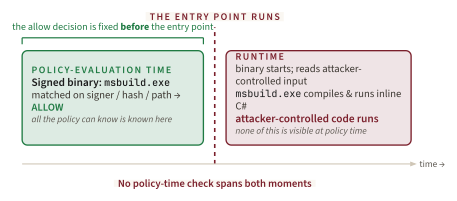
The structural limit being demonstrated. A publisher-gate allowlist cannot evaluate what a signed binary will do after it starts. If the policy allows Microsoft-signed code, it has no way to know that msbuild.exe will compile and execute attacker-supplied C# at runtime. The same kind of structural ceiling that applied to AppLocker's user-mode evaluator applies to App Control's publisher gate. Different mechanism, different layer; same kind of structural ceiling.
The community corpus. Jimmy Bayne's bohops/UltimateWDACBypassList [565] preserves per-binary attribution to Forshaw, Smith, Nelson, Graeber, Moe, and others. Pair with the LOLBAS Project [592] as the cross-platform LOLBin catalog and you have the empirical record the Recommended Block Rules canonicalise.
Microsoft's response was institutional, not architectural. Publish the inverse list and update it continuously. The Microsoft Recommended Block Rules policy is the canonical mitigation [563]. Snapshots of the page through 2019, 2020, 2022, and 2023 show a monotonically growing enumeration: a handful of entries at first, around forty by 2026, with each addition traceable to a named-researcher write-up.
Side note. Matt Graeber's original 2016 cdb.exe write-up URL www.exploit-monday.com/2016/08/windbg-cdb-shellcode-runner.html now serves an unrelated 2011 NTFS-ADS post (also by Graeber, but pre-cdb-era). The verbatim August 2016 LOLBin post is preserved in the Wayback Machine [593]. The attribution is independently triangulated by the Microsoft Recommended Block Rules page itself ("Microsoft recognizes... Matt Graeber") [563] and by bohops/UltimateWDACBypassList [565].
"App Control with the Recommended Block Rules" and "App Control without them" are not the same product. The block list is load-bearing.
DO NOT consider any application whitelisting solution to be secure against a bored member of staff.: James Forshaw, DG on Windows 10 S [596]
Operational cost is non-zero. The webclnt.dll block in the Recommended Block Rules has a documented practitioner side effect. Peter Upfold's July 2024 write-up [598] documents a 5-15 second Word "not responding" hang on OneDrive / SharePoint saves caused specifically by that block, on machines with App Control for Business enforcing the Microsoft Recommended Block Rules. The mitigation has a cost. Honest deployment means measuring the cost against the threat it addresses.
Aside: The Word-hang anecdote: webclnt.dll has a real operational cost. Peter Upfold reported in July 2024 [598] that "users were experiencing a 5-15 second delay when saving a document to OneDrive or SharePoint, during which Word would show as 'not responding.' All machines in question use App Control for Business (WDAC)." The cause was the webclnt.dll entry in the Microsoft Recommended Block Rules, which blocks the WebDAV redirector. WebDAV is the underlying transport Office uses for some OneDrive / SharePoint save paths. The block exists because webclnt.dll has historically been used by attackers to coerce NTLM authentication to attacker-controlled UNC paths; the side effect is a Word hang on legitimate saves. This is the texture of "App Control with the Recommended Block Rules": not theoretical, not free.
Tie back to the thesis. The bypass corpus does not undermine App Control's security-boundary status. It underlines that without the Recommended Block Rules, an App Control "allow all Microsoft-signed code" policy is not a coherent security policy. The boundary holds because Microsoft and the community continuously update the inverse list.
App Control with vs without the Recommended Block Rules are qualitatively different products. A signed policy with HVCI is the boundary configuration; the Recommended Block Rules are required hardening for any policy that trusts Microsoft-signed code broadly. An App Control deployment that allows Microsoft-signed code without the Block Rules is enforcement-of-a-name, not enforcement-of-a-capability. The single most-skipped step in production deployments is the merge of the Recommended Block Rules and the Vulnerable Driver Blocklist into the active policy.
If both AppLocker and App Control have structural ceilings, and Microsoft maintains them both, the question is not "which one is correct?" It is: what is Microsoft's third application-control product, who is it for, and how does it relate to the first two? That is Smart App Control.
Smart App Control
Windows 11 22H2 ships on September 20, 2022 [383] [580]. Microsoft introduces Smart App Control (SAC) for consumer Windows. It runs on the same kernel CI machinery as App Control for Business [599]. It is not App Control for Business. Why is it a distinct product?
The mechanism. SAC uses the same ci.dll evaluator as App Control for Business. Its decision source is ISG, with a fallback to "valid signature from a Trusted Root CA" when ISG has no verdict [599]. On an eligible clean install of Windows 11 22H2 or later, SAC starts in evaluation mode and either moves to enforcement or turns itself off, depending on whether Microsoft assesses the device as a good fit.
The product is categorically different.
- Unmanaged: no admin policy, no GPO, no Intune authoring surface.
- All-or-nothing: there is no per-app rule list. Either SAC is on for the device, or it is off.
- Auto-disables silently: when the device's telemetry suggests SAC would be disruptive, it can disable itself without prompting the user [599].
- Enterprise-managed devices keep it off: SAC stays off if "your device is enterprise-managed or developer-mode has been configured" [600].
Definition: Smart App Control. A consumer-grade Windows 11 application-control feature that uses the same kernel CI evaluator as App Control for Business but provides no policy authoring surface. SAC consults the Intelligent Security Graph for reputation and a Trusted Root CA signature fallback for unknown binaries. SAC is binary: on (enforcing for the device) or off. On eligible clean installs of Windows 11 22H2 and later for unmanaged consumer devices, it starts in evaluation mode and then turns on or off [599] [600].
The 2026 update most older write-ups still get wrong. SAC can be re-enabled without a clean install on current Windows versions. The Microsoft Support FAQ [600] states: "Recent Windows updates allow Smart App Control to be enabled within the Windows Security App without requiring a clean installation" and "Recent Windows updates allow Smart App Control to be re-enabled without requiring a clean installation." If you read a blog post that claims SAC requires a Windows 11 reinstall to enable, that post pre-dates these updates. The current SAC state-machine vocabulary is evaluation mode (not audit mode) [599].
SAC enable/disable on current Windows. The widely-cited 2022-era guidance that "to turn on Smart App Control, a Windows 11 reinstall is required" is no longer true [600]. Microsoft has shipped the in-place enable / re-enable surface in the Windows Security app. If your reading list still warns of the reinstall requirement, the warning is empirically outdated as of 2026.
Side note. The Microsoft documentation about SAC is itself inconsistent on this point. The Smart App Control overview developer page still says SAC "can only be enabled on a clean install of a version of Windows that contains the Smart App Control feature" and lists "A clean Windows install" as a SAC requirement [599], while the Microsoft Support FAQ [600] documents the in-place re-enable surface. The FAQ is the more current source and is the one Microsoft updates when servicing changes the behavior; the developer overview page lags. Practitioners reading the two pages back-to-back should treat the FAQ as authoritative for current Windows.
Why SAC is not "WDAC for consumers": the enforcement engine is approximately the same, but the product is categorically different. Unmanaged, all-or-nothing, ISG-gated, silently auto-disables. The kernel is the same; the management story is the inverse. The FAQ flags this misconception explicitly.
Three products now sit in the inventory: AppLocker, App Control for Business, Smart App Control. The practitioner question is no longer "which one is best?" It is "which one fits which deployment?" That is the job of the next section.
Side-by-Side Comparison
Most comparisons of AppLocker and App Control are organized by feature inventory. That answers the wrong question. Organize the comparison by what the security practitioner actually needs to decide, and the line between the two becomes obvious.
| Practitioner-decision dimension | AppLocker | App Control for Business |
|---|---|---|
| MSRC servicing-criteria classification | Defense-in-depth (not a security feature) [537] | Security feature when signed policy and HVCI [537] |
| Enforcement locus | User-mode AppIDSvc + kernel AppID.sys minifilter [562] | Kernel ci.dll (HVCI: VTL1) [279] |
Survives SYSTEM-equivalent attacker | No. sc stop AppIDSvc ends enforcement | Yes, when policy is signed and HVCI is on |
| Per-user / per-group rules | Yes [575] | No (whole-device) [575] |
| Driver coverage | No (drivers go through KMCS / DSE) | Yes: App Control policy can govern drivers as a peer of KMCS |
.bat / .cmd script enforcement | Yes [574] | No. Script enforcement is host-cooperative and cmd.exe is not enlightened [601] [575] |
| Signing infrastructure required | None | Internal code-signing PKI required for signed policy (the security-boundary configuration) |
| Reboot required to apply policy changes | No (immediate take-effect through AppIDSvc) | Yes for signed policies (because the trusted-signer set is sealed at boot) |
| GPO deployment | Mature dedicated UI | Single-policy XML through Administrative Templates → System → Device Guard |
| MDM / Intune deployment | AppLocker CSP (in maintenance) [602] | ApplicationControl CSP (multi-policy, where new feature work lands) [602] [603] |
| Active feature development | None; "isn't getting new feature improvements" [537] | Yes; multi-policy cap removed April 2024 [591], Server 2025 OSConfig integration [604] |
| Canonical bypass corpus | Oddvar Moe UltimateAppLockerByPassList [564] | Jimmy Bayne bohops/UltimateWDACBypassList [565]; Microsoft Recommended Block Rules [563] |
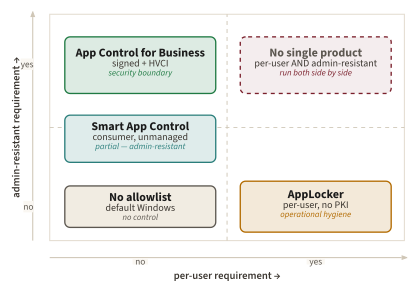
The table does not say "AppLocker bad, App Control good." It says the two are non-substitutable. AppLocker gives you per-user policy on devices that do not have a code-signing PKI. App Control gives you a real security boundary on devices that do.
Side note. Every "App Control = Yes" row in the security-boundary direction is gated on the policy being signed and HVCI being on. Every "AppLocker = Yes" row in the per-user direction comes with the user-mode-service ceiling. The chapter repeats these gating conditions in the prose so the reader does not over-read the table.
Aside: What the table does not show. The comparison table is intentionally pitched at the practitioner-decision layer. It does not show audit-mode behavior (both products support it), the specific Event Log IDs (AppLocker logs to Microsoft-Windows-AppLocker/*, App Control to Microsoft-Windows-CodeIntegrity/*), the reboot semantics for unsigned vs signed App Control policies (unsigned changes can take effect without reboot in some configurations; signed changes require a reboot to refresh the trusted signer set), or the specific PowerShell cmdlet inventory. These details matter operationally and are covered on Microsoft Learn [537] [602]; they do not change the decision shape.
Key idea. AppLocker and App Control for Business are non-substitutable. The line between them is not new vs old; it is per-user without PKI vs security boundary with PKI. A deployment that needs both (per-user policy on some collections and a real security boundary on others) runs both side by side, which is exactly the configuration Windows 11 24H2 supports.
The table makes the what explicit. The why both still ship is still left implicit. The next section makes the case explicit, including the load-bearing negative citation that AppLocker is not on Microsoft's deprecated-features page as of February 2026.
Why both still ship
A line that has circulated in community summaries since 2023: "AppLocker is being sunsetted, migrate to WDAC." Is that line true?
The load-bearing negative citation. As far as the cited Microsoft Learn Deprecated features in the Windows client page shows in its February 2, 2026 update [605], AppLocker is not on the list. The page enumerates features Microsoft has formally deprecated: WMIC, PowerShell 2.0, NTLM, DirectAccess, Maps, EdgeHTML, Paint 3D, the LPR/LPD print services, the UWP Map control. AppLocker is not among them.
What Microsoft does say, taken verbatim from the App Control and AppLocker Overview page [537]:
- As established in the AppLocker structural-limit section, Microsoft's own servicing-criteria language disqualifies AppLocker as a security feature [537]; the load-bearing point for this section is the second half of the same page.
- "Although AppLocker continues to receive security fixes, it isn't getting new feature improvements."
Although AppLocker continues to receive security fixes, it isn't getting new feature improvements.: Microsoft Learn, App Control and AppLocker Overview [537]
The October 8, 2024 cumulative update KB5044288 (OS Build 25398.1189, Windows Server, version 23H2) confirms the "continues to receive security fixes" claim with a concrete servicing fix [606]: the release notes specifically include "[AppLocker] Fixed: The rule collection enforcement mode is not overwritten when rules merge with a collection that has no rules. This occurs when the enforcement mode is set to 'Not Configured.'" The fix shipped on the Server SKU first; the AppLocker code path is shared, so the fix appears on the client SKUs through their parallel monthly servicing. AppLocker is in maintenance mode, not deprecation.
Five reasons AppLocker still ships in 2026.
| Reason | Practitioner consequence | Source |
|---|---|---|
| Per-user rules | App Control is whole-device. Multi-user terminal-server, Citrix VDI, and education labs need per-user policy. | [575] |
| No signing infrastructure required | App Control's tamper-resistance story requires an internal code-signing PKI; AppLocker requires none. | [537] |
| GPO ergonomics | AppLocker has a mature dedicated GPO UI; App Control GPO deployment is single-policy format only (multi-policy requires the ApplicationControl CSP). | [602] |
| Installed base | Existing AppLocker deployments work; ripping them out for a different security model has migration cost without a forced trigger. | [537] |
| Threat-model fit | Some organizations only need to keep end users from running random downloads: the operational hygiene threat model. AppLocker fits that model and admits its scope. | [537] |
The first reason is the load-bearing one. The kernel ci.dll evaluator does not consult per-user token context as a policy input; the App Control policy is whole-device by design. Until that changes, any environment whose risk model depends on different rule sets for different user identities (terminal servers, RDS hosts, Citrix VDI, education labs, kiosks shared by multiple users) has to keep AppLocker even if every other dimension would point toward App Control.
The community-folklore correction. The "AppLocker is deprecated" line is not Microsoft's position. The Microsoft position is the comparative one in App Control and AppLocker Overview: App Control is the recommended security feature; AppLocker is the supported parallel option for the scenarios above. The strongest defensible characterization of AppLocker's roadmap is "feature complete, not actively developed, continues to receive security fixes": not "deprecated." Microsoft's Deprecated features in the Windows client page reinforces this in an unexpected direction [605]: when the page deprecated Microsoft Defender Application Guard for Office, it recommended transitioning to "Microsoft Defender for Endpoint attack surface reduction rules along with Protected View and Windows Defender Application Control": a Microsoft-curated recommendation that names App Control as the forward-looking layer, not the legacy one.
Side note. The KB5044288 October 2024 fix [606] is the concrete proof-point that the "security fixes" claim is observable. It addresses a specific AppLocker rule-merge bug. A genuinely deprecated feature does not get bug fixes shipped on Patch Tuesday two years after rename.
'AppLocker is deprecated' is not the Microsoft position. The phrase frequently appears in community summaries, conference slides, and migration-vendor sales decks. It is not in Microsoft Learn. AppLocker is not on the deprecated-features list [605] as of February 2026, it continues to receive security fixes [606], and Microsoft Learn explicitly preserves it for the scenarios where App Control is not a substitute [537]. If your migration plan rests on the assumption that AppLocker will be removed soon, the assumption does not have a public Microsoft commitment behind it.
If both still ship, the natural next question is not which one to use today but where the ceiling for any allowlist mechanism is. That ceiling is structural, it is the same for AppLocker, App Control, and SAC, and the research community has named it.
What no allowlist can do
The publisher-gate structural limit shown in the Where This Link Breaks section was specific to App Control. Here is the more general version of the same observation: application control cannot evaluate side effects. The same ceiling applies to AppLocker, App Control, SAC, ISG, every Microsoft Recommended Block Rules iteration, and every third-party product in the same market.
The structural claim is folklore-level but universally observed; no published impossibility theorem yet states it formally. The closest standard result is Rice's theorem: any non-trivial behavioral property of a Turing-complete program is undecidable in the general case. A publisher-gate allowlist asks a behavioral question. "will this binary do something that violates policy?" (and answers it with a structural fact) "who signed it?" The mismatch is not a defect of any individual allowlist product; it is a working bound the field treats as a corollary of Rice. The policy evaluator runs before the binary starts. It knows what the binary is: the signer subject, the file hash, the path on disk, the Authenticode metadata. It does not know what the binary will do. If msbuild.exe is signed by Microsoft and the policy allows Microsoft-signed binaries, the policy has no way to know that msbuild.exe will then read an attacker-controlled .csproj file containing an inline MSBuild task (a <UsingTask> with embedded <Code>) and compile and execute the attached C# at runtime.
This is the structural reason Microsoft publishes the Recommended Block Rules [563]. It is also the structural reason "allow all Microsoft-signed code" is not a security policy. It is a starting point.
This is the same ceiling, one tier up. The Authenticode chapter (Chapter 12) watched a valid Realtek signature carry Stuxnet's drivers into the kernel; the Code Integrity chapter (Chapter 8) watched WHQL-signed drivers become Bring-Your-Own-Vulnerable-Driver primitives. In both, the signature was real and the code was hostile. App Control inherits that ceiling because it consumes the very same signature: a publisher gate answers who signed this?, never what will it do?, so application control, kernel code integrity, and Authenticode all bottom out on the identical undecidable question, asked at three different layers of the same stack.
As established in the AppLocker structural-limit section and the Where This Link Breaks section, the bound is observed from both sides of the asymmetric arms race. External offensive research arrives at the "bored member of staff" framing in the Windows 10 S analysis [596]; the Microsoft-employed authors of the canonical deployment baseline arrive at the "determined user with administrative rights" framing in the AaronLocker README [576]. Two independent perspectives, the same ceiling stated in their own vocabularies. This section's contribution is not to re-quote either; it is to name the structural reason both arrive at the same place.
Key idea. The publisher-gate ceiling is not an artifact of AppLocker's user-mode design or App Control's kernel-but-publisher design. The ceiling is a property of the allowlist model whose allow signal is "this code is from a publisher I trust" instead of "this code's runtime behavior matches a trusted policy." Closing the ceiling would require policy-time content semantics, which no Microsoft-shipped mechanism provides today.
Aside. Why there is no impossibility theorem (yet). The folklore claim "a publisher-gate allowlist cannot evaluate side effects" does not have a published formal impossibility result in the cryptography or program-analysis literature. Rice's theorem supplies the necessary-condition argument used above (any non-trivial behavioral property of programs is undecidable in the general case) but a tighter result calibrated to publisher-gate allowlists would have to constrain the adversary model (for example, bound the candidate input space or restrict the binary's capability surface) before any positive decidability claim becomes possible. The application-control literature has not crossed that bar; this chapter does not either.
If the ceiling is structural, what is the research community actively trying that might push it upward? Microsoft is not the only player; the field has named open problems.
Proof on a live machine
This section is a walkthrough, not a screenshot gallery. Its purpose is to let a reader sit at a Windows 11 Enterprise, Windows 11 Education, or Windows Server host and determine which of the two locks is actually making decisions. The evidence class remains 🔵 DOCUMENTED: the commands are reproducibility probes tied to Microsoft-documented surfaces, not private telemetry captured from this book's lab. The depth comes from the interpretation discipline. Each probe asks four questions in order: where is the policy stored, which component evaluates it, where is the enforcement point, and which bypass class is still outside the lock?
🔵 DOCUMENTED: AppLocker evaluator and policy surface
Reproduce on an elevated PowerShell prompt:
Get-Service AppIDSvc | Select-Object Name, Status, StartType
Get-AppLockerPolicy -Effective -Xml
Walkthrough: the first command asks whether the Application Identity service exists and whether it is running. The second asks the AppLocker management layer to serialize the effective policy as XML. A meaningful result contains the AppLocker rule collections: executables, scripts, Windows Installer files, DLLs if enabled, and packaged apps. Those collections are human-readable because AppLocker is a management policy format, not a kernel CI blob. A publisher rule names a signer and optional product, filename, and version fields. A hash rule names a file digest. A path rule names a filesystem location. The important proof point is not that XML exists; it is that the XML belongs to a user-and-group-aware policy engine whose decision is evaluated by AppIDSvc using the caller token and attribute-based access checks [562] [574].
Enforcement walkthrough: when a user starts foo.exe, process creation reaches the kernel. AppID.sys observes the create path and collects metadata about the candidate image. It then asks AppIDSvc for a verdict. AppIDSvc, running as LocalService, evaluates the effective XML against publisher, hash, or path rules and returns allow or deny. The kernel honors that returned verdict. If DLL rules are enabled, the same shape repeats at image-load time, which is why Microsoft warns about the operational cost of DLL enforcement [562]. This is the AppLocker architecture in one sentence: kernel interception, user-mode policy decision, kernel enforcement of the returned decision.
Gap analysis: this proves AppLocker is active only against the threat model in which the evaluator remains available. A standard user denied by AppLocker has met a real control. A local administrator or SYSTEM attacker has not met the same class of boundary, because stopping or disrupting the service removes the evaluator. That is why Microsoft's overview classifies AppLocker as a defense-in-depth and management control rather than as a feature that meets the MSRC security-servicing criteria [537] [301]. The bypass class to look for here is not merely a clever LOLBin; it is evaluator removal or policy-path abuse by an already-privileged principal.
🔵 DOCUMENTED: App Control active policy and Code Integrity event surface
Reproduce on an elevated PowerShell prompt:
Get-ChildItem "$env:SystemRoot\System32\CodeIntegrity\CiPolicies\Active" -Filter *.cip |
Select-Object Name, Length, LastWriteTime
Get-WinEvent -LogName 'Microsoft-Windows-CodeIntegrity/Operational' -MaxEvents 20 |
Select-Object TimeCreated, Id, ProviderName, Message
Walkthrough: the first command inspects the active binary policy format. App Control for Business policy is normally authored as XML with ConfigCI tooling, merged if necessary, then compiled into .cip form before the kernel consumes it [591] [588] [602] [603]. The second command inspects the Code Integrity operational channel, where audit and enforcement decisions surface. A host may have no .cip files, one base policy plus supplements, or many active policies; modern Windows removed the historical 32-policy cap in 2024 [591] [589]. The storage fact matters because this is not AppLocker XML being interpreted by AppIDSvc. It is a CI policy consumed by the same code-integrity path that participates in driver signing and kernel-mode code-signing enforcement.
Enforcement walkthrough: when the image loader prepares to map foo.dll or start foo.exe, the kernel Code Integrity path calls into ci.dll. The evaluator parses the image identity: Authenticode signer, catalog relationship, hash, path if the policy permits path rules, Managed Installer extended attribute, and ISG reputation if that option is enabled. It compares those inputs against the active .cip policies and returns allow or deny before the image runs. A denial commonly appears to the caller as a code-integrity failure such as an invalid image hash, and it appears to the operator in Code Integrity events [583]. This is the App Control architecture in one sentence: kernel image-load decision, CI policy consumed as binary policy, no user-mode AppLocker service in the verdict path.
Gap analysis: this proves a different boundary only if the deployment knobs match the threat model. An unsigned .cip can still enforce against ordinary users, but an administrator can replace or remove it. A signed policy changes the attack: the attacker now needs a policy signed by the organization's policy signer, not merely write access to the policy path. HVCI changes it again by moving the CI evaluator into the virtualization-protected trust boundary. The remaining bypass classes are therefore not AppLocker-style service removal; they are policy-authoring omissions, signed-but-abusable binaries, signed vulnerable drivers, weak supplemental-policy governance, and cloud reputation ambiguity [563] [587] [271] [279].
🔵 DOCUMENTED: Signed-policy and HVCI boundary condition
Reproduce on an elevated PowerShell prompt:
(Get-CimInstance -ClassName Win32_DeviceGuard `
-Namespace root\Microsoft\Windows\DeviceGuard).SecurityServicesRunning
Then inspect the App Control deployment source: Intune policy, ApplicationControl CSP, GPO-backed policy path, or local deployment package. The WMI command tells whether hypervisor-enforced code integrity is running. The deployment source tells whether the .cip policy is unsigned operational configuration or a signed policy whose signer is controlled by the organization.
Walkthrough: read this as a two-bit test. Unsigned policy + HVCI off is useful application control, but it is not the admin-resistant configuration the chapter cares about. Unsigned policy + HVCI on protects the evaluator but not the policy file against an administrator. Signed policy + HVCI off protects the policy file but leaves the evaluator in the ordinary kernel trust domain. Signed policy + HVCI on is the configuration that aligns with Microsoft's security-feature claim: the policy cannot be casually replaced by SYSTEM, and the CI evaluator is protected by virtualization-based security [537] [279] [301].
Gap analysis: even this strongest quadrant is not magic. It does not prove that the policy is good. A signed policy that allows every Microsoft-signed binary but omits the Recommended Block Rules admits signed interpreters or build tools from the bypass corpus above (cdb.exe, csi.exe, dnx.exe, dotnet.exe, msbuild.exe, mshta.exe, and others) that attackers have used as living-off-the-land launchers [563] [565] [597] [595] [594] [593]. A signed policy with broad path rules can still trust writable locations. A signed policy with stale supplemental policies can outlive the application estate it was meant to describe. The live-machine proof therefore ends with an adversarial question, not a green check: which bypass class is still admitted by this exact policy?
The walkthrough replaces the missing visual diagram with a concrete path through the machine. For AppLocker, follow the launch from user token to AppID.sys, then to AppIDSvc, then to XML rule evaluation, then back to the kernel verdict. For App Control, follow the load from image loader to ci.dll, then to active .cip policy, then to Code Integrity eventing. For Smart App Control, follow the same CI evaluator but remove enterprise knobs: no per-user policy, no enterprise policy authoring surface, no managed rollout, and no enterprise override except disabling the feature where Microsoft permits it [599] [600]. Once the reader can trace those three paths, the chapter's thesis is no longer a product comparison. It is an enforcement-location comparison.
Open problems and active research
Seven open problems the field has named but not closed. The most honest framing is: each one has a Microsoft partial-mitigation, none has a clean solution. Each is treated below with the problem statement, the empirical or architectural evidence, the current Microsoft (and where relevant, regulatory) mitigation, and the residual gap.
1. Continuous catch-up against new Microsoft-signed LOLBins. Every new signed binary that takes a "run code from this file" argument is a candidate addition to the Recommended Block Rules [563]. The list is by construction monotonic and never complete. The empirical evidence is the lag between a LOLBin's public disclosure and its appearance on the Microsoft page, observable in Wayback Machine snapshots of the page. Three case studies bracket the lag range. Matt Graeber's August 2016 cdb.exe shellcode-runner write-up [593] appears on the recommended-block-rules page in the months that followed. Jimmy Bayne's August 2019 dotnet.exe write-up [597] appears in a batch of additions roughly a year later. Peter Upfold's mid-2024 webclnt.dll-via-Word issue [598] was a hang, not a LOLBin, but the WebDAV / WebClient surface had appeared in the page revisions of the prior couple of years. The case studies suggest a working practitioner bound: lags between a public LOLBin disclosure and a corresponding entry on the Microsoft Recommended Block Rules page range from several months to over a year, with longer tails for less load-bearing additions. A practitioner planning App Control deployments should not wait for the Microsoft page to catch up; merge community lists (LOLBAS [592], bohops/UltimateWDACBypassList [565]) into your own enforcement explicitly. The open research question is whether a binary's capability surface (does it load arbitrary code? does it invoke a script host?) can be inferred at scale, so the block list is generated rather than curated. Static analysis identifies some signals (a binary that imports LoadLibrary and GetProcAddress is at minimum suspect), but no Microsoft-shipped tool does this automatically across the signed-binary surface.
2. Signed-but-vulnerable drivers (BYOVD). WHQL-signed drivers with kernel-mode vulnerabilities remain App Control's hardest residual class. Microsoft layers three distinct mitigations against this class, each at a different point in the load path. Load-time: the Vulnerable Driver Blocklist [271] is a policy fragment enforced by ci.dll at every driver-load callback; the page itself admits the constraint plainly with "the vulnerable driver blocklist isn't guaranteed to block every driver found to have vulnerabilities." Write-time: the Defender for Endpoint Attack Surface Reduction rule "Block abuse of exploited vulnerable signed drivers" [384] intercepts an attempt to write a known-bad signed driver to disk, blocking the deployment step rather than the load step. Post-load: HVCI (memory integrity) [279] [579] running in VTL1 ensures that a driver that does load (whether through a gap in the blocklist or because the device is not enrolled in ASR) cannot be used to load unsigned code into the kernel or tamper with the code-integrity evaluator. HVCI narrows the executable-code and CI-tampering classes; it does not neutralize every vulnerable-driver behavior, since depending on the bug such a driver can still expose dangerous IOCTLs, read or write kernel data, or disable security products. The three layers compose: ASR is the perimeter, the blocklist is the gate, HVCI narrows what a loaded vulnerable driver can escalate to.
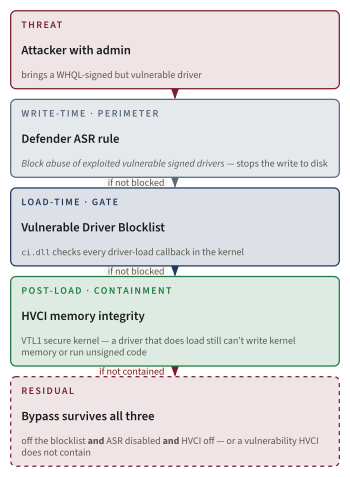
Side note. The Microsoft-recommended driver blocklist is published in two physical forms. The version baked into Windows ships through monthly Windows Update servicing. A separately downloadable XML at aka.ms/VulnerableDriverBlockList is updated on its own cadence and is usually more complete than the version in-box on a given Patch Tuesday. The Code Integrity chapter (Chapter 8) covers KMCS, DSE, and the BYOVD class in depth; this section's BYOVD treatment is intentionally scoped to App Control's layered-mitigation role.
3. Cloud-evaluated allow decisions (ISG, SAC). The decision authority for "is this binary allowed?" is moving off-device to Microsoft's reputation services. Latency, offline-mode behavior, and policy-transparency consequences are open practitioner concerns. Known good reputation can lag for newly-signed binaries; unknown defaults can disrupt legitimate workflows; the verdict itself is opaque to the organization deploying the policy. The mechanism is documented [587]; the operational implications continue to be discovered in production. The regulatory framing is the sharpest published constraint: the Australian Cyber Security Centre's Implementing application control page [607] is unambiguous that cloud-reputation-driven decisioning, by itself, does not qualify as application control under the Essential Eight maturity model.
The ACSC lists "checking the reputation of an application using a cloud-based service before it is executed" among the practices under the heading "What application control is not.": Australian Cyber Security Centre, Implementing application control [607]
NIST SP 800-167 [608] uses gentler language but arrives at the same operational conclusion: cloud-evaluated reputation is an additive signal, not an authoritative one. The practitioner consequence: an App Control policy that relies on ISG for its allow decisions in a regulated cardholder, classified, or critical-infrastructure environment will be flagged by both regimes. ISG and SAC remain useful additive signals; they do not substitute for an explicit allow policy authored and signed on-premises.
4. AI-assisted policy generation. AaronLocker [576] [585] is the canonical example of a heuristic generator. It builds "audit" and "enforce" rule sets from observed telemetry, with explicit user-writeability pruning via Sysinternals AccessChk [609]. ML-assisted variants are an active third-party space. The chapter is honest about not inventing specific Microsoft features that do not exist; the "ITL" fabrication is the failure mode this avoids. The honest 2026 status of generative policy authoring inside Microsoft's own tooling is that Microsoft has shipped a Security-Copilot-powered Policy Configuration Agent for Intune, scoped to the settings catalog (device-configuration profiles), with no App-Control-specific surface.
Intune Policy Configuration Agent does not author App Control policies. The Security-Copilot-powered Policy Configuration Agent in Microsoft Intune [610] [611] assists administrators with settings catalog policies. The agent's role requirement is the Intune Policy and Profile manager RBAC role; the surface it operates on is device-configuration profiles, not App Control XML. The Intune Copilot agent overview [612] confirms the inventory of shipped agents and does not include an App-Control-authoring agent. The chapter does not assert that Microsoft has shipped end-to-end generative App Control policy authoring because, as of June 2026, Microsoft has not. The closest production workflow is the audit-mode-then-merge loop in ConfigCI, and the closest automatic allow-listing signal is Intune-Management-Extension-as-managed-installer.
5. Per-user without losing the kernel boundary. App Control is whole-device; this is the why-both-still-ship section's reason number one for why AppLocker still ships. No public Microsoft roadmap addresses per-user rules in App Control. Closing this would let App Control fully replace AppLocker in VDI / Citrix / terminal-server scenarios. The kernel evaluator has no per-user-token context by design, and adding it without compromising the boundary's tamper-resistance is a non-trivial design problem: per-user policy would have to be authored, signed, and refreshed at logon time without admitting an attacker who can forge a token into authoring their own per-user allow rule.
6. .bat / .cmd script enforcement. AppLocker's Script collection covers them [574]; App Control's script enforcement is host-cooperative [601] and cmd.exe is not an enlightened host. This is a documented gap [575] that has persisted since launch. Microsoft Learn is unusually direct about what the limitation actually means and what the recommended mitigation is.
App Control doesn't directly control code run via the Windows Command Processor (cmd.exe), including .bat/.cmd script files. However, anything that such a batch script tries to run is subject to App Control control. If you don't need to run cmd.exe, it's recommended to block it outright or allow it only by exception based on the calling process.: Microsoft Learn, Script enforcement with App Control [601]
The architectural fix would require either cmd.exe enlightenment (a substantial change to a binary with three decades of behavioral compatibility) or a kernel-side script-execution hook that does not exist today. Until then, the recommended mitigation is the one Microsoft itself names: deny cmd.exe by default in the App Control policy and allow it by exception based on the calling process, or rely on AppLocker's Script collection on the same device in parallel for the .bat / .cmd workload.
7. AppLocker's end state. It is not deprecated [605]; it is not actively developed [537]; it continues to receive security fixes [606]; and Microsoft Learn explicitly recommends the App Control / AppLocker pair as the substitute path for the now-deprecated Microsoft Defender Application Guard for Office [605]. The chapter should not speculate about a deprecation date Microsoft has not announced. The open question is operational: when, if ever, will the practitioner reasons in the why-both-still-ship section (per-user, no-PKI, GPO ergonomics, installed base, threat-model fit) be obsolete? Until App Control gains per-user rules, the answer is not soon. The lifecycle-quantification evidence is unambiguous on the direction of travel: the negative citation on the deprecated-features page, the comparative-recommendation positive characterization in App Control and AppLocker Overview, the KB5044288 Patch Tuesday servicing fix, and the AppLocker recommended as MDAG-substitution finding from the deprecated-features page itself all point the same way.
Where to follow these problems. The Microsoft-org-hosted WDAC-Toolkit repository [613] is the source repo for the App Control Wizard and the most reliable channel for App Control authoring-tool updates. The bohops UltimateWDACBypassList [565] is the canonical community corpus that feeds the Recommended Block Rules attribution chain. The LOLBAS Project [592] is the cross-platform LOLBin catalog. For BYOVD, the Microsoft Vulnerable Driver Blocklist page [271] is the running mitigation index, with the downloadable XML at aka.ms/VulnerableDriverBlockList as the more-current sibling.
The structural ceiling is real and the research direction is open. Within the bounds that exist today, what should a 2026 practitioner actually do? That is a decision tree, not an essay.
What it means for you
Five questions, in order. Answer them and you have a deployment plan.
1. Do you need per-user rules and you do not have a code-signing PKI? → Deploy AppLocker. Use AaronLocker [576] [585] as the deployment-tooling baseline. AaronLocker's Create-Policies.ps1 runs Sysinternals AccessChk [609] against %ProgramFiles% and %SystemRoot% to identify user-writable subdirectories and produce a thorough audit policy you tune from telemetry before flipping enforcement on.
2. Do you need a real security boundary against admin-equivalent attackers? → Deploy App Control for Business with a signed policy (signed by your organization's PKI, not by the publisher of any individual application) and HVCI on. Anything less and you do not have the configuration the MSRC servicing criteria treat as a security boundary.
3. Do you have a managed software distribution mechanism (Configuration Manager, Intune, Patch My PC, third-party tooling)? → App Control for Business with Managed Installer enabled [586] [603]. Tagging the deployment agent as a managed installer trust-propagates that agent's installs into the policy without requiring you to enumerate every binary it deploys.
4. Do you have a long tail of unmanaged user apps you cannot enumerate? → App Control for Business with ISG enabled [587]. But never as the only authorization path for business-critical apps. ISG is additive, not authoritative.
5. Consumer or un-managed Windows 11 device? → Smart App Control, if eligible [599] [600]. Otherwise nothing.
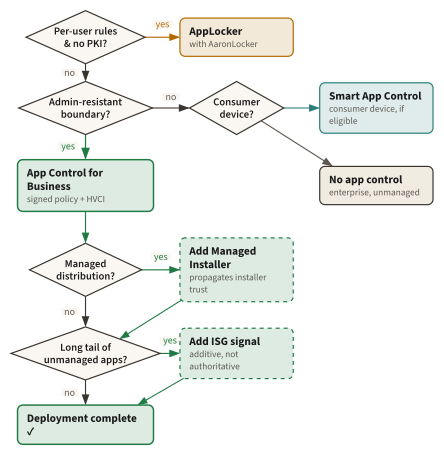
The actual deployment knobs.
| Scope | GPO node | PowerShell cmdlet inventory | CSP / MDM path |
|---|---|---|---|
| AppLocker | Computer Configuration → Windows Settings → Security Settings → AppLocker | Get-AppLockerPolicy, Set-AppLockerPolicy, Test-AppLockerPolicy, New-AppLockerPolicy | AppLocker CSP (maintenance only) [602] |
| App Control for Business | Computer Configuration → Administrative Templates → System → Device Guard | New-CIPolicy, Merge-CIPolicy, ConvertFrom-CIPolicy, Set-CIPolicySetting, Set-CIPolicyVersion, Add-SignerRule (ConfigCI module) | ApplicationControl CSP [602]; Intune endpoint security UX [603] |
| App Control Wizard | n/a | Wraps ConfigCI cmdlets [588] | n/a (MSIX desktop app) |
| Server 2025 default policy | OSConfig PowerShell cmdlets [604] | OSConfig | n/a |
The Intune deployment surface is the ApplicationControl CSP [602], not the older AppLocker CSP. Microsoft is explicit that new App Control feature work lands in ApplicationControl only. The Intune endpoint-security UX path [603] sits on top of that CSP.
Always merge the Recommended Block Rules. The single most-skipped step in production App Control deployments is the merge of the Microsoft Recommended Block Rules [563] and the Vulnerable Driver Blocklist [271] into the active policy. Without them, "allow all Microsoft-signed code" admits cdb.exe, csi.exe, dnx.exe, msbuild.exe, mshta.exe, dotnet.exe, and the rest of the LOLBin catalog. With them, you have the configuration the MSRC servicing criteria treat as a security boundary. The merge is two Merge-CIPolicy invocations and a redeploy.
The GPO node still says Device Guard. The App Control for Business GPO node is still labeled Device Guard in gpedit.msc, even on Windows 11 24H2. Microsoft Learn calls this out explicitly [537]: "The terms 'Device Guard' and 'configurable code integrity' are no longer used with App Control except when deploying policies through Group Policy." The naming confusion is the GPO tree's, not yours.
Regulatory anchors. NIST SP 800-167 [608] on application allowlisting is the federal framing. The ACSC Essential Eight [607] treats application control as one of eight baseline mitigations and is explicit that "the use of file names, package names or any other easily changed application attribute is not considered suitable as a method of application control": a structural exclusion that maps cleanly onto Authenticode-signer and hash rules but rules out an AppLocker policy built primarily on path. PCI DSS v4.0.1 [614] requires comparable controls for cardholder environments. The chapter does not work through any of them in depth; the citations are here so a practitioner can find their own compliance map.
Side note. The Wayback-preserved 2017 Device Guard policy deployment guide [615] is the canonical historical reference for the pre-1709 era, before the WDAC rename. Practitioners maintaining older infrastructure occasionally need it.
The AppLocker MMC wizard does not create default rules automatically. If you enable enforcement on a collection with zero rules, the collection's default behavior is to deny everything that matches the collection. An enforcing Executable collection with no rules blocks every .exe on the device, including the ones Windows needs to boot useful applications. The wizard surface has an Automatically generate rules button precisely to avoid this footgun; the AaronLocker authoring path bakes the default rules in from the start. If you have ever seen a Windows session that suddenly cannot launch anything after a GPO refresh, this is the most common cause.
The decision tree is operational. The remaining job is to inoculate against the misconceptions the field has accumulated over twenty-five years. That is the closing summary.
Closing
The thesis was the chapter's first sentence: two locks on the same door, two threat models, not redundancy. AppLocker is operational hygiene, the user-mode evaluator Microsoft itself declines to call a security feature. App Control for Business (with a signed policy, HVCI on, and the Recommended Block Rules merged in) is the MSRC security boundary. Both ship in Windows 11 24H2 and Server 2025 because neither is a strict superset of the other, and the practitioner gets to choose, per deployment, which lock the door needs. For deeper treatment of the cryptographic plumbing, see the Authenticode chapter (Chapter 12); for the HVCI / VTL story and the BYOVD residual in the open-problems section, see the Code Integrity chapter (Chapter 8), with the VTL model itself owned by the Secure Kernel chapter (Chapter 6). The line between security feature and operational hygiene control is sharp in Microsoft's own words, and the two products defending that line will both keep shipping until the line itself moves.
Bequeaths. This is the last link in Part II, and it closes the arc the part opened. The Code Integrity chapter (Chapter 8) made is this code trustworthy as kernel code? a question the kernel itself could answer; the Authenticode chapter (Chapter 12) bound a name to the bytes so the question had an answer at all. This chapter spends both inheritances on the final question the Kernel & Code part can answer. is this code allowed to run?, and hands the credential tier a guarantee with a hard edge: on a device with a signed App Control policy, HVCI on, and the Recommended Block Rules merged in, only vetted code executes, and not even SYSTEM can rewrite that rule without the organization's signing key. That is the whole bequest, and naming what it is not is the honest half. It does not constrain what the vetted code then does. An allowlist that admits a signed, trusted process has said nothing about whether that process, running as administrator, will walk into lsass.exe and read the credentials Windows keeps in memory. Which is exactly where the next link begins. The Mimikatz chapter (Chapter 14) opens the credential-theft decade by showing that hardening which code runs left the credential cache itself in the same VTL0 world as the attacker, and the Credential Guard chapter (Chapter 15) is Microsoft's architectural answer. The Kernel & Code part proved the machine will only run code it has vetted; it did not promise that vetted code is harmless. The chain now turns from code to credentials.