The Integrity-Level Stack
- Inherits: The identity axis of the NT access check:
SeAccessCheckresolving a request against an access token's SIDs and privileges and an object's DACL (Chapter 22, Windows Access Control). That model answers who the caller is; it carries no built-in notion of how trustworthy the calling code is, and it cannot bound a process that runs with the owner's own authority. - Promise: A subject at a lower integrity level cannot write to (nor inject a mutating window message into) a higher-integrity object or window on the same desktop: Mandatory Integrity Control enforces this inside
SeAccessCheckbefore the DACL is consulted, and User Interface Privilege Isolation enforces it inwin32k.sys. The everyday interactive administrator runs on a Medium-IL filtered token while the full admin token sits dormant. Named non-promise: the Medium→High elevation itself is a security feature, not a security boundary (Microsoft's own classification, February 2007). - TCB: The integrity-SID comparison in the MIC evaluator (the short-circuit that runs before the DACL), the UIPI filter in
win32k.sys, the LSA logon code that builds the filtered/linked token pair, and theLocalSystemAppinfo broker plus theWinlogonSecure Desktop that together gate the token swap. - Adversary → Break: The canonical bypass classes discussed here do not violate MIC write-up or UIPI; they exploit channels the integrity evaluators deliberately do not cover: a Medium-IL process prepares per-user
HKCUstate, plants a DLL on a writable search path, or activates an auto-elevation-eligible COM object that a High-IL auto-elevated binary then consumes. The Promise ends exactly where access control ends and information flow begins, because the filtered and linked tokens share one user SID, profile,HKCUhive, and logon-session LUID. - Residual: Once a High-IL (or any service) token exists, escalation to
NT AUTHORITY\SYSTEMviaSeImpersonatePrivilege/SeAssignPrimaryTokenPrivilegeand the Potato lineage → owned by The SeImpersonate Primitive (Chapter 24). Same-IL, same-desktop isolation between two Medium-IL processes lies outside both MIC and UIPI and is closed only by layering AppContainer and restricted tokens on the integrity SID; theuiAccesscarve-out and the access-control-versus-information-flow gap remain open within this chapter's own scope. - Bequeaths: To The SeImpersonate Primitive (Chapter 24): an integrity-labeled world in which a process's IL bounds what it may write and which windows it may touch. Does NOT provide: any bound on a token that already holds
SeImpersonate/SeAssignPrimaryTokenbecoming SYSTEM, enforcement of Biba's Invocation Property, or same-user identity isolation. That arrives only with Administrator Protection (2024). - Proof: 🔵 documented throughout. Microsoft Learn, twenty years of public bypass research, and reader-runnable probes (token IL via
whoami /all, object labels viaaccesschk -e -l, the auto-elevate manifest set viasigcheck -m, the UAC Operational channel) whose expected shapes are shown but not captured on this book's lab VM.
The Reasoner's question. When the same user owns both processes, what prevents lower-integrity code from writing upward, injecting into higher-integrity windows, or silently inheriting administrator authority, and where does that protection deliberately stop?
Foundations. What you need before this chapter.
- Access token. The kernel object that carries a user's SIDs, privileges, restricted SIDs, linked-token relationship, and mandatory integrity label: the authority a process runs with. The Windows Access Control chapter (Chapter 22) owns the token-and-DACL model in full; this chapter needs only the integrity label the token carries.
- DACL vs. SACL. The discretionary access control list says which identities may access an object. The system access control list can also carry a mandatory label ACE, which MIC evaluates before the DACL.
- Integrity level (IL). A well-known SID in the
S-1-16-Xfamily. Medium is the normal interactive desktop, High is elevated administrator code, Low and Untrusted are sandbox tiers, and System is the service/kernel-adjacent tier. - Split token. For an administrator in Admin Approval Mode, logon creates both a filtered Medium-IL token and a linked full High-IL token. The shell uses the filtered token; Appinfo may later create a new process with the linked token.
- Appinfo and the Secure Desktop. Appinfo is the
LocalSystembroker that performs elevation.consent.exerenders the prompt on the Winlogon desktop inside the user's session; the prompt asks permission, but Appinfo moves the token bits. - Security feature vs. security boundary. UAC's original split-token transition was publicly described by Microsoft as not defining a Windows security boundary. This chapter treats bypass research as evidence of that design boundary, not as a how-to.
Chapter thesis. UAC has never been the consent prompt. Two Vista-era primitives, Mandatory Integrity Control (MIC) and User Interface Privilege Isolation (UIPI), add an integrity axis to the access check and a windowing-layer analog that blocks cross-IL message injection. The split-token model gives every administrator a Medium-IL filtered token at logon and holds the full admin token dormant. The yellow dialog is the smallest part of the system. The author of its canonical reference, Mark Russinovich, publicly disclaimed it as "not a security boundary" in February 2007, and twenty years of bypass research has been the empirical confirmation. In November 2024, Microsoft finally moved the boundary line with Administrator Protection. The MIC + UIPI plumbing outlived UAC itself: it is still part of the substrate for browser sandboxes, AppContainer, and the Adminless successor in 2026.
Two whoami outputs, sixty seconds apart
Open an unelevated PowerShell on a Windows 11 administrator account. Run whoami /groups /priv. Click "Yes" on the yellow prompt. Open an elevated PowerShell on the same account. Run the same command. The two outputs are different lists of SIDs. Sixty seconds have passed. The consent prompt did not move a single bit of OS state on its own. The operating system did, because of a stack of primitives that ship with every Windows install and that almost no Windows user has ever heard the names of. This chapter is a tour of that stack, and of what twenty years of bypass research has taught us about it.
Place the two outputs side by side. The user is the same. The session is the same. The clock has barely moved. Read them carefully.
🔵 DOCUMENTED: expected whoami shape for a split-token administrator.
PS C:\Users\admin> whoami /groups /priv | findstr /i "Mandatory Administrators SeDebug"
BUILTIN\Administrators                Group used for deny only
Mandatory Label\Medium Mandatory Level Label
(SeDebugPrivilege not present)
PS C:\Users\admin> whoami /groups /priv | findstr /i "Mandatory Administrators SeDebug"
BUILTIN\Administrators                Enabled by default, Enabled group, Group owner
Mandatory Label\High Mandatory Level   Label
SeDebugPrivilege                       Disabled
Four facts fall out of those two outputs, and each one of them is a foothold for the rest of this chapter.
The first fact is that the administrator group SID is present in both tokens. It is not added by the elevation. In the filtered token it carries the flag SE_GROUP_USE_FOR_DENY_ONLY, which means the access-check algorithm consults it only when matching a deny ACE and otherwise pretends it is absent [999]. In the elevated token, the same SID is fully enabled. The dialog did not add a SID; it changed which token Windows uses.
The second fact is the integrity level. In the filtered token, the mandatory label reads Mandatory Label\Medium Mandatory Level. In the elevated token, the same label reads Mandatory Label\High Mandatory Level. That label corresponds to a well-known SID under the S-1-16-X family (S-1-16-8192 for Medium and S-1-16-12288 for High) [969]. The integrity level is not a regular group SID. It is a separate field on the token, and as the section on Mandatory Integrity Control shows below, it drives a separate access-check evaluator that runs before the discretionary access check [964].
The third fact is the privilege set. The filtered token holds a small set of user-mode privileges (SeChangeNotifyPrivilege, SeShutdownPrivilege, a handful of others). The elevated token holds the full administrator privilege set, including the named ones the security press writes about: SeDebugPrivilege, SeTakeOwnershipPrivilege, SeLoadDriverPrivilege, SeBackupPrivilege, SeImpersonatePrivilege, and twenty or so others, depending on the Windows build [1000].
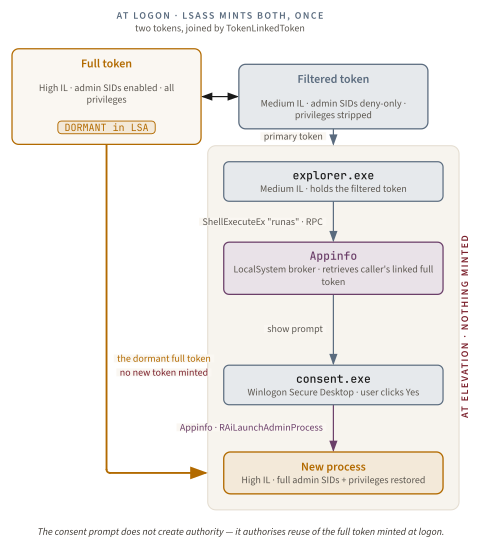
The fourth fact is the most subtle, and the one this whole chapter exists to make rigorous. The yellow dialog did not create the elevated token. The OS created it at logon, almost half an hour before the prompt ever rendered, and held it dormant in the LSA. The prompt asked the user a single question: may I, the operating system, use the token I already have? It did not ask: may I, the operating system, mint a more privileged token now? That distinction is the difference between how every Windows user talks about UAC and how UAC actually works.
The consent prompt does not elevate. The yellow dialog moves no bits. It asks permission to use authority that was already constructed at logon and held dormant. The integrity primitives, MIC and UIPI, do the bounding work whether or not a prompt ever renders.
The four primitives we are about to tour are the substrate beneath everything in those two whoami outputs. Mandatory Integrity Control (MIC) is the access-check evaluator that can deny a Medium-IL write into a higher-labeled object before any DACL is consulted; ordinary %SystemRoot%\System32 denials also commonly depend on DACLs, owner, privileges, and the filtered administrator token. User Interface Privilege Isolation (UIPI) is the windowing-layer analog that prevented your Medium-IL Edge tab from injecting WM_SETTEXT into the High-IL elevated PowerShell next to it. The split-token model is the LSA policy that decided your interactive shell should hold the Medium-IL token instead of the High-IL one. The Application Information service (Appinfo) is the SYSTEM-trusted broker that mediated the token swap when you clicked "Yes."
This chapter walks every one of those layers, then ends at the empirical proof: twenty years of "UAC bypasses," and Microsoft's own quiet acknowledgment, from week one, that the dialog was never the security boundary [1001]. Why did Microsoft build this stack in the first place? What was wrong with how Windows XP did it?
The XP problem and the Vista bet
On the overwhelming majority of consumer Windows XP installs in 2003, every process the user launched ran as Administrator, because the first interactive account XP provisioned at setup was an Administrator and the typical user never created a separate Limited User account [1002]. Every browser tab. Every embedded Word macro. Every drive-by download. The operational vulnerability surface was the entire OS, because authority on Windows is carried in the access token, and the access token of those XP-era user processes held the full administrator SID set.
Sysinternals co-founder Mark Russinovich, then a Microsoft engineer following the 2006 Winternals acquisition, framed the problem precisely in the June 2007 issue of TechNet Magazine: "Most users of Windows XP run with full administrative rights all the time, allowing all software they run, including malware, to have unrestricted access to the system" [1000]. The sentence reads like a confession, and it was. The OS shipped with a sound access-control model and an operational policy that defeated it from the first reboot.
Two distinct threat models drove the architectural response Vista shipped four years later.
Threat model one: the runaway admin
The first threat model was the runaway admin. Default-admin consumer installs meant malware silently inherited admin authority because the user was the admin. A drive-by exploit in Internet Explorer ran as the user, the user was an admin, and the malware was an admin. There was no point in the OS where a least-privilege boundary could intervene, because the token never carried a least-privilege bound to begin with. The DACLs were correct; the policy that filled the tokens was the failure.
Trace the exploit at token granularity. The browser process receives shellcode and creates a child process. Process creation copies the parent's primary token unless the caller explicitly supplies another one. On XP's default-admin posture, that token contains an enabled BUILTIN\Administrators SID and the administrator privilege set. When the child writes a service under HKLM\SYSTEM\CurrentControlSet\Services, the DACL sees an enabled admin SID and grants the write. When the child drops a driver, takes ownership of a protected file, or opens another process with debug rights, the privilege check consults a token that already carries those privileges. No elevation event exists because no elevation transition exists. The malware did not defeat least privilege; it inherited the absence of least privilege.
This is why Vista's answer had to change logon policy, not just add warnings. A warning shown after every privileged operation would train users to click through and would still leave every child process holding the full admin token between warnings. A voluntary runas culture had already failed at consumer scale. The durable fix was to make the ordinary interactive token non-admin by construction while keeping a compatible path back to admin authority for installers, control panels, and management tools. The split-token model is exactly that compromise.
Threat model two: the shatter-attack class
The second threat model was the shatter-attack class. In August 2002, security researcher Chris Paget published a paper titled "Exploiting design flaws in the Win32 API for privilege escalation" on the Bugtraq mailing list, immediately mirrored on Help Net Security [1003]. The paper coined the term shatter attack and demonstrated that on Windows NT, 2000, and XP, any process running on a user's interactive desktop could send a WM_TIMER message carrying a callback function pointer to any other process's message loop on the same desktop. The receiving process would invoke the callback in its own address space, at its own privilege level [1003].
Note. The shatter-attack term is sometimes attributed to Brett Moore alone. Paget's August 2002 Bugtraq paper actually coined the term; Moore's Black Hat USA 2004 talk Shoot The Messenger: Win32 Shatter Attacks productised the technique class and brought it to a wider conference audience. Both attributions are correct for different artifacts.
This was an architectural defect. The receiving process did not authenticate the message origin. It could not, because the Win32 messaging system was designed in the late 1980s under the assumption that all windows on a desktop belonged to one trust principal. By 2002, that assumption had been false for a decade: services ran on the user's interactive desktop with LocalSystem authority, and the user's browser could send them messages.
Microsoft's December 2002 patch (security bulletin MS02-071) fixed individual services that exposed the most exploitable callbacks. It did not fix the architectural class, because the class was a property of the Win32 messaging design, not of any one service [1003].
The Vista bet, stated as four design decisions
Between 2005 and 2006, Microsoft made four decisions about how Vista would respond. The first was to split the administrator's authority by default: an admin user would not hold a single admin token at logon, but a filtered token plus a dormant linked one. The second was to mediate the recombination through an OS-controlled UI surface, so the user could see and consent to the moment authority crossed an integrity boundary. The third was to add a second access-check axis (integrity) that the DACL could not override. The fourth was to add a windowing-layer analog to close the cross-IL variant of the shatter-attack class.
All four shipped together. Vista RTM'd on November 8, 2006 to OEMs and businesses, and Microsoft launched it to consumers on January 30, 2007 [1004]. The press release called it "the most significant product launch in Microsoft Corp.'s history."
The architectural canon was published five months later, in the June 2007 issue of TechNet Magazine under the title Security: Inside Windows Vista User Account Control [1000]. The author was Russinovich, and the chapter became the single most-cited primary on UAC in the Windows-security literature. Five months earlier, however, in a TechNet Blogs post about PsExec, the same author had quietly written something the entire later debate would rest on, and almost no one read it for what it actually said [1001]. We will return to that post when we reach the twenty-year bypass record. First, the harder question: why couldn't NT's existing access-control model handle any of this on its own?
Why the DACL and the privilege were not enough
Windows NT had the access-control model from day one: the SIDs, access tokens, DACLs, privileges, and the SeAccessCheck algorithm the Windows Access Control chapter (Chapter 22) covers in full [952][1005]. The model was correct in theory and broken in practice. To see why, watch what happens when an XP administrator opens a malicious Word document.
The user double-clicks the document. Word starts. Word loads the document's embedded macro. The macro calls URLDownloadToFile and writes evil.exe into %TEMP%. Then it calls CreateProcess on evil.exe. The new process inherits its parent's primary access token, which is the user's interactive token, which carries the administrator group SID, enabled, with the full administrator privilege set. The DACL on HKLM\SYSTEM\CurrentControlSet\Services grants Full Control to BUILTIN\Administrators. The malware writes a new service entry. The malware now persists across reboots, all without a single elevation prompt, because there was no elevation transition to prompt at. The user was already the administrator [1000].
The first problem is in the D of DACL. Discretionary access control lists are discretionary by definition: the owning principal of an object decides who has access [955]. An attacker running as the user can rewrite any DACL the user owns. That is not a bug; it is the meaning of the word discretionary. Mandatory access-control models (Bell-LaPadula 1973 [1006], Biba 1977 [1007]) exist precisely because discretionary models cannot defend against principals running with the owner's authority.
The second problem is in the privilege model. A Windows access token carries a list of named privileges such as SeDebugPrivilege, SeTakeOwnershipPrivilege, SeLoadDriverPrivilege. Each privilege is a per-token authorization to bypass some specific DACL check. An admin token holds them all. There is no way in the NT 4.0 / 2000 / XP design to say "this Word process holds the admin's identity but should not be trusted to use SeDebugPrivilege." Privileges are granted to tokens at logon, and the only way to remove them from a downstream process is to construct a restricted token explicitly, by hand, with CreateRestrictedToken [1008].
Generation 1: the seven-year failure to make least-privilege voluntary
Between 1999 and 2006, Microsoft and the Windows security community tried four different ways to make least privilege voluntary. None of them worked at consumer scale.
CreateRestrictedToken is a Win32 API, documented since Windows XP and Server 2003, that produces a copy of an existing access token with selected SIDs marked deny-only, selected privileges removed, and an optional list of restricting SIDs added [1008]. It is the kernel primitive every later sandbox (Chromium's renderer sandbox, AppContainer, Office Protected View) is built on. It was a primitive, not a policy. A consumer install with default-admin logons could not use it without an opt-in from every application vendor.
runas.exe, shipped in Windows 2000, let a user explicitly launch a process under a different identity. The user was supposed to log in as a standard user and runas an administrator account when needed. In practice, the user logged in as the administrator and forgot the standard account existed.
Software Restriction Policies (SRP), shipped with Windows XP, let a domain admin define hash, path, certificate, or zone rules that the OS enforced at process creation [1009]. SRP was a policy mechanism on top of the SAFER substrate [1010]. It worked when configured. On consumer Windows it was off by default; on enterprise Windows it was configured by the few who knew it existed.
Aaron Margosis, then a Microsoft consultant, ran a years-long blog campaign called "Non-Admin" arguing that ordinary users should log in as standard users and only elevate when necessary. His tooling included LUA Buglight (which diagnosed which OS calls a misbehaving application made that required admin privilege), MakeMeAdmin (a runas shim), and PrivBar (a status-bar widget that displayed the IL of the current process) [1002]. The blog became required reading inside Microsoft and the Windows-admin community.
The lesson Microsoft took from the 1999-2006 experience was that voluntary least privilege does not scale. You cannot solve the runaway-admin problem with policy and exhortation. You need an architectural primitive that runs by default, bounds authority by integrity rather than by identity, and absorbs the legacy of applications written for unrestricted admin without breaking them. All four primitives of the Vista bet shipped together in November 2006 [1004].
What does an integrity primitive look like, and how is it different from "another ACE"?
The twin primitives: MIC and UIPI
The Vista design only makes sense if MIC and UIPI are read as a pair. MIC answers the kernel question: when a subject token asks for access to a securable object, is the requested operation permitted by the integrity lattice before identity is even considered? UIPI answers the window-manager question: when one process tries to manipulate another process's window on the same interactive desktop, is the sender allowed to influence a higher-integrity receiver? The first primitive protects files, registry keys, named kernel objects, and other objects that flow through SeAccessCheck. The second protects the Win32 message path that never flows through SeAccessCheck at all.
That split is why neither primitive can be summarized as "UAC prompts." A prompt may never appear when a Low-IL browser renderer tries to write a Medium-IL file; MIC still denies. A prompt may never appear when a Medium-IL process tries to inject a mutating message into a High-IL window; UIPI still drops. The primitives are default-on integrity evaluators. The split-token and Appinfo layers later decide when a user may cross from Medium to High, but MIC and UIPI define what the lower side may not do while it remains lower. Read every subsequent bypass class through that lens: a bypass succeeds only when it finds a channel these two evaluators intentionally do not cover.
Mandatory Integrity Control
Definition: Mandatory Integrity Control (MIC). An access-check evaluator that compares the integrity level of a subject token to the integrity level of a target object before consulting the object's DACL. MIC denials short-circuit the access check; a Low-IL principal cannot write to a Medium-IL object regardless of what the DACL says.
The load-bearing fact about MIC is in a single sentence on the Microsoft Learn reference page, and the entire architectural difference between MIC and "just another ACE" lives in that sentence. MIC "evaluates access before access checks against an object's discretionary access control list (DACL) are evaluated" [964].
Pause on that ordering. Before the DACL. Not together with it. Not after it. The integrity-level check is a separate evaluator that runs first for operations covered by the object's mandatory policy, and a denial on that policy bit is final. On the default NO_WRITE_UP policy, for example, a lower-IL write is rejected before the DACL can grant it. That is what the word mandatory in Mandatory Integrity Control means.
Definition: Integrity Level (IL). A well-known SID, carried on every Windows access token and every securable object. Microsoft's MIC documentation describes the canonical operational set as Low, Medium, High, and System; the broader S-1-16-X SID namespace also contains Untrusted, Medium Plus, and Protected Process labels that should not be mistaken for a seven-level MIC lattice.
The well-known integrity-level SIDs are defined in the Well-known SIDs reference page on Microsoft Learn [969]. The table below separates the MIC levels readers normally reason about from labels that are visible in the SID namespace but have extra semantics outside ordinary MIC.
| Integrity SID | RID (S-1-16-X) | Status in this chapter | Typical use |
|---|---|---|---|
| Untrusted | S-1-16-0 | Additional restricted label | Most-restricted sandboxes; rare on consumer Windows |
| Low | S-1-16-4096 | Canonical MIC level | IE Protected Mode, AppContainer, Edge / Chrome renderers |
| Medium | S-1-16-8192 | Canonical MIC level | Default for interactive user processes |
| Medium Plus | S-1-16-8448 | UIAccess artifact | UI-Access processes (uiAccess=true manifest, Windows 7+) |
| High | S-1-16-12288 | Canonical MIC level | Elevated administrative processes |
| System | S-1-16-16384 | Canonical MIC level | Kernel-mode and LocalSystem services |
| Protected Process | S-1-16-20480 | Protected-process SID artifact | PPL also depends on process-protection and signing-level policy |
Note. The Microsoft Learn MIC reference page describes the operational set as four integrity levels (low, medium, high, system) [964]. The Well-known SIDs page enumerates additional labels [969]. Untrusted is real but uncommon in consumer workflows, Medium Plus is TokenUIAccess made visible in label form, and Protected Process is not the source of PPL enforcement by itself. Treating all seven rows as one ordinary lattice overstates what MIC alone decides.
The IL lives on a token in the TokenIntegrityLevel field, retrievable through GetTokenInformation and the TOKEN_MANDATORY_LABEL structure [964]. The IL lives on an object in the system access control list (SACL) as a SYSTEM_MANDATORY_LABEL_ACE, a special ACE type that carries the object's IL SID and a mandatory-policy mask [974]. Three policy bits are defined in the winnt.h header [974].
SYSTEM_MANDATORY_LABEL_NO_WRITE_UP(0x1), default. A subject at lower IL cannot write to this object.SYSTEM_MANDATORY_LABEL_NO_READ_UP(0x2), opt-in. A subject at lower IL cannot read this object.SYSTEM_MANDATORY_LABEL_NO_EXECUTE_UP(0x4), opt-in. A subject at lower IL cannot execute this object.
Object authors who do not specify a mandatory label inherit the default, which is NO_WRITE_UP only [964]. The opt-in policies are exactly that: opt-in. A High-IL process that wants its files invisible to a Medium-IL process must explicitly request NO_READ_UP on the SACL. By default, MIC bounds writes, not reads, and that is one of the structural shapes Forshaw's 2017 "Reading Your Way Around UAC" series exploited [1011].
The "regardless of DACL" property is the part to read slowly. A Low-IL principal cannot write to a Medium-IL object "even if that object's DACL allows write access to the principal," because the IL check runs first and short-circuits the access decision before the DACL evaluator ever sees the request [964]. This is the difference between adding "another ACE" for integrity and adding a separate evaluator that runs first. An integrity ACE in the DACL would have been overridable by the object owner, because DACLs are discretionary. A mandatory-label ACE in the SACL is enforced by SeAccessCheck itself, independently of any other ACE in the DACL.
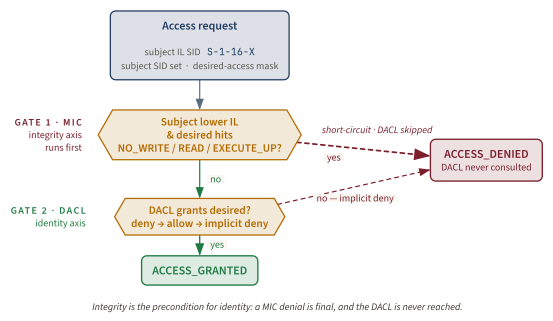
The architectural payoff is in the access-check decision itself: strip the API noise away and it reduces to two evaluators in series, in an exact order.
The naive reading of MIC is "they added another ACE for integrity." The correct reading is that they added a separate axis with its own evaluator that the DACL cannot override. The reader who internalises that ordering can re-derive almost every subsequent design decision Vista made about UAC, AppContainer, IE Protected Mode, and Administrator Protection. When the mandatory policy covers the requested operation, a MIC denial is final and the DACL is not consulted. That is what mandatory means.
Key idea. MIC adds a second axis to the access check. The first axis is identity (DACL plus token SIDs); the second is integrity (IL). The two axes are evaluated in order: integrity first, identity second. A failure on the integrity axis short-circuits the entire check, regardless of what the identity axis would have said.
MIC bounds file, registry, and most other securable-object writes across IL boundaries. But the XP-era shatter attacks Paget published in 2002 were not about file writes. They were about same-desktop cross-process message injection in the Win32 windowing layer, and MIC cannot help with that, because window messages do not pass through SeAccessCheck. So Vista shipped a second primitive specifically for the windowing layer.
User interface privilege isolation
Definition: User Interface Privilege Isolation (UIPI). The windowing-layer analog of MIC. UIPI blocks a defined subset of window messages and hook APIs sent from a lower-IL process to a window owned by a higher-IL process on the same desktop, terminating the cross-IL variant of the shatter-attack class.
If MIC is mandatory integrity for objects, UIPI is mandatory integrity for windows. Same idea, different layer of the OS. Same principle: a separate evaluator that runs in the window manager and blocks lower-to-higher message and input operations regardless of the window's own configuration [1012][1013][1014].
The canonical failed-shatter scenario is short and exact, with one caveat: precise return values are API- and message-specific. A Medium-IL malware process calls SendMessage(hwnd, WM_SETTEXT, 0, (LPARAM)"some-attacker-controlled-string") against a window handle (hwnd) belonging to a High-IL elevated PowerShell on the same desktop. On Windows XP, which predates UIPI and had no integrity-based elevation, the analogous message would arrive at a higher-privileged process's window and update its edit control, with no authentication check anywhere in the path. On Vista and every subsequent Windows release, Microsoft documents that message sending is subject to UIPI and lower-IL threads can send only to lesser-or-equal IL queues; when UIPI blocks a SendMessage call, GetLastError is set to 5 (ERROR_ACCESS_DENIED) [1012]. In the representative WM_SETTEXT lab shape, the message is dropped before the receiving process's window procedure sees it [1000][1012].
The "silently dropped" part matters operationally. Legacy applications written before Vista did not check the return value of SendMessage. When Vista shipped UIPI, those applications kept "working" in the sense that they did not crash. They just stopped being effective at any cross-IL interaction they may have previously relied on. This is the same compatibility shape Microsoft used everywhere in Vista: the new bound was real, but the API surface returned plausible failure codes rather than raising new errors that broke legacy callers.
What UIPI blocks, precisely
UIPI does not block every window message. It blocks a specific dangerous subset, and a complete reading of the chapter requires reading the list slowly.
| Operation | UIPI behavior from lower IL to higher IL |
|---|---|
SendMessage / PostMessage for WM_SETTEXT, edit-control mutators, combo-box mutators | Blocked when sent lower-to-higher; typical failure is 0 / ERROR_ACCESS_DENIED, but return details are API-specific |
Posted messages above WM_USER (0x0400) | Blocked |
WM_TIMER with a callback function pointer | Blocked (the original Paget vector) |
SetWindowsHookEx against a higher-IL thread or process | Blocked |
AttachThreadInput to a higher-IL thread | Blocked |
SendInput targeting a higher-IL window | Blocked by UIPI; Microsoft notes the return value does not identify UIPI as the cause |
| Journal record / journal playback hooks | Blocked |
| Mouse and most keyboard input from the OS itself | Allowed (the user is the principal) |
Most paint messages (WM_PAINT, WM_ERASEBKGND) | Allowed |
Read-only window queries (GetWindowText, EnumWindows) | Generally allowed or degraded; for example, GetWindowText can retrieve captions across processes but not another process's edit-control text |
"UIPI blocks all WM_* messages" is one of the most common misconceptions in Windows-security literature. It does not. It blocks the dangerous subset: the messages and hooks that allow a sender to alter the receiving process's state or execute code in it; read-only queries may be allowed or degraded by API-specific rules [1001][1012][1013][1015].
The UIPI drop path, fully verbalized. A Medium-IL process starts with a handle to a window owned by an elevated PowerShell. The handle itself is not the authority; it is only a reference into the window-manager namespace. The sender calls SendMessage(hwnd, WM_SETTEXT,...). Control enters the user/kernel windowing path, where win32k.sys can associate the sender thread's process token with Medium IL and the target window's owning process with High IL. UIPI then asks two questions: is the sender lower than the receiver, and is this message in the mutating or injection-like class? For WM_SETTEXT, both answers are yes. The window manager returns failure to the caller in the representative shape Microsoft documents for UIPI-blocked SendMessage calls, and does not dispatch the message to the target window procedure. The elevated PowerShell never parses attacker-controlled text, never updates its edit control, and never runs code on the sender's behalf. Nothing about the target's DACL participates, because this is not a securable-object access check; it is the Win32 analog of MIC.
The opt-in exemption: ChangeWindowMessageFilterEx
The UIPI block is per-window and per-message. When a higher-IL window has a legitimate reason to accept a specific message from lower-IL senders (for example, a developer tool that needs to receive WM_COPYDATA from a Medium-IL client), the higher-IL process can call ChangeWindowMessageFilterEx to add the specific message to its window's allow-list [1016].
The action constants are documented as MSGFLT_ALLOW (add the message to the allow-list), MSGFLT_RESET (remove explicit policy and inherit defaults), and MSGFLT_DISALLOW (explicitly block the message even if defaults would allow it) [1016]. The function returns BOOL; failure is non-fatal and the caller is expected to validate the result.
Note. A High-IL window that opts WM_SETTEXT into the cross-IL allowed list inherits the responsibility to validate the contents of every message it then receives. The filter is the gate. It is not the validator. A higher-IL process that takes attacker-controlled text and pastes it into a system shell has bypassed UIPI in the same way a service that takes attacker-controlled input and passes it to system() has bypassed least privilege. The mechanism cannot make the higher-IL process safe; it can only make the higher-IL process aware.
The uiAccess=true carve-out
The single largest residual exemption from UIPI is the uiAccess=true manifest flag, designed to support accessibility software (screen readers, on-screen keyboards, remote-control tools) that needs to interact with protected UI [1017]. A process that asserts uiAccess=true in its application manifest gets, at process creation, the TokenUIAccess token flag and an observable UIAccess token shape (often described as Medium Plus for non-admin launches). UIAccess deliberately permits selected cross-IL UI interaction; what it does not do is raise the token to High IL or grant write-up to High-IL securable objects. The carve-out is still a UIPI exception surface, but it is a token-label and launch-policy story, not a magic Medium-to-High write pass.
The gating conditions for uiAccess=true are tight, by design. Microsoft Learn enumerates three [1017]. The manifest must assert uiAccess="true" in the requestedExecutionLevel element. The binary must carry a valid Authenticode signature. The binary must reside in a directory writable only by administrators, which in practice means %SystemRoot%\System32, %ProgramFiles%, or a similarly admin-only path. The three conditions together are intended to bound uiAccess to vetted, signed, install-time-protected binaries.
We will return to the uiAccess carve-out when we reach Administrator Protection, because Forshaw's February 2026 Project Zero retrospective documents that five of nine pre-GA Administrator Protection bypasses operated entirely through this surface [1018]. The Vista-era exemption inherited unchanged into 2026 is, nearly twenty years later, the single largest residual cross-IL attack class in the Windows integrity stack.
What UIPI killed, precisely
UIPI killed the cross-IL variant of the Paget-2002 shatter-attack class (later extended by Brett Moore's 2004 work). Same-IL shatter attacks (two Medium-IL processes on the user's Default desktop, both belonging to the same user, both running with the user's authority) are not blocked by UIPI, because UIPI is an IL-based filter. Two same-IL processes can still send each other arbitrary window messages, and this is exactly why every modern browser sandbox layers AppContainer and a restricted-token sandbox on top of MIC [325]: the integrity primitives are correct, but they are integrity primitives, not identity primitives, and same-IL same-desktop processes need a different isolation mechanism.
Together, MIC and UIPI provide an integrity bound on access (objects) and on user-interface manipulation (windows). Both are mandatory, default-on, and constant-overhead. They are the load-bearing primitive pair of the entire integrity-level stack. But how does the OS decide which processes get which IL? When you log in as Administrator and open a PowerShell, why is that PowerShell Medium and not High?
The split-token breakthrough
The integrity-level pair (MIC plus UIPI) is the access-control primitive. The split-token model is the policy decision that wires those primitives into the administrator's everyday experience. Without the split-token policy, an administrator's interactive shell would hold a High-IL token at logon and UAC would never need to exist. With it, every administrator on Windows 11 today has two tokens. One is in use. The other is dormant. The yellow dialog is the negotiation that toggles between them.
Definition: Split-token model (Admin Approval Mode). The Vista policy in which an Administrators-group user logging on receives a Medium-IL filtered token plus a dormant High-IL linked token. The filtered token becomes the primary token of the interactive shell; the linked token is used only after consent or auto-elevation, and only when the Application Information service brokers a process creation with it.
What the LSA does at logon
When EnableLUA=1 in HKLM\SOFTWARE\Microsoft\Windows\CurrentVersion\Policies\System (the default since Vista), and an Administrators-group user logs on, the Local Security Authority subsystem (LSASS) constructs three things during logon processing [999].
The first is the full token: an access token that contains all of the user's administrator group SIDs (enabled, not deny-only), all of the privileges the user is authorized to hold, and an integrity level of High. This is the token that, on XP, would have been the user's primary token from logon onward.
The second is the filtered token: a copy of the full token with all administrator-equivalent group SIDs marked SE_GROUP_USE_FOR_DENY_ONLY, all privileges except a small user-mode subset removed, and the integrity level reduced to Medium. The administrator group SIDs are not removed; they are marked deny-only so they still match deny ACEs but do not satisfy allow ACEs. The privileges are not zeroed; the powerful ones (SeDebug, SeTakeOwnership, SeLoadDriver, SeAssignPrimaryToken, and others) are dropped from the filtered token entirely.
The third is the linked relationship: the LSA stamps each token with a reference to the other via the TokenLinkedToken information class, so that a holder of the filtered token can, with the right privileges, retrieve a handle to the dormant full token by calling NtQueryInformationToken(filteredToken, TokenLinkedToken, &linkedToken,...) [999].
The filtered token then becomes the primary access token of the user's interactive shell (explorer.exe). Every process the user launches by clicking, by Win+R, by typing in a console, inherits the filtered token as its primary token. The dormant full token sits in the LSA, addressable through TokenLinkedToken. The verbatim Microsoft Learn statement is exact: "When an administrator logs on, two separate access tokens are created for the user: a standard user access token and an administrator access token" [999].
The linked-token construction, fully verbalized. The causal chain starts at interactive logon, not at the later consent prompt. The user authenticates, LSA resolves group membership, and Windows discovers that the account belongs to an administrator-equivalent group while Admin Approval Mode is enabled. LSA first builds the full administrator token: administrator SIDs enabled, powerful privileges present, High IL. It then derives a filtered token: administrator SIDs remain present but become deny-only, powerful privileges are removed, and the mandatory label becomes Medium. Finally, LSA records the relationship between the two tokens with TokenLinkedToken. The filtered token is assigned to explorer.exe, making it the ancestor of the user's ordinary process tree. The full token remains dormant, reachable only through the elevation broker path. Therefore a later prompt is not a token factory; it is a request to use the already-linked full token for a new process.
The TokenElevationType API surface
Three values of the TOKEN_ELEVATION_TYPE enumeration describe what state the current process is in [1019].
TokenElevationTypeDefault(1): no split-token policy is in effect for this token. This is the legacy case (EnableLUA=0) or the case where the user is not a member of any administrators-equivalent group at all. The single token is the only token, and no linked token exists. On a default consumer or enterprise Windows 11 install with an admin account, this value is rare.TokenElevationTypeFull(2): the current process is running with the unfiltered admin token. Admin Approval Mode is in force; this process either was launched via elevation (and holds the linked full token) or was created in a context where the filtered/full distinction is collapsed (some service contexts).TokenElevationTypeLimited(3): the current process is running with the filtered token, Admin Approval Mode is in force, and a dormant full token exists. This is the typical state of an interactive admin shell on Windows 11.
Note. TokenElevationTypeDefault (value 1) is the legacy or domain-controller case in which EnableLUA=0 and the user has no filtered token at all. On a default consumer Windows install, administrators are always TokenElevationTypeLimited or TokenElevationTypeFull, never Default. The Default case is what reverting EnableLUA to 0 produces, and it is the configuration the closing misconceptions section warns against.
What the consent prompt actually does
The behavior of the consent prompt now resolves to a single operation, and the operation is not "elevate." When the user invokes "Run as administrator" on a binary, the shell calls ShellExecuteEx with the "runas" verb [1020]. The Application Information service (the LocalSystem broker examined later in this chapter) receives the request via RPC. Appinfo, running as LocalSystem, retrieves the linked full token of the calling user via TokenLinkedToken. Appinfo shows the consent prompt on the Secure Desktop. If the user clicks "Yes," Appinfo creates a new process using the full token as the new process's primary token, using the privileges Appinfo holds because it is LocalSystem [1000].
The bits that move are the kernel-level handle for the new process and the assignment of the linked token as that process's primary token. The bits the prompt itself moves are zero. The prompt is the consent surface; the token swap is the primitive.
Key idea. The consent prompt does not create authority. It uses authority that was already constructed at logon and held dormant in the linked token. The same primitive can move bits without the prompt. That is exactly what auto-elevation does.
Split-token administrator in UAC just means MS get to annoy you with prompts unnecessarily but serves very little, if not zero security benefit.: James Forshaw, Reading Your Way Around UAC (Part 1), Tyranid's Lair, May 2017
Forshaw's 2017 critique is the load-bearing observation that frames the rest of the chapter [1011]. Even with the elegant split-token policy in place, there is a structural problem the design did not solve. The filtered token and the linked token share the same user SID. They write to the same %USERPROFILE%. They consult the same HKCU registry hive. They live in the same logon-session LUID. From an integrity-isolation point of view, the two tokens are bounded against each other; from an identity-isolation point of view, they are the same user.
That shared-identity property is what made the bypass-research industry possible, and what Administrator Protection finally attacks in 2024. We will return to it. First, let us tour the rest of the stack the consent prompt sits on. If Appinfo is the SYSTEM-trusted broker that does the token swap, where does it live? And what stops malware from spoofing the consent prompt itself?
The full UAC stack on a modern Windows box
The reader now knows the four load-bearing primitives, but a real elevation is not a single API call. It is a pipeline with different trust decisions at different layers. The shell decides what the user asked for. Appinfo decides whether the target qualifies for elevation and which prompt path applies. The Secure Desktop decides where the consent UI can safely receive input. The token manager decides which primary token the new process will receive. Auto-elevation adds one more branch: for a narrow set of Microsoft-signed maintenance binaries, Appinfo can create the High-IL process without rendering consent at all.
The important habit is to keep those layers separate. A spoofed dialog is a Secure Desktop problem. A missing linked token is an LSA/token problem. A failed runas verb is an Appinfo or policy problem. A registry-hijack bypass is usually not a prompt problem at all; it is a post-elevation behavior problem in an auto-elevated binary. This section walks the modern stack in the order a request actually travels: desktop isolation first, broker second, activation surface third, allowlist last.
The Secure Desktop, not Session 0
Definition: Secure Desktop. A separate desktop object at the Object-Manager path \Sessions\<n>\Windows\WindowStations\WinSta0\Winlogon, within the user's interactive session, on which consent.exe runs the UAC prompt. Isolated from the user's Default desktop by Object-Manager DACL and the SwitchDesktop API.
When you click "Run as administrator" and the screen dims and the prompt appears, the screen dims because you have just been switched to a different desktop. Not a different session, not Session 0, not a different window station. A different desktop within the same window station, accessed through the SwitchDesktop API [1000].
The Object-Manager path is exact. Inside the user's interactive session (Session 1 if the user is the first interactive logon, higher numbers for subsequent users), there is a window station named WinSta0. Inside WinSta0 there are several desktop objects: Default (where the user's normal interactive processes paint), Winlogon (where consent.exe runs the prompt), and Disconnect and Screen-saver for related uses. The full path of the Secure Desktop is \Sessions\<n>\Windows\WindowStations\WinSta0\Winlogon.
The Winlogon desktop is protected by an Object-Manager DACL that the user's normal interactive processes (running on Default) cannot open for DESKTOP_CREATEWINDOW or DESKTOP_HOOKCONTROL. A Medium-IL malware process on Default cannot draw into the Winlogon desktop, cannot enumerate its windows, and cannot send messages to them. The OS performs the desktop switch in win32k.sys and renders consent.exe's window on the new desktop with a snapshot of the previous desktop as a dimmed background, so the user has visual continuity but consent.exe is the only process accepting input [1000].
Anti-confusion: the Secure Desktop is not in Session 0. The Secure Desktop is not in Session 0. Session 0 Isolation is a different Vista feature that moved all Windows services off the interactive desktop into a non-interactive session (Session 0), separately from the per-user interactive sessions (Sessions 1, 2,...). The Secure Desktop is within the user's interactive session: a different desktop object inside the same window station, not a different session. The two features ship together in Vista and are constantly confused, because they are both 2006-era hardening primitives. They are architecturally independent: Session 0 Isolation prevents services from drawing on the user's desktop, and the Secure Desktop prevents the user's processes from drawing on the prompt's desktop. Conflating them mis-describes how either one works. Session 0 Isolation is its own topic; this chapter treats only the Secure Desktop.
Definition: Session 0 Isolation. A separate Vista feature, architecturally independent of the Secure Desktop, that moved all Windows services off the interactive desktop and into Session 0. The two features ship together in Vista and are constantly confused, but they live at different layers of the Object Manager hierarchy.
The WinSta0 hierarchy, in one pass. Default hosts ordinary application windows; Winlogon hosts logon, lock, credential, and UAC consent UI. A UAC prompt switches the active desktop from Default to Winlogon inside the same WinSta0, not to Session 0. Default-desktop processes lack the rights needed to draw, hook, or send messages there; the dimmed background is only a visual affordance.
The Secure Desktop addresses UI spoofing and input injection against the prompt itself. It does not address whether elevation can happen without a Secure Desktop prompt; that is the territory of the auto-elevation allowlist and of the bypass-research record, both below.
The application information service (Appinfo)
Definition: Application Information service (Appinfo). The SYSTEM-trusted Windows service (appinfo.dll, hosted in svchost.exe, runs under LocalSystem) that mediates the token swap between filtered and linked tokens at elevation time. Required service: "Run as administrator" fails without it. The modern process-creation entry point is RAiLaunchAdminProcess.
Every UAC elevation on Windows goes through one service: Appinfo (display name "Application Information"). Its image is C:\Windows\System32\appinfo.dll, loaded into a shared svchost.exe host process, running as LocalSystem [1000].
The job is single-purpose: be the SYSTEM-trusted broker that performs the token swap. A Medium-IL caller cannot, by definition, create a process holding a token the caller does not possess. Creating a process under a token with privileges the caller lacks requires two privileges Medium-IL filtered admin tokens do not hold: SeAssignPrimaryTokenPrivilege and SeIncreaseQuotaPrivilege. LocalSystem has both [1000]. The broker therefore has to run as LocalSystem, and that is what Appinfo is for.
The modern entry point on Appinfo's RPC interface is RAiLaunchAdminProcess, documented verbatim in Forshaw's February 2026 Project Zero post on Administrator Protection [1018]. The Medium-IL caller invokes ShellExecuteEx with "runas"; the shell marshalls the request across to Appinfo's RPC handler; Appinfo retrieves the caller's TokenLinkedToken; if a prompt is needed, Appinfo shows consent.exe on the Secure Desktop; if the user clicks "Yes," the RAiLaunchAdminProcess path creates the new process under the linked full token.
Disable Appinfo and "Run as administrator" returns an error. It is the single point of trust in the elevation pipeline, which is exactly why the bypass-research industry pays attention to it: anything that can trick Appinfo into auto-elevating an attacker-influenced binary, without the consent prompt, becomes a fileless UAC bypass of the registry-hijack class examined below.
Two activation surfaces
Two activation surfaces, two attack surfaces. When you say "elevate a thing," the operating system understands two distinct primitives, not one. ShellExecuteEx "runas" is whole-process elevation: the OS launches a new process and runs the entire process at High IL. The COM Elevation Moniker is per-object elevation: the OS spins up an isolated dllhost.exe that exposes exactly one COM CLSID's methods at High IL while the caller stays at Medium. The bypass-research literature attacks these two surfaces in very different ways. Conflating them mis-describes both the attack surface and the fix surface.
The first activation surface is ShellExecuteEx with the "runas" verb. The OS launches consent.exe, asks the user, and if approved, Appinfo creates a brand-new process under the caller's linked full token. The new process is High-IL for its entire lifetime, with the entire administrator privilege set and all the admin group SIDs enabled. The Windows Explorer "Run as administrator" context menu uses this verb. So does any program that calls ShellExecuteEx and sets the lpVerb member of SHELLEXECUTEINFO to the string "runas" [1020]. Do not confuse this with runas.exe /trustlevel, which is SAFER / trust-level machinery rather than Explorer's elevation verb.
Definition: COM Elevation Moniker. A COM activation surface (Elevation:Administrator!new:{CLSID}) that asks the OS to instantiate a single COM out-of-process server in a new elevated dllhost.exe, exposing only that one CLSID's methods at High IL. Per-object elevation, distinct from ShellExecuteEx "runas" whole-process elevation.
The second activation surface is the COM Elevation Moniker. A Medium-IL caller invokes CoGetObject (or CoCreateInstance via a moniker) with the display name "Elevation:Administrator!new:{CLSID}" (or "Elevation:Highest!new:{CLSID}"). This asks the OS to instantiate a single COM out-of-process server in a new elevated dllhost.exe host process, exposing only that one CLSID's methods at High IL. The caller stays at Medium. Only the COM object's host process is elevated, and only for the lifetime of the object [980].
The semantics are deliberately narrow. The COM Elevation Moniker requires the target CLSID to opt in via two registry values under HKCR\CLSID\{CLSID}: Elevation\Enabled = 1 and an LocalizedString value that names the elevation prompt's display string. Not every COM class is moniker-eligible; the registry enables elevation per CLSID.
| Property | ShellExecuteEx "runas" | COM Elevation Moniker |
|---|---|---|
| Granularity | Whole process | One COM object |
| Lifetime | Entire process lifetime | Object lifetime only |
| Caller IL after | Caller stays Medium; new process High | Caller stays Medium |
| New process | Target executable | dllhost.exe host |
| Authority surface | All admin SIDs and privileges, broad | Methods of one CLSID, narrow |
| Typical use | "Run as administrator" context menu, MSI installers | Programmatic file copy, Wmi management, registry edits |
| Primary canonical bypass class | DLL-search-order against the new process | Auto-elevated COM behavior abuse |
The distinction matters because most of the canonical UAC bypasses do not touch ShellExecuteEx "runas" at all. Leo Davidson's December 2009 essay attacked the COM Elevation Moniker by invoking the IFileOperation COM class (auto-elevation-eligible, registered under the right CLSID) from a Medium-IL caller, and using its CopyItem method to overwrite a system file at High IL [1021][1022]. The ICMLuaUtil and IColorDataProxy interfaces follow the same shape: a Medium-IL caller instantiates an auto-elevatable COM class via the moniker, and then calls a method on the High-IL object that performs an attacker-chosen action [954].
Both surfaces share the same backend: Appinfo brokers the token swap, and RAiLaunchAdminProcess (or its COM equivalent) creates the new process. The difference is whether the elevated child is a whole new process (broad authority for a long time) or a COM object's host (narrow authority for a single activation). The bypass-research literature exploits the second class far more than the first, because the second class exposes a narrower, more abusable behavioral surface: the CLSID's methods.
The auto-elevation allowlist
Vista's prompt fatigue was a usability disaster. Beta reviewers described users clicking through three or four prompts per common task. Windows 7, shipped in October 2009, tried to cut the noise by quietly elevating a curated set of Microsoft-signed binaries with no prompt at all. That single decision shaped the next fifteen years of UAC bypass research, because every "bypass" you have ever read about lives inside the gap between which binary gets elevated and what the binary does after elevation.
Definition: Auto-elevation allowlist. The set of Microsoft-signed binaries in trusted system directories on Appinfo's internal allowlist that elevate without a consent prompt. Four gating conditions: autoElevate=true manifest element, Microsoft Authenticode signature, trusted directory path, and an internal Appinfo allowlist entry enforced inside appinfo.dll.
The manifest element is a single string. Inside the application's side-by-side manifest, under the <trustInfo> / <security> / <requestedPrivileges> element, the binary asserts <autoElevate>true</autoElevate> [1023]. That assertion was discovered and publicly documented by independent UK developer Leo Davidson in December 2009 [1021].
The autoElevate=true manifest assertion is necessary but not sufficient. Appinfo enforces three additional gating conditions before honoring an auto-elevation request [1021].
- The binary must carry a valid Authenticode signature chained to a Microsoft root certificate.
- The binary's path must reside under a trusted system directory, in practice
%SystemRoot%\System32or%SystemRoot%\SysWOW64(or the localized variants for non-English locales). - The binary's name must appear on an internal allowlist enforced in code in
appinfo.dll, not in any user-visible policy file.
The fourth gate (the internal allowlist) is the one that surprises practitioners. A binary can be Microsoft-signed, located in System32, and carry autoElevate=true in its manifest, and Appinfo can still refuse to auto-elevate it, because the binary's name is not on the hard-coded allowlist inside appinfo.dll. There is no public Microsoft-published file enumerating the allowlist; the practical way to approximate it operationally is to scan manifests, verify signatures and paths, and cross-check which binaries actually auto-elevate. Reverse engineering, ETW/Procmon traces, and service behavior can all refine that list; autoElevate=true alone is only a candidate signal.
Four gating conditions. Three of them constrain which binary gets elevated. None of them constrain what the binary does after elevation. The fourth gap, the behavioral one, is the space the bypass-research industry has occupied for fifteen years. That is the subject of the next section.
Twenty years of bypass research as empirical test
The bypass material in this section is gap analysis, not a tutorial. It names public classes, historical exemplars, and architectural failure modes so defenders can reason about what the integrity stack does not cover; it intentionally avoids turnkey procedures, payloads, or operational instructions.
In February 2007, thirteen days after Vista's consumer launch, Mark Russinovich published a TechNet Blogs post titled PsExec, User Account Control and Security Boundaries. The post walked through a quirk of how PsExec's -l switch interacted with restricted tokens on Windows XP, used the walkthrough to introduce Vista's integrity-level model, and then dropped a single sentence the entire later debate would rest on [1001].
Neither UAC elevations nor Protected Mode IE define new Windows security boundaries... potential avenues of attack, regardless of ease or scope, are not security bugs.: Mark Russinovich, PsExec, User Account Control and Security Boundaries, TechNet Blogs, February 12, 2007
That sentence, in the public record from week one, is the architectural reason the canonical UAC-bypass classes discussed here were generally treated as non-boundary issues rather than serviced security vulnerabilities. The bypass-research literature is the empirical proof of the disclaimer, not a counterargument to it. Three durable bypass classes carry the empirical weight.
The ms-settings / DelegateExecute registry-hijack class
The first durable class is the registry-hijack bypass of auto-elevated binaries. As gap analysis, the mechanism is this: some auto-elevated Microsoft binaries historically resolved file-extension, URL-protocol, or shell-handler state through HKCR; HKCR overlays per-user HKCU\Software\Classes before machine-wide HKLM\Software\Classes. The architectural gap is that a Medium-IL user can influence the per-user side of that lookup, while the elevated binary consumes the resolved handler after Appinfo has already granted High IL. The result is Medium-to-High influence through user-writable configuration, not a direct MIC write-up violation [982][1024].
The first public canonical demonstration was Matt Nelson's August 15, 2016 post Fileless UAC Bypass Using eventvwr.exe and Registry Hijacking, published under the handle enigma0x3. Historically, Event Viewer auto-elevated because of its manifest and then resolved an mscfile handler through a lookup path that could be influenced from the user's hive. The technique required no dropped executable beyond the user-writable registry state; that is what fileless means in this context [982].
Nelson productised the class through 2017. The March 14, 2017 Bypassing UAC Using App Paths post generalized to HKCU:\Software\Microsoft\Windows\CurrentVersion\App Paths\control.exe, exploited by sdclt.exe [1025]. The March 17, 2017 'Fileless' UAC Bypass Using sdclt.exe post showed a fileless variant of the same attack using the IsolatedCommand REG_SZ value on HKCU:\Software\Classes\Folder\shell\open\command, with sdclt.exe /KickOffElev as the trigger [1026]. The same post referenced WikiLeaks's March 2017 Vault7 disclosures, in which the CIA's "Vault7" cache contained operationalised versions of the technique, confirming nation-state adoption of the bypass class [1026].
The fodhelper variant was published on May 12, 2017 by winscripting.blog, in the post First entry: Welcome and fileless UAC bypass (winscripting.blog/2017/05/12/first-entry-welcome-and-uac-bypass/); it abuses HKCU\Software\Classes\ms-settings\shell\open\command. It is a separate researcher's contribution, not part of Nelson's series, and is anchored by UACMe Method 33 (credited to winscripting.blog) and MITRE ATT&CK T1548.002 [954][1024].
The registry-hijack causal path, fully verbalized. The defensible way to read this class is as a data-flow bug across a non-boundary, not as a recipe. The Medium-IL user can write per-user shell-association state under HKCU because that hive belongs to the user. An auto-elevated Microsoft binary later starts at High IL because Appinfo's gates evaluate the binary, signature, path, manifest, and allowlist entry, not every registry lookup the binary will perform after launch. When the elevated binary resolves a handler through HKCR, Windows overlays HKCU\Software\Classes ahead of HKLM\Software\Classes. If the binary consumes the per-user mapping after elevation, Medium-originated configuration influences High-IL behavior. MIC is not violated: the lower process never wrote directly to a High-IL object. UIPI is not involved: no window message crossed upward. The gap is the access-control versus information-flow gap: High reads or trusts state that Low or Medium was allowed to prepare.
Microsoft's response to the eventvwr bypass was to ship a fix in the Windows 10 Creators Update (1703) that made eventvwr.exe not consult the registered association the technique exploited. The fix was technique-specific, not class-specific: the ms-settings (fodhelper), App Paths (sdclt), and IsolatedCommand (sdclt) variants remained exploitable through subsequent Windows 10 builds and into Windows 11 [954][1024]. Those examples fit the non-boundary doctrine Russinovich stated in 2007: UAC bypasses of this shape are compatibility and hardening work unless they violate a serviced boundary or feature goal [1001][301].
The DLL-search-order class
The second durable class is the DLL-search-order attack against auto-elevated binaries. Mechanism: an auto-elevated binary calls LoadLibrary on a DLL name resolved via the standard Windows search order: the application directory, the system directory, the current directory, the PATH environment variable, and so on. If any path on that search order earlier than the legitimate one is writable by the Medium-IL caller, the caller can plant an attacker DLL at that path. When the auto-elevated binary loads the legitimate name, the search order returns the attacker's DLL first, and the DLL is loaded at the binary's elevated IL [1021].
The foundational canonical example is the December 2009 Leo Davidson essay Windows 7 UAC whitelist: Code injection issue (and more). Davidson demonstrated that sysprep.exe (Microsoft-signed, in System32, auto-elevation-allowlisted) loads cryptbase.dll from its application directory before the system directory. The bypass uses auto-elevating file-copy behavior to plant a malicious cryptbase.dll into the trusted System32\sysprep directory, then triggers the in-place sysprep.exe; the trusted-path binary loads the attacker's DLL into a High-IL process [1021]. The same essay introduced the IFileOperation COM-object technique that founded the COM-object behavior-abuse class examined below, making the December 2009 Davidson essay the single most-cited primary in the entire UAC bypass literature.
Coverage in the trade press confirmed the class's significance immediately. In February 2009, The Register reported on a related Long Zheng / Rafael Rivera disclosure that demonstrated piggybacking on auto-elevation via rundll32.exe [1027], establishing that the auto-elevation surface had been understood as exploitable from the moment Windows 7 shipped.
Microsoft's mitigations against the DLL-search-order class have been incremental. SafeDllSearchMode was made the default in Windows XP SP2 and reshuffled the search order so the application directory came before the current directory. The LOAD_LIBRARY_SEARCH_* flags (introduced in Windows 8 and backported to Vista and 7 via update KB2533623) let applications opt into stricter search behavior. Side-by-side manifest pinning and the KnownDLLs mechanism shrink the surface further. All of these are application-author opt-ins; an auto-elevated binary that does not use them remains exploitable, and UACMe's catalog of 70+ methods includes numerous DLL-search-order entries across Windows versions [954].
The auto-elevated COM-object behavior-abuse class
The third durable class abuses the behavior of auto-elevation-eligible COM classes. Mechanism: a COM class registered as auto-elevation-eligible (the IFileOperation / ICMLuaUtil / IColorDataProxy family historically, then the explicit COMAutoApprovalList registry surface introduced in Windows 10 RS1 / build 14393 in August 2016) can be instantiated High-IL by a Medium-IL caller via the COM Elevation Moniker. Once instantiated, the High-IL object exposes methods (file copy, registry write, executable launch) that perform actions at High IL using whatever parameters the caller passes [1021][1022].
Davidson's IFileOperation proof of concept from December 2009 is the canonical example. A Medium-IL caller instantiates IFileOperation via the COM Elevation Moniker. The resulting dllhost.exe runs at High IL and exposes IFileOperation::CopyItem and related methods. The caller invokes CopyItem("evil.dll", "C:\\Windows\\System32\\"). The High-IL dllhost.exe performs the copy, because the High-IL token has write access to %SystemRoot%\System32. The caller has now planted a DLL in System32 without ever holding a High-IL token itself [1021][1022].
The COMAutoApprovalList era began in August 2016 with the Windows 10 Anniversary Update (RS1, build 14393). Microsoft added a dedicated registry surface at HKLM\SOFTWARE\Microsoft\Windows NT\CurrentVersion\UAC\COMAutoApprovalList enumerating which CLSIDs consent.exe would auto-elevate without a prompt. The change was unannounced: there is no Microsoft-published security bulletin naming the introduction. The community anchor is UACMe Method 49, whose fix-note carries the verbatim "Side effect of consent.exe COMAutoApprovalList introduction" against the TpmInit.exe ICreateNewLink technique, dated to RS1 / build 14393 [954]. Method 27 captures the subsequent narrowing in RS3 (Insider build 16199), when Microsoft removed the UninstallStringLauncher interface from the list.
| Class | Mechanism | Canonical research | Microsoft response |
|---|---|---|---|
| Registry-hijack (DelegateExecute) | Auto-elevated binary resolves user-writable HKCU handler | Nelson, eventvwr Aug 2016; sdclt and fodhelper 2017 | Patched individual binaries; treated as hardening / non-boundary issues in this lineage |
| DLL-search-order | Auto-elevated binary loads attacker DLL via standard search path | Davidson, December 2009 (sysprep + cryptbase) | SafeDllSearchMode, LOAD_LIBRARY_SEARCH_*, KnownDLLs; shrunk but not eliminated |
| Auto-elevated COM behavior | Medium-IL caller invokes High-IL methods via moniker | Davidson, December 2009 (IFileOperation); COMAutoApprovalList RS1 Aug 2016 | Curated allowlist; entries added or removed in feature updates without CVEs |
The doctrine and the aha
The two distinct 2007 sources need precise attribution, because the citation chain is the load-bearing artifact of the entire UAC-as-not-a-boundary argument.
Citation chain for the 'not a boundary' doctrine. The verbatim "Neither UAC elevations nor Protected Mode IE define new Windows security boundaries" sentence lives in the PsExec, User Account Control and Security Boundaries TechNet Blogs post by Mark Russinovich, dated February 12, 2007 [1001]. The architectural reference that most practitioners cite, Security: Inside Windows Vista User Account Control, was published in the June 2007 issue of TechNet Magazine and is the canonical reference for the integrity model, file/registry virtualization, and the elevation pipeline [1000]. The architectural article does not contain the "not a security boundary" sentence; the February blog post does. Conflating the two is a citation error and gives the wrong impression of when Microsoft committed to the boundary classification.
The Microsoft Security Response Center's published servicing criteria define a security boundary as one that "provides a logical separation between the code and data of security domains with different levels of trust" [301]. The same page says servicing normally requires both a boundary-or-feature-goal violation and severity that meets the servicing bar [301]. For original UAC, the canonical public confirmation of the classification remains Russinovich's February 2007 sentence above: UAC elevation was a security feature and compatibility mechanism, not a Windows security boundary [1001].
Forshaw's January 2026 Project Zero post on Administrator Protection reads the doctrine clearly in retrospect: "due to the way it was designed, it was quickly apparent it didn't represent a hard security boundary, and Microsoft downgraded it to a security feature" [1018]. Forshaw's "downgraded" wording is useful retrospective shorthand, but Russinovich's February 2007 post shows the public classification from the start: UAC elevation was a security feature, not a Windows security boundary, from the moment it shipped. The reclassification in November 2024 was a re-promotion with new architecture, not a fix to the old architecture.
Twenty years of bypasses confirm the disclaimer, not refute it. The twenty-year UAC bypass-research record is empirical confirmation, not counterargument, of Russinovich's 2007 disclaimer. Microsoft generally did not service the canonical bypass classes as security vulnerabilities because Russinovich had already said in writing that the consent prompt was a feature, not a boundary. The bypass record is the proof that the disclaimer was honest from week one.
For the Windows administrator who has watched the bypass-research industry produce a new fileless bypass every six to twelve months, the aha is now narrower and cleaner: those bypasses map the access-control versus information-flow gap in a backward-compatible OS. The empirical record from 2009 forward (Davidson, Nelson, hfiref0x, Forshaw) is the cumulative confirmation that the disclaimer was honest.
If MIC, UIPI, and the split-token model are sound primitives, and the bypasses do not violate Microsoft's own classification of them, what are the actual theoretical limits of integrity-level systems? What can MIC and UIPI never do, by design?
Theoretical limits: What MIC and UIPI cannot do, by design
The 2007 disclaimer was not just an admission of weakness. It was an accurate statement of the theoretical limits of any access-control primitive in a backward-compatible operating system. The bypass-research industry of 2009 to 2026 has empirically traced out those limits one technique at a time, and a careful reading of the theory tells us why the trace looks the way it does.
This section is the conceptual guardrail against overclaiming. MIC can answer a local access question: may this token perform this operation on this object right now? UIPI can answer a local UI question: may this sender deliver this mutating message to that higher-IL window right now? Neither primitive can answer the global question that defenders often wish they answered: will any future High-IL component consume state that a lower-IL component was allowed to prepare? That global question is information-flow, invocation, and program-behavior analysis, not simple access control. The theory matters because it explains why the bypass classes cluster around readers, brokers, COM objects, handler resolution, and search order rather than around direct writes through MIC.
Biba 1977 and the three rules
The integrity model MIC partly echoes Kenneth J. Biba's 1977 MITRE technical report MTR-3153 [1007][1007]. Biba's model is the integrity-side mirror of the better-known Bell-LaPadula confidentiality model [1006][1006]: where Bell-LaPadula's "no read up" prevents confidentiality leaks, Biba's "no write up" prevents integrity contamination. The Biba model defines three rules.
- Simple Integrity Property (no read down): a subject at integrity level cannot read an object at integrity level . A High-IL subject cannot read Low-IL data, because Low-IL data may have been written by an untrusted source and might contaminate the subject's state.
- Star Integrity Property (no write up): a subject at integrity level cannot write an object at integrity level . A Low-IL subject cannot write to a High-IL object, because the Low-IL subject's writes would degrade the High-IL object's integrity.
- Invocation Property: a subject at integrity level cannot invoke (call, request services from) a subject at integrity level . A Low-IL caller cannot ask a High-IL server to perform an action on the caller's behalf, because the High-IL server would then act on Low-IL inputs.
MIC implements the Star Integrity Property as the default NO_WRITE_UP policy. Every object that does not explicitly request a different policy is protected against lower-IL writes [964][974]. That is the one Biba rule MIC actually enforces.
MIC does not implement Biba's Simple Integrity Property at all. There is no NO_READ_DOWN policy in the winnt.h mandatory-label-policy enumeration. The opt-in NO_READ_UP bit MIC exposes points the other way: it stops a lower-IL subject from reading a higher-IL object, which is structurally Bell-LaPadula's Simple Security Property (no read up for confidentiality) repurposed onto an integrity SID rather than a confidentiality label [1006][974]. By default, MIC does not block a Low-IL process from reading a High-IL file, though the DACL still must grant the read. This is the design choice Forshaw's Reading Your Way Around UAC series turned into a research program in 2017 [1011].
MIC does not implement the Invocation Property either. A Medium-IL process can invoke a High-IL service via the COM Elevation Moniker, via ShellExecuteEx "runas", via any of the auto-elevated binaries, via RPC to Appinfo. The absence of the Invocation Property is exactly what makes UAC operationally usable: a strict reading of Biba would forbid every brokered elevation surface in Windows, and the OS would be unbearable to use. The omission is deliberate, and it is the theoretical reason why every "bypass" of UAC is technically a use of an architectural surface, not a violation of it.
Biba versus MIC, fully verbalized. Put Biba's three integrity rules in one column and Windows MIC in the other. Biba's Star Integrity Property says no write up; MIC implements that by default with NO_WRITE_UP. Biba's Simple Integrity Property says no read down; MIC does not implement it, because Windows deliberately permits higher-integrity code to read many lower-integrity inputs for compatibility, diagnostics, and brokering. Biba's Invocation Property says a lower subject may not invoke a higher subject; Windows explicitly omits that rule, because UAC, COM elevation, services, installers, and Appinfo are all controlled invocations of higher-integrity code. The extra MIC bit NO_READ_UP is not Biba's no-read-down rule. It is a confidentiality-style no-read-up option, closer to Bell-LaPadula, applied to integrity labels. That is the boundary of the model: MIC gives Windows a practical default write-integrity rule, not a complete Biba machine.
The access-control versus information-flow gap
The deeper bound is information-flow. Dorothy Denning's May 1976 Communications of the ACM paper A lattice model of secure information flow established the formal framework [1028]. The underlying limit is fundamental: information-flow enforcement is undecidable in the general case, because verifying that a program never leaks information from class to class requires deciding properties of arbitrary programs, which reduces to the halting problem. Denning's lattice model pairs with a conservative compile-time certification that stays decidable precisely because it over-approximates.
MIC enforces access control, not information flow. The distinction is essential. Access control answers "can this subject perform this operation on this object?" decidably, at operation time, by walking the object's ACEs against the token. Information flow asks "does the final state of this system contain any information derived from data the subject was not authorized to read?" That is undecidable.
What this means for UAC: even when MIC perfectly enforces NO_WRITE_UP, a Low-IL process can still influence a High-IL process via shared state the High-IL process reads. Forshaw's January 2026 lazy DOS device directory hijack [1018] is exactly such an attack: it places attacker-controlled state in a location a High-IL process will later read, without ever writing up directly. MIC cannot prevent this; no access-control primitive can. Closing the gap requires information-flow analysis, which is provably undecidable for arbitrary code.
The five concrete limits
The theoretical bounds map onto five concrete limits any practitioner can observe on a default Windows 11 install.
The first limit is that no-write-up does not imply no-influence-up. A Low-IL process cannot write to High-IL objects directly, but it can place state (registry keys, files, environment variables, named objects) that a High-IL process will subsequently read or be influenced by. Every fileless UAC bypass in the registry-hijack class walks through this gap.
The second limit is that NO_READ_UP is opt-in [964]. By default, MIC does not block a Low-IL process from reading a High-IL file, though the DACL still must grant the read. This is intentional: accessibility tools, antivirus, and diagnostic utilities depend on many cross-IL reads. The cost is that High-IL data placed at a default-policy location and readable by DACL is visible to Medium-IL or lower processes on the system.
The third limit is that UIPI covers only the windowing layer. Sockets, named pipes, COM, RPC, shared memory, MIDL-defined RPC interfaces, and every other inter-process channel that does not go through win32k.sys is out of scope [1000]. UIPI is necessary, but it is not sufficient for cross-IL isolation; the full bound requires MIC on the file system, the registry, and every named object the higher-IL process might consume.
The fourth limit is the same-IL same-desktop attack surface. Two Medium-IL processes on the user's Default desktop are not isolated from each other by either MIC or UIPI. They have the same IL (no MIC bound) and they own windows on the same desktop with the same IL (no UIPI bound). Every modern browser sandbox addresses this separately, by combining MIC (the renderer runs at Low IL or Untrusted IL) with AppContainer (capability-based identity isolation) and restricted tokens (CreateRestrictedToken-style SID denial) [1029][325]. Where MIC alone is insufficient, the stack layers additional primitives, but those primitives are additions to MIC, not replacements for it.
The fifth limit is the auto-elevated-binary surface. As long as a Medium-IL process can cause a High-IL process to come into existence executing user-controllable inputs (registry handlers, DLL search-order resolution, COM moniker activation, command-line arguments), the bypass-research industry has architectural space to operate. The fix would be to apply the Invocation Property strictly, which would break elevation.
Why MIC has to be a separate evaluator
The practical reason MIC could not be implemented as discretionary ACEs is simpler than theory: DACLs are owner-mutable, and an attacker running with the owner's authority can rewrite discretionary policy [955]. HRU supplies the broader theoretical backdrop, not a one-line proof of MIC's implementation. Harrison, Ruzzo, and Ullman proved that the safety question (given an initial access matrix, will any future sequence of operations cause subject to acquire permission on object ?) is undecidable for the general access-matrix model [1030]. Encoding integrity as ordinary discretionary state would place the integrity label back inside that mutable access-matrix world.
By making MIC a separate evaluator with non-discretionary semantics, Windows avoids that trap for each access check: compare two SIDs, consult three policy bits, decide. The strength comes from the separation and from the deliberately narrow question MIC asks. MIC is bounded because it is structurally simpler.
None of the bypass classes cataloged earlier violate any of these limits. They all operate within them. The registry-hijack class places Low-IL state where a High-IL reader will consume it (limit #1). The DLL-search-order class abuses the auto-elevated-binary surface (limit #5). The COM-behavior-abuse class operates on the absent Invocation Property. Microsoft's response, repeated for sixteen years, was to acknowledge these as architectural realities of the design rather than as bugs to fix. The bypass-research literature is the empirical map of the access-control versus information-flow gap that no mainstream OS has closed.
Did Microsoft ever try to actually move the boundary? What does it look like when a security feature finally becomes a security boundary?
The Adminless successor and the open problems
In November 2024, Microsoft did something it had not done in seventeen years. It moved the security-boundary line. Administrator Protection, announced as a Windows 11 platform feature, became the first generation in the integrity-level lineage that Microsoft classifies as a security boundary [323][1031]. The reclassification is structurally substantial. It is not Microsoft renaming UAC; it is Microsoft adding the architectural primitives a boundary classification requires.
Windows still needs administrative work: installing drivers, changing protected policy, writing system locations, and servicing the OS. The change is that the everyday user identity no longer has to perform that work. Split-token UAC separated two tokens for the same identity; Administrator Protection separates the elevated identity itself. That is why the feature belongs in this chapter rather than in a generic endpoint-hardening chapter: it is the integrity-level lineage learning from its own bypass literature. The open problems are the ones identity separation does not erase, especially UI Access, compatibility with software that assumed shared HKCU state, and the usability cost of re-authenticating through Windows Hello.
What the split-token model shared, and what Administrator Protection separates
The four shared properties between the filtered token and the linked token were the structural reason UAC could not be a security boundary. They are listed verbatim in Forshaw's May 2017 Reading Your Way Around UAC framing [1011]: same user SID, same %USERPROFILE%, same HKCU hive, same logon-session LUID. Administrator Protection attacks all four.
Definition: System Managed Administrator Account (SMAA). The per-user separate identity Windows 11 Administrator Protection provisions at first elevation. Has a different SID, %USERPROFILE%, HKCU hive, and LUID from the calling user, defeating the registry-hijack class of UAC bypasses by structurally separating elevated-process state from the caller's state.
| Property | 2007 Split-Token (UAC) | 2024 Administrator Protection |
|---|---|---|
| User SID | Same as caller | Different (per-user System Managed Administrator Account, SMAA) |
%USERPROFILE% | Same as caller | Different: C:\Users\ADMIN_<random>\ |
HKCU registry hive | Same hive as caller | Different hive (per-SMAA) |
| Logon session LUID | Same session as caller | Fresh logon session per elevation |
| Authentication | Consent click only | Windows Hello integrated authentication |
| Classification | Security feature, not boundary | Security boundary |
The concrete operational consequence of the SMAA identity change is structural defeat of the entire registry-hijack class. When an attacker writes the canonical fodhelper bypass key to HKCU\Software\Classes\ms-settings\shell\open\command, the attacker writes to the caller's HKCU hive. When fodhelper.exe is then elevated under Administrator Protection, the elevated process runs under the SMAA identity, with the SMAA's own HKCU hive, which does not contain the attacker's key. The auto-elevated binary resolves the ms-settings association via the SMAA's HKCU, falls through to HKLM, and gets the legitimate handler. The attacker's bypass is structurally defeated by the identity change, not by a per-binary fix [323][1018].
The 2025 timeline
Administrator Protection's rollout has been incremental because the feature changes the shape of elevation, not merely the prompt skin. The public line begins with Windows 11 Insider Preview exposure in the 2024 cycle, where the model appeared as an opt-in administrator-protection toggle tied to System Managed Administrator Accounts and Windows Hello integrated authentication [323][1031]. Microsoft then used 2025 to move the feature from preview semantics toward servicing-channel reality: developer guidance in May 2025 described the SMAA lifecycle and the token-theft motivation for the redesign, while the first broadly available implementation shipped as an optional, staged rollout in update KB5067036 on October 28, 2025 [1031][1018].
The December 1, 2025 revert is the nuance that a thin timeline usually loses. Microsoft Learn records that the feature was temporarily rolled back "while an application compatibility issue is dealt with" [323]. Forshaw's January 26, 2026 Project Zero post adds the operational reading: the compatibility issue was unlikely to be related to the bypasses he had reported and that Microsoft fixed before GA [1018]. That matters because it separates two questions. The security question is whether SMAA identity separation closes the shared-SID, shared-HKCU, shared-profile bypass class. The compatibility question is whether the Windows ecosystem can tolerate elevated work happening under a different managed identity with a different profile, hive, and logon session.
The answer in late 2025 was: architecturally yes, operationally not everywhere yet. Applications that assumed an elevated process would see the caller's exact %USERPROFILE%, write to the caller's HKCU, or rendezvous through the caller's logon-session-local state could break. That is not incidental; it is the security property itself. Administrator Protection defeats old UAC bypasses by making those assumptions false. The rollback therefore does not weaken the thesis of this chapter. It proves how deep the change is. A feature that simply changed consent.exe artwork would not need a compatibility pause; a feature that separates identity, profile, hive, LUID, and authentication naturally does.
The 2026 retrospective: nine bypasses, five via UI Access
Forshaw's January and February 2026 Project Zero pair is the canonical modern retrospective on Administrator Protection's architectural maturity. The January post documents nine separate Administrator Protection bypasses Forshaw reported to Microsoft during the Insider Preview cycle, all of which were fixed before general availability [1018]. The post details one in depth (the lazy DOS device directory hijack) and summarizes the rest.
If the weaknesses in UAC can be mitigated then it can be made a secure boundary.: James Forshaw, Bypassing Windows Administrator Protection, Project Zero, January 26, 2026
The February 2026 follow-on post, Bypassing Administrator Protection by Abusing UI Access, is the more architecturally significant of the pair. It documents that five of the nine pre-GA Administrator Protection bypasses operated entirely through the uiAccess=true exemption, the long-standing UIPI carve-out for accessibility software inherited unchanged from Vista 2007 [1018].
The reading is structural. Administrator Protection successfully closes the bypass surface that the split-token model's shared identity created (limit #1 through limit #4 above). It does not close the bypass surface created by the UI Access carve-out, because UI Access is a deliberate exemption from UIPI. Closing UI Access would break screen readers, on-screen keyboards, remote-control tools, and every accessibility utility that depends on cross-IL window-message access. The exemption is necessary; the residual attack surface is the cost of accessibility.
The three gating conditions for uiAccess=true (manifest assertion, valid Authenticode signature, admin-only install location) are documented in the Security Considerations for Assistive Technologies Microsoft Learn page [1017]. Forshaw's February 2026 post enumerates them verbatim and describes the RAiLaunchAdminProcess Appinfo RPC entry point the UI-Access bypasses operate through [1018]. The trade press picked up the story immediately: The Register covered Forshaw's January 2026 post under the headline "Google researcher sits on UAC bypass for ages, only for it to become valid with new security feature" on January 28, 2026 [1032].
The downstream legacy
MIC and UIPI outlived UAC. The integrity-SID primitive is the connective tissue of every later sandbox model on Windows.
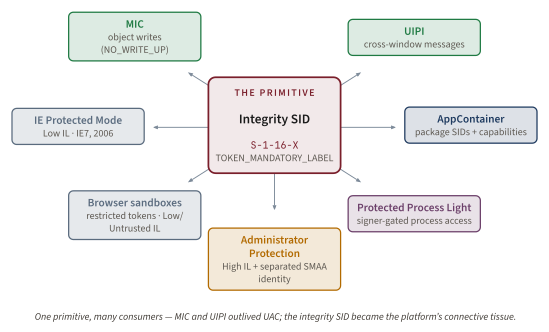
AppContainer (Windows 8, 2012) layers package SIDs above the integrity SID and rides the same SeAccessCheck infrastructure [325]. IE Protected Mode (Windows Vista IE7, 2006) was the first non-UAC consumer of Low IL, running browser-rendered content as a Low-IL process before the user's Medium-IL interactive shell. Modern browser sandbox tiers (Chrome, Edge, Firefox content processes) use Low-IL or Untrusted-IL sandbox processes, layered with AppContainer and restricted tokens [1029]. Protected Process Light (Windows 8.1, 2013; Chapter 10) sits adjacent to this lineage rather than inside ordinary MIC: PPL-protected processes carry labels, but the load-bearing protection is the kernel's process-protection and signing-level policy, which restricts code loading, injection, and access from non-protected processes [327]. Administrator Protection itself uses the integrity-SID primitive more directly: SMAA processes run at High IL while the calling Medium-IL admin shell stays Medium [323].
The twenty-year experiment was a success. The integrity-level stack did exactly what it was designed to do: bound integrity, not authority. The consent prompt was honestly never the security boundary. Microsoft's November 2024 reclassification finally promotes a feature to a boundary by adding the architectural support the boundary classification requires (separate identity, separate profile, separate hive, separate LUID, Windows Hello-mediated transition). The bypass-research literature is the empirical proof that the 2007 disclaimer was honest, and the proof that the architecture worked exactly as architected.
Key idea. MIC and UIPI outlived UAC. The integrity-SID primitive is connective tissue for AppContainer, modern browser sandboxes, Protected Mode, and the Administrator Protection successor; PPL is adjacent, with signing-level protection doing the load-bearing work. The yellow dialog is the smallest, most replaceable piece of the system.
What it means for you: Inspecting the stack on a real box
Every primitive in this chapter is observable on the Windows install you are reading on. The goal of the lab is not to run bypasses; it is to make the invisible state visible: the mandatory label on your shell, the deny-only administrator SID in the filtered token, the High-IL child Appinfo creates, the manifest bit that makes a binary a candidate for auto-elevation, and the event-log/Procmon artifacts left by the broker. If you can observe those five things, the chapter stops being theory and becomes a checklist you can apply during incident response or hardening reviews.
Keep the controls strict: compare unelevated and elevated shells from the same account, confirm the observer tool's integrity level, and record the Windows build because UACMe applicability, COMAutoApprovalList membership, and auto-elevated binary behavior change across feature updates.
Inspecting integrity levels
whoami /groups | findstr Mandatory prints the mandatory label of the current process token. From an unelevated PowerShell on an administrator account, it will read Mandatory Label\Medium Mandatory Level. From an elevated PowerShell, it will read Mandatory Label\High Mandatory Level. From a renderer-process command inside a Chromium-based browser, it would read Mandatory Label\Low Mandatory Level or Untrusted Mandatory Level, depending on the sandbox tier.
whoami /all is the longer view. It prints every group SID, every privilege, and the full mandatory label. (Process Explorer (and System Informer) will show you the same data graphically, but whoami is the canonical first-party command for getting at the same kernel information from the shell.) Run it twice (once from an unelevated PowerShell, once from an elevated PowerShell on the same admin account) and diff the outputs to see what the elevation actually changed. That is the empirical re-creation of this chapter's opening whoami hook.
Sysinternals' Process Explorer has an Integrity column you can add via View / Select Columns / Process Image. Once enabled, it shows the IL of every running process at a glance. System Informer (the open-source Process Explorer successor) supports the same column plus richer SACL inspection. The accesschk -e -l <object> Sysinternals command prints the mandatory label of a file, registry key, or other securable object. On some Windows builds and objects, accesschk -e -l C:\Windows\System32\drivers\ may show a higher mandatory label; treat that as one input to the access decision, not the whole explanation, because DACLs, ownership, privileges, and token filtering also protect system directories.
The exact PowerShell one-liner for token inspection
The PowerShell-native equivalent of whoami /all that programs can consume is:
[System.Security.Principal.WindowsIdentity]::GetCurrent() |
  Select-Object -ExpandProperty Groups |
  ForEach-Object { $_.Translate([System.Security.Principal.NTAccount]) }
This produces the same SID-to-account-name resolution whoami /groups does, and is useful inside automation that needs to test deny-only group membership programmatically.
Inspecting UIPI
UIPI is harder to observe directly because the OS does not emit a friendly "message dropped by UIPI" event for every blocked message. Use a repeatable windowing experiment instead. Start one elevated PowerShell and one unelevated Visual Studio Spy++ instance. In Spy++, use Search / Find Window and drag the finder tool over the elevated PowerShell window. Note the target handle, owning process, and thread. Now attempt a mutating operation from the Medium-IL side: subclassing the elevated window, installing a hook into its thread, or sending a WM_SETTEXT-class mutator with a tiny test harness. The expected result is boring by design: the target text does not change, the hook is not installed, and the caller sees failure. For SendMessage/PostMessage, Microsoft documents GetLastError 5 when UIPI blocks the call; for other APIs, such as SendInput, the return path may not identify UIPI as the cause [1012][1013][1014].
A useful control is to repeat the same operation against a second unelevated Notepad or PowerShell window. Same-IL to same-IL message delivery succeeds where Medium-to-High delivery fails. That control proves the handle is valid and the test harness works. The common false diagnosis is to blame Spy++ or Visual Studio bitness. Bitness can affect hook injection, but it does not explain the same-IL control succeeding and the cross-IL case failing. Another failure mode is running Spy++ elevated by accident; if Spy++ is High IL, UIPI is no longer testing a lower-to-higher send. Confirm the tool's integrity column in Process Explorer before interpreting the result.
Enumerating the auto-elevation list
sigcheck -m C:\Windows\System32\*.exe | findstr /i autoelevate walks every executable in System32 and prints manifest lines containing autoElevate. A representative fragment looks like this:
C:\Windows\System32\eventvwr.exe:
        <autoElevate>true</autoElevate>
C:\Windows\System32\fodhelper.exe:
        <autoElevate>true</autoElevate>
C:\Windows\System32\computerdefaults.exe:
        <autoElevate>true</autoElevate>
That output is a candidate list, not the Appinfo allowlist. The cross-check is behavioral and version-specific: run sigcheck -m on one binary to confirm the embedded manifest, verify the Microsoft signature with sigcheck -q -m -i, then launch the binary from a Medium-IL shell while watching whether Appinfo creates a High-IL child without a consent prompt. Windows build matters. Event Viewer behavior changed after the Windows 10 Creators Update 1703 fix; COMAutoApprovalList behavior changed around RS1 build 14393 and RS3 build 16299; UACMe annotates those version boundaries because the operational allowlist shifts across feature updates [1021][954]. The failure modes are predictable: Sysinternals tools missing from PATH, 32-bit redirection showing SysWOW64 instead of System32, Smart App Control or Defender blocking research tooling, and assuming autoElevate=true alone is sufficient when Appinfo's signature, path, and internal-name gates still have to pass.
Watching Appinfo in action
For Procmon, start capture only after clearing the display, then add these filters: Process Name is consent.exe Include; Process Name is svchost.exe Include; Path contains appinfo.dll Include; Operation is RegQueryValue Include; Operation is CreateFile Include; and, for manifest work, Path ends with .manifest Include. Trigger ShellExecuteEx with runas on a harmless Microsoft tool such as an elevated PowerShell. Expected artifacts are registry reads under HKLM\SOFTWARE\Microsoft\Windows\CurrentVersion\Policies\System, image and manifest reads for the target binary, token-related process creation by the Appinfo-hosting svchost.exe, and a short-lived consent.exe process if consent is required [999][1000].
For Event Viewer, use Applications and Services Logs / Microsoft / Windows / UAC / Operational. If the log is disabled, enable it before the run. Do not hard-code event IDs from another build or blog post. Query the provider manifest first, then inspect the newest records from the channel on the target host:
wevtutil gp Microsoft-Windows-UAC /ge /gm:true | findstr /i "event id message"
Get-WinEvent -LogName 'Microsoft-Windows-UAC/Operational' -MaxEvents 20 |
  Select-Object TimeCreated, Id, ProviderName, Message
A representative result should show recent Microsoft-Windows-UAC records whose messages describe the elevation request, consent path, denial, or policy outcome for that build. Use those discovered IDs in any SIEM rule, and keep the provider manifest output beside the rule as the source of truth.
Version caveat: not every Windows SKU exposes the same message text, and enterprise audit policy may redirect useful elevation telemetry into the Security log instead. Treat the UAC Operational channel as the first-party audit trail and Procmon as the mechanism microscope. If Procmon shows consent.exe but the UAC log is empty, check that the Operational channel is enabled. If the log shows a request but no approval, the user denied consent or policy blocked elevation. If neither Procmon nor the log shows Appinfo activity, the target likely did not use an elevation path at all.
A safe lab for the bypass classes
UACMe is the community catalog of 70+ documented UAC bypass methods, each with author, technique, target binary, and Windows-version applicability annotations [954]. For inspection of the integrity-level state of running processes from an analyst's workstation, James Forshaw's sandbox-attacksurface-analysis-tools repository (the NtObjectManager, TokenViewer, and NtCoreLib PowerShell modules) is the standard research toolchain [988]. The UACMe reference implementations (akagi32.exe, akagi64.exe) are flagged by Microsoft Defender as HackTool:Win32/Welevate, the detection name Davidson noted as early as 2009 [1021]. This is research tooling, not endpoint operations: run UACMe only on a snapshot VM with Defender exclusions documented, and treat the output as an empirical confirmation of the bypass-research record rather than as an offensive primitive.
The five-command lab tour. The minimum five commands a reader can run on their own Windows box to verify everything in this chapter: 1. whoami /all (run twice: once unelevated, once elevated; diff the outputs) 2. whoami /groups | findstr Mandatory (inspect the IL of the current token) 3. sigcheck -m C:\Windows\System32\eventvwr.exe (read the autoElevate manifest) 4. tasklist /svc /fi "imagename eq svchost.exe" | findstr Appinfo (confirm the Appinfo service host) 5. Process Explorer with the Integrity column enabled, sorted by IL (the entire stack at a glance). The whole tour takes ten minutes. By the end you will have seen the split-token model, the integrity-level lattice, the auto-elevation allowlist, the Appinfo broker, and the Medium-vs-High distribution of your interactive desktop, with your own eyes.
Five misconceptions that will not die
The recurring practitioner mistakes are worth stating explicitly, because each one maps to a different layer of the stack. Treat this as a diagnostic checklist. When someone makes a claim about UAC, ask which layer the claim is really about: mandatory object access, window-message filtering, split-token policy, Appinfo brokering, Secure Desktop spoofing resistance, or Administrator Protection's identity separation. Most bad UAC arguments collapse two of those layers into one sentence.
Is UAC a security boundary?
No. Microsoft's canonical February 2007 statement was that neither UAC elevations nor Protected Mode IE define new Windows security boundaries [1001]. That is not a cynical after-the-fact excuse; it is the design doctrine that explains the entire bypass record. Original split-token UAC leaves the filtered token and linked token under the same user SID, profile, HKCU hive, and logon-session LUID. A Medium-IL process can therefore prepare per-user state that a later High-IL process may read. MIC prevents direct write-up; it does not prevent every influence path through same-user state. Administrator Protection is the later boundary-classified successor because it changes those shared properties by introducing SMAA identity separation and Windows Hello-mediated authentication [323][1018].
Is the Secure Desktop in Session 0?
No. The Secure Desktop is the Winlogon desktop inside WinSta0 in the user's own interactive session. Session 0 Isolation is a different Vista feature that moved services out of interactive sessions [1000]. The diagnostic distinction is Object-Manager hierarchy. Session 0 answers which session services run in. Secure Desktop answers which desktop inside the user's interactive window station receives the prompt. When the screen dims, Windows has not moved the user to Session 0. It has switched the active desktop from Default to Winlogon, where ordinary Default-desktop processes cannot draw, hook, or drive the prompt.
Does an autoElevate=true manifest make any binary auto-elevate?
No. The manifest is one gate, not the policy. Appinfo also requires a Microsoft signature, a trusted system path, and membership in its internal allowlist [1021][1023]. This is why copying <autoElevate>true</autoElevate> into a lab executable does not make the binary silently elevate. sigcheck -m enumerates the manifest-asserting set; it does not prove Appinfo will honor the request. The operational test is whether a Medium-IL launch results in a High-IL process without consent on that Windows build. Failing to distinguish candidate manifest from effective allowlist is the root of many bad auto-elevation write-ups.
Does UIPI block every window message?
No. It blocks the dangerous mutating subset: selected SendMessage / PostMessage cases, hooks, input attachment, journal hooks, and injection-like operations. Paint and many read-only queries are allowed or degraded by API-specific rules [1001][1012][1013][1015]. The security reason is state mutation. WM_SETTEXT can change the target's state; WM_TIMER with a callback was the classic shatter vector; SetWindowsHookEx can inject code into a higher-IL thread. WM_PAINT asks the target to redraw itself and does not carry the same attacker-controlled state transition. UIPI is therefore a filter, not a blanket firewall around HWNDs.
Are ShellExecuteEx runas and the COM elevation moniker the same?
No. runas creates a whole High-IL process; the COM moniker creates one elevated out-of-process COM object while the caller remains Medium [1020][980]. The distinction changes both analysis and remediation. A runas elevation gives the new process broad authority for its lifetime, so DLL-search-order and command-line behavior matter. A COM elevation exposes a narrower method surface inside an elevated dllhost.exe, so the question becomes whether that CLSID's methods perform attacker-chosen file, registry, or process actions. Davidson's IFileOperation work is the canonical example of the second shape [1021][1022].
Does Administrator Protection make UACMe obsolete?
Only partly. SMAA identity separation structurally defeats the classic per-user-registry hijack class: the attacker writes the caller's HKCU hive, while the elevated process reads the SMAA's different HKCU hive [323]. It also changes assumptions about profile paths and logon-session-local rendezvous. But it does not repeal every class of elevation abuse. UI Access remains a deliberate accessibility carve-out, and Forshaw's February 2026 retrospective records that five of nine pre-GA Administrator Protection bypasses used that inherited surface [1018]. UACMe remains valuable as a historical and version-applicability catalog, even where particular methods are closed.
Is EnableLUA=0 reasonable hardening?
No. It collapses the split-token policy and returns admin-account processes to the XP-style posture: High IL by default, full admin SIDs enabled, and the daily shell carrying administrator authority [999]. MIC as a kernel primitive still exists, and browser sandboxes can still construct Low-IL restricted tokens explicitly, but the administrator's normal Explorer tree no longer benefits from the Medium-IL filtered token. The practical diagnostic is simple: if an unelevated shell on an admin account already reports High IL and TokenElevationTypeDefault, the system has stopped exercising the UAC design this chapter describes. Leaving EnableLUA=1 is the secure default on modern Windows.
The plumbing outlived the yellow dialog
Return to the two whoami outputs from the start of this chapter. The user is the same. The session is the same. The clock has barely moved. Read them again, and now read what each line means.
The administrator group SID was present in both tokens, marked deny-only on the filtered token and enabled on the elevated token. The integrity level changed from Medium (S-1-16-8192) to High (S-1-16-12288). The privilege set expanded from the small user-mode subset to the full administrator set. The bits that moved were the kernel-level token-assignment bits in the new process Appinfo created via CreateProcessAsUser, using the dormant linked token that LSA had constructed thirty minutes earlier at logon. The yellow dialog was the consent surface on top of a token-swap primitive that existed before the dialog rendered and that can move bits without the dialog (via auto-elevation).
Four primitives carried the work. Mandatory Integrity Control added an axis to the access check that runs before the DACL and short-circuits on a Low-to-High write attempt, regardless of what the DACL says. User Interface Privilege Isolation closed the cross-IL variant of the shatter-attack class that Paget published in 2002, by dropping the dangerous subset of window messages and hook calls from lower-IL senders to higher-IL receivers. The split-token model gave every administrator a Medium-IL filtered token at logon and held the full token dormant. The Appinfo SYSTEM-trusted broker mediated the token swap when consent or auto-elevation called for it.
The bypass-research industry of 2009 to 2024 was the empirical confirmation of Russinovich's 2007 disclaimer. Davidson's December 2009 essay opened the auto-elevation surface; Nelson's 2016-2017 series productised the registry-hijack class; hfiref0x's UACMe cataloged more than seventy methods and counting; Forshaw's 2017 Reading Your Way Around UAC series named the read-side surface; the cumulative record was a sixteen-year demonstration that original UAC was not a security boundary, exactly as Russinovich had publicly stated in February 2007. The canonical classes discussed here fit Microsoft's servicing doctrine for non-boundary issues: hardening candidates, not automatic security vulnerabilities [1001][301].
The November 2024 Administrator Protection reclassification is the line finally moving. The split-token model's four shared properties between filtered and linked tokens (same SID, same %USERPROFILE%, same HKCU, same LUID) are replaced by an SMAA identity that differs on all four dimensions, plus Windows Hello-mediated authentication for every elevation [323][1031]. The registry-hijack class is structurally defeated; the residual surface is the UI Access carve-out inherited unchanged from Vista 2007, which Forshaw's February 2026 Project Zero post documents as the source of five of nine pre-GA bypasses [1018].
The yellow dialog is the only piece of UAC most users will ever see. It is also the one piece the OS could replace tomorrow without changing what UAC is. MIC and UIPI outlived UAC. AppContainer, modern browser sandboxes, IE Protected Mode, Office Protected View, and Administrator Protection all ride directly on integrity labels, restricted tokens, desktop isolation, or adjacent primitives that shipped with Vista and its successors; Protected Process Light shares the lineage but relies chiefly on process-protection and signing-level enforcement [1004][325][1029][327]. The quiet plumbing did the work.
Next time you click "Yes" on the consent prompt, the bits that move belong to the same family as the bits that move when Edge spawns a renderer at Low IL and when a SMAA process shadows your administrator identity on a Windows 11 25H2 install with Administrator Protection enabled; when Defender protects LSASS as PPL, a neighboring signing-level mechanism joins that family rather than ordinary MIC doing the whole job. The dialog is the smallest part of the system. Twenty years of empirical research proved Russinovich right: UAC was never the boundary. The integrity-level stack was the quiet plumbing, and Administrator Protection is the later boundary-classified successor [1001][323].
Bequeaths. This chapter hands the next link an integrity-labeled world: a process's IL now bounds what it may write (MIC, evaluated before the DACL) and which higher-IL windows it may touch (UIPI, in win32k.sys), and the everyday administrator runs on a Medium-IL filtered token rather than the full admin token. What it does not bequeath is any bound on what a higher-integrity token may be tricked into doing. A process that already holds SeImpersonatePrivilege (default for elevated administrators and many SCM-started service workloads) or SeAssignPrimaryTokenPrivilege (default for LOCAL SERVICE / NETWORK SERVICE) can still be walked to NT AUTHORITY\SYSTEM. That residual is the entire subject of the next chapter, The SeImpersonate Primitive (Chapter 24), where the Potato lineage turns an impersonation token into SYSTEM. The integrity stack labels the world; it does not enforce Biba's Invocation Property, and until Administrator Protection (2024) it does not separate the elevated identity from the caller's.